Find the report
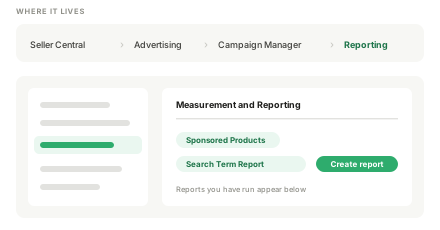
Seller Central → Advertising → Campaign Manager → Measurement and Reporting.
- It lives under Campaign Manager, not the main reports menu
- Same path whoever runs the account
Example view — illustrative figures, not a live account.

Paste your Amazon search term report and see exactly where the budget is leaking — wasted spend, terms to negate, and terms that have earned an exact-match campaign.
 Altira
 Bear Balanced
 Dr. Martin’s NutritionAltira
 HoMedics
 Mojo
Mojo JEETHoMedics
 Marley
 KoreanSkin
 NativaeMarley
 Olyvo Labs
 Pet Lovers
 We Love Doodles
 PettopOlyvo Labs
Needs a search term column and a spend column. Sales, clicks and orders columns are used if present.
The analyser reads a Sponsored Products search term report. Four steps to get one out of Seller Central and into the box above.
Seller Central → Advertising → Campaign Manager → Measurement and Reporting.
Example view — illustrative figures, not a live account.
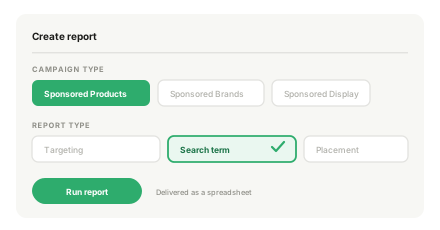
Create report → Sponsored Products → Search Term Report.
Example view — illustrative figures, not a live account.
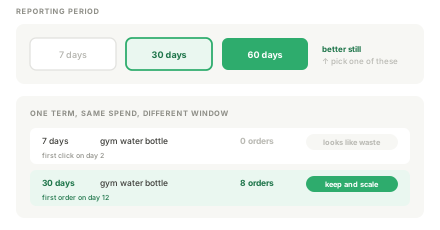
Choose a period of at least 30 days, ideally 60.
Example view — illustrative figures, not a live account.
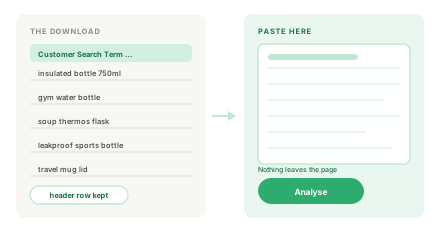
Download, open, and paste the whole sheet including the header row.
Example view — illustrative figures, not a live account.
A short window lies to you. Seven days of data on a product with a long consideration cycle will show terms as failures that convert on day twelve. Attribution windows matter — pull at least a month.
Do not negate on spend alone. A term with two clicks and no order has not had a fair test. One with forty clicks and no order has. Click volume is shown next to every row for exactly this reason.
Negatives first, because that is money back immediately. Then move proven converters into exact-match campaigns where you can bid them deliberately. Only then adjust bids on what is left. Doing it in the other order means you are bidding on a structure you are about to change.
The first run often looks alarming, and it usually should not. A search term with spend and no sales is only wasted money once it has had enough clicks to prove it, and on a low-volume product that can take weeks. Negating too early is one of the easiest mistakes to make: a tidy campaign with a long negative list, and no discovery left in it. Look at click volume before you act on any single row.
The other half of the report is the half people skip. Terms that converted well in broad or phrase match have earned their own exact-match campaign, where you can bid them properly instead of paying auction prices set by whatever else the broad term is catching. That migration — promote the winners, negate the proven losers, leave the undecided alone — is most of what campaign maintenance actually is, and it is the part that compounds.
This tool does one slice of PPC management: the search term report read that should happen monthly. Work out the margin it has to clear with the profit and break-even ACoS calculator, and see the campaign structure it feeds in the CEMBLOC engagement. Prices for the managed version are published in full.
A person reads the full search term history, not one export, and writes up what to negate, promote and leave alone — within 48 hours.
★★★★★ Verified on ClutchThey not only delivered results quickly, but did so in a way that felt aligned with our brand and Amazon's terms.
Amazon marketing servicesQuality 5.0Schedule 5.0Cost 5.0Refer 5.0Peter ReitanoCEO, Mojo — Toronto · eCommerce · Aug 2025
★★★★★ Verified on ClutchWhat stood out most was their understanding of Amazon reputation management.
Online reputation management · Jan–Oct 2025Quality 5.0Schedule 5.0Cost 5.0Refer 5.0Maggie StoneSenior IT Operations, Kendra Scott — Austin, Texas · Retail · Jun 2026
★★★★★ Verified on ClutchMotionTrust Digital's experience with Amazon stands out.
Amazon SEO & ecommerce marketing · Jan–Aug 2026Quality 5.0Schedule 5.0Cost 5.0Refer 5.0Tara LangeContent & Communications Officer, VIBAe — Helsinki, Finland · eCommerce · Aug 2026
★★★★★ Verified on ClutchThey communicated clearly throughout the engagement, provided updates consistently, and remained responsive.
PPC & ecommerce marketing · Jan–May 2026Quality 5.0Schedule 5.0Cost 5.0Refer 5.0Alex TwiggMarketing Director, CEMBLOC — England · Manufacturing · May 2026
★★★★★ Verified on ClutchMotionTrust Digital's personalized approach and deep commitment to understanding our business impressed us.
Amazon consulting & listing optimizationQuality 5.0Schedule 5.0Cost 5.0Refer 5.0James WaddingtonCo-Founder, BlueCo — London, England · Ongoing since Jul 2024
★★★★★ Verified on ClutchThe communication and ease of the whole process were great.
Online reputation management · Dec 2024–Jan 2025Quality 5.0Schedule 5.0Cost 5.0Refer 5.0Mark BOwner, e-commerce company — Kennewick, Washington · Jan 2025
★★★★★ Verified on ClutchThey got it done.
Amazon marketing · Dec 2024–Feb 2025Quality 5.0Schedule 4.0Cost 4.5Refer 4.5Roman ChuyanPresident, Nature Of Beauty Inc. — Boston, Massachusetts · Jan 2025
Tab-separated or comma-separated, with a header row. Pasting straight from Excel gives you tab-separated automatically. The tool finds the columns by name, so column order does not matter and extra columns are ignored.
No. The parsing is JavaScript running on your own machine. You can turn off your internet connection after the page has loaded and the tool will still work — which is the simplest proof that nothing is being sent.
No. Check the click count first. A term needs enough clicks to have had a fair chance — roughly the inverse of your conversion rate. If you convert at 10%, a term with fewer than ten clicks has told you nothing yet.
Search term reports attribute sales within a fixed window, and Seller Central's campaign view may use a different window or include Sponsored Brands and Display. Use this for term-level decisions, not as a replacement for account reporting.
Work with us
A search term report tells you where the money went; it does not tell you what the campaign structure should be. Book 30 minutes with the person who would rebuild it, or get the account audited in writing. If the structure is sound, you will hear that too.