
Amazon keyword research: a practical guide for sellers
 By Monjur HossainFounder & Amazon Strategy Lead
·
Published
·
Last reviewed
·18 min read
By Monjur HossainFounder & Amazon Strategy Lead
·
Published
·
Last reviewed
·18 min read
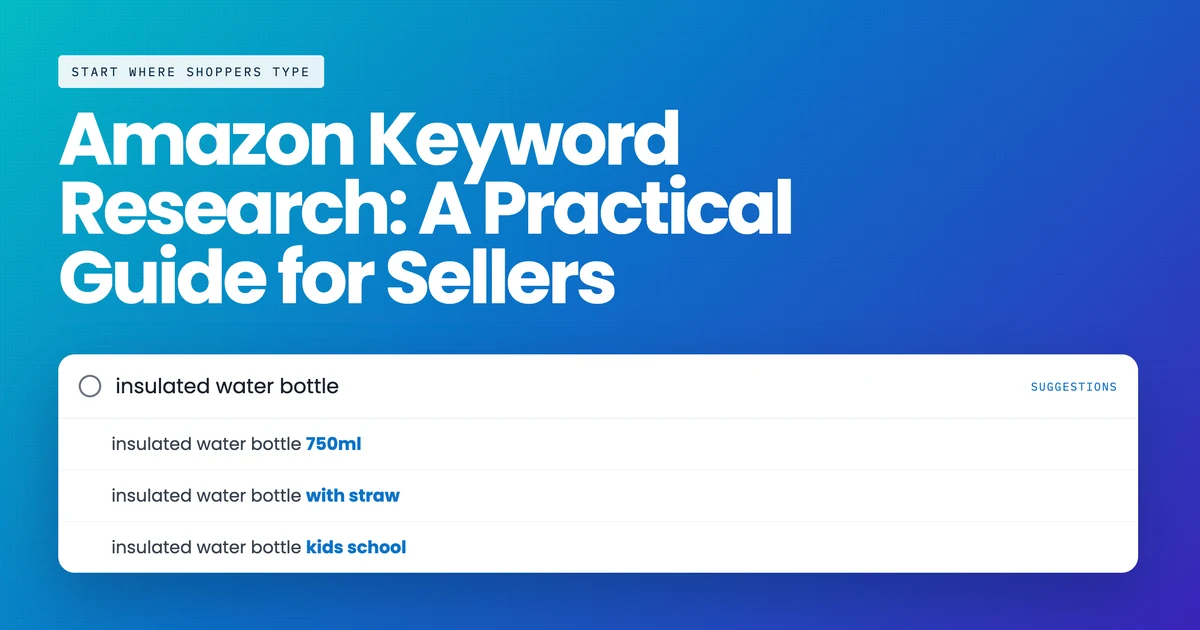
Amazon keyword research means finding the words shoppers type into Amazon search and placing the most relevant ones in your listing. Start with Amazon's own data: Brand Analytics, Search Query Performance, Product Opportunity Explorer and your ad search term report. Cut to 10–20 terms per product and fit them into a 75-character title, Item Highlights, bullets and backend terms.
How is Amazon keyword research different from Google?
The habits transfer badly, and the difference is not cosmetic.
Google is an answer engine serving a mixed population — researchers, comparers, browsers, occasionally buyers. Amazon is a catalogue being searched almost exclusively by people who intend to buy something. That single fact changes four things.
There is no informational tier. Nobody types "what is a French press" into Amazon expecting an explanation. Every query is a shopping query, which means the long tail is made of product attributes — size, material, compatibility, quantity, use case — rather than questions.
Conversion is a ranking input, not just an outcome. On Google, ranking well brings traffic and what happens next is largely your problem. On Amazon, what happens next feeds back: a term you rank for but convert badly on will decay. This is why indexing for loosely relevant high-volume phrases actively harms you, which has no real Google equivalent.
Exact phrasing matters less than it used to, and relevance matters more. Amazon has moved from straightforward keyword matching towards semantic understanding of what a product is. Stuffing every variant of a phrase into a listing is a 2019 tactic that now mostly wastes characters you no longer have.
You have a fixed, small amount of space. Google will happily index a two-thousand-word page. Amazon gives you a title, five bullets, a description, a backend field and A+ content, and as of July 2026 the title is 75 characters. Keyword research on Amazon is therefore an allocation problem far more than a discovery problem, and most guides still treat it the other way round.
Step one: build the seed list from Amazon’s own data
Start with what Amazon already knows about your products and your shoppers. It is free, it is not modelled, and most sellers never open it.
Brand Analytics Top Search Terms
Requires Brand Registry. For a given search term it gives the search frequency rank, the three most-clicked ASINs, and each one’s share of clicks and share of conversions.
The conversion share column is the most valuable number available to any Amazon seller and almost nobody uses it: it tells you whether a term’s traffic actually buys, and whether the clicks concentrate on one dominant listing or spread across the page. A term where one ASIN takes 60% of conversions is a term you are unlikely to win with a listing edit.
Search Query Performance
For your own ASINs, this shows every query that produced impressions, and then the funnel: clicks, adds to cart, purchases, with your share of each at every step. This is the report that answers "did the change work", and it is the reason to record a baseline before you touch anything.
Read it by looking for the break in the funnel. High impressions and low click share is a title, image or price problem. High click share and low purchase share is a detail page problem. Both look identical in a keyword tool and need completely different fixes.
The advertising search term report
The literal strings shoppers typed before clicking your ads. No modelling, no sampling, no index — the words themselves, with spend and conversions attached. If you run Sponsored Products at all, this is your best keyword source, and it improves every week you leave an automatic campaign running.
The search bar itself
Type your category and read the autocomplete suggestions, then repeat with each letter of the alphabet appended. It is tedious and it is current, real demand from the shopping interface. Add the related searches strip and the "customers frequently viewed" carousel on your three nearest competitors, both of which are Amazon publicly stating which products it considers substitutes for each other.
And the source nobody thinks of: your own reviews and questions
Read the last hundred reviews on your products and your three closest competitors, and the customer questions underneath them. People describe products in the words they were searching with, and they describe problems in the words the next shopper will search with. A run of reviews mentioning that something "fits a standard door frame" tells you a compatibility phrase belongs in your listing, and no keyword tool will ever surface it, because the demand is real but the phrasing is yours.
Returns data does the same job in reverse. A product returned repeatedly as "not as described" usually means the listing is indexed for something it is not, and finding that term is worth more than finding a new one — removing it improves conversion on everything else.
Amazon keyword research service
Want the keyword map done for you?
Competitor research is the slow part. If you'd rather skip the spreadsheets, we'll build a term map for each ASIN and explain why every keyword goes where it does.
See our keyword research serviceStep two: take the keywords your competitors already have
This is the one job Amazon’s own reports cannot do, and the honest reason most sellers pay for a tool. A reverse ASIN lookup takes a competitor’s ASIN and returns the keywords it ranks for.
Pick the ASINs deliberately. Three to five is plenty, and they should be products a shopper would genuinely consider instead of yours — same use case, comparable price band, similar pack size. The common mistake is picking the category’s biggest sellers, which returns the keywords of a brand with a decade of sales history and a budget you do not have.
When the export comes back, ignore the volume column for a moment and read two others:
- Organic rank versus sponsored rank. A competitor at organic position 3 earned it. A competitor at sponsored position 1 and organic position 40 is renting it, and the term is far more open than the page suggests.
- Title density. How many page-one products carry the exact phrase in the title. Low density on a term with real volume is the clearest opportunity in the discipline: demand exists and nobody has claimed the words.
Do not simply adopt a competitor’s list. They may be ranking for terms by accident, may have a variant you do not sell, and may be making the relevance mistake you are about to inherit. Treat the export as candidates, not conclusions. There is more on the method in our guide to which tools do this and what they cost.
Step three: sort by relevance, then by winnability, then by volume
In that order, and the order is the whole point. Most keyword research fails here rather than at the discovery stage.
Relevance first. For each candidate, ask whether a shopper typing it would be satisfied by your product. Not "could it plausibly match" — would they be pleased. If the honest answer is no, delete the row regardless of volume. Indexing for terms you satisfy poorly buys clicks that do not convert, and because conversion feeds ranking, it costs you position on the terms you do want. Irrelevant traffic on Amazon is not free.
Winnability second. Use organic-versus-sponsored rank and title density together. A term where page one is full of exact-match titles from established brands is a term you will spend a quarter losing. A term with demand and thin title density is where a new listing can actually move.
Volume third, and only as a tiebreak. Every volume figure outside Brand Analytics is modelled from rank movement and panel data, which is why the same keyword can show wildly different numbers in two tools open side by side. Trust the ratio between two terms; do not trust the absolute.
You should end with somewhere between eight and twenty terms per ASIN. If you have four hundred, you have an export rather than a plan. The discipline of cutting is where the value is, because the next step has almost no room in it.
A tiering that survives contact with the listing
Split the survivors into three tiers before you write anything, because the placement step will force you to choose and it is better to have chosen already.
Tier one, one to three terms. The phrases that describe what the product fundamentally is. These earn title characters. If you cannot name them in a sentence without hedging, the product positioning is the problem rather than the keyword research.
Tier two, roughly five to ten. Attributes and use cases a buyer filters on — size, material, compatibility, who it is for. These belong in Item Highlights and the bullets, where there is room to phrase them as benefits rather than strings.
Tier three, everything else that survived relevance. Synonyms, alternate spellings, regional wording, common misspellings. These go in the backend field, where no human reads them and the only job is matching.
Doing the tiering before the writing prevents the most common failure mode, which is a title assembled from whatever was at the top of the spreadsheet.
Amazon keyword mapper
Fit your keywords into 75 characters
Placement is where most of the value sits now. Our free mapper helps you sort terms into title, Item Highlights, bullets and backend without repeating yourself.
Try the keyword mapperStep four: place them — and what changed in July 2026
This is the section that dates most published guides, including one still ranking on page one that was last updated in November 2024.
Amazon announced that "Starting July 27, 2026, titles in all categories except for media will need to be 75 characters or less including spaces." Alongside it, a new Item Highlights field provides a further 125 characters, and Amazon confirmed that from 10 August 2026 Item Highlights displays beneath the title on desktop and mobile. Crucially, Amazon also stated that "Item name and Item highlights are both inputs for search, and one isn’t prioritized over the other".
Two practical consequences. First, if you have not rewritten your titles, Amazon may have done it for you: brand owners were given 14 days to review AI-generated recommendations, and titles still over the limit were to be updated to the AI version gradually after 27 July.
Check what your titles currently say before you plan anything. Second, the total space did not shrink as much as it appears — 200 characters across two fields rather than one — but it is now split, and the first 75 characters are what a shopper reads while scanning a results page.
Where each kind of term belongs
| Field | Space | What goes here |
|---|---|---|
| Title (Item name) | 75 characters, all categories except media | Brand, the primary keyword, and the one or two attributes that decide a click. Nothing else fits |
| Item Highlights | 125 characters | Materials, use cases and comparison attributes. A search input, not a dumping ground |
| Bullets | Five, category-dependent length | Secondary terms inside real sentences that answer buying objections |
| Backend search terms | 249 bytes, not characters | Synonyms, misspellings, alternate spellings. No commas needed, no repetition, no brand names you do not own |
| Description and A+ | Varies | Long-tail and context. A+ modules replace the description when present |
Three placement rules worth more than the rest
Never repeat a term across fields. Amazon indexes the listing, not each field separately. A word in the title does not need to be in the backend, and repeating it wastes bytes you are short of.
Backend is measured in bytes. 249 bytes, so accented and non-Latin characters cost more than one each. Going over does not truncate gracefully — the whole field can be ignored.
Do not use competitor brand names in backend search terms. Amazon prohibits it, it is a trademark exposure, and it is one of the easier things for a rival to report.
Which keyword research mistakes cost the most?
Six, in rough order of damage done.
Chasing volume you cannot satisfy. The single most expensive error. A high-volume term adjacent to your product looks like an opportunity and behaves like a tax: clicks arrive, conversion is poor, and because conversion is a ranking input the damage spreads to the terms you legitimately own. If a shopper typing the phrase would be disappointed by your product, the phrase is not yours.
Treating the export as the deliverable. A thousand rows feels like progress and commits you to nothing. The work is the cut: which eight to twenty terms, in which field, and why. Any research process that ends with a spreadsheet rather than a decision has stopped one step short.
Writing for the algorithm in fields humans read. Titles and bullets are read by buyers scanning a results page in about two seconds. A title that reads as a keyword list loses the click to a competitor whose title reads like a product, and the click is what you were optimising for in the first place.
Ignoring variations. On a parent listing with children, shoppers search by the attribute — size, colour, count, flavour. Those attribute words belong in the child listings and in Item Highlights, and they are consistently the most under-served terms in a catalogue because the research was done at parent level.
Forgetting misspellings and regional wording. Amazon corrects some misspellings and not others, and the backend field is where the uncorrected ones belong. US and UK English differ in ways that matter commercially — "diaper" and "nappy", "flashlight" and "torch" — so a listing copied between marketplaces usually leaves demand on the table.
Doing it once. Categories move. Competitors enter, seasons shift, Amazon changes the rules — as it did in July 2026. A keyword set that was right eighteen months ago is now a set of assumptions nobody has checked.
Step five: check it worked
Keyword research that is never measured is a creative writing exercise. Three checks, in order.
Is it indexed? Search the exact phrase plus your ASIN in the Amazon search bar. If your product appears, Amazon has associated the term with the listing. If not, it has not, and no amount of ranking work will help. Indexing usually takes 24 to 72 hours after a listing change, occasionally longer during high traffic periods.
Did the funnel move? Two to four weeks later, open Search Query Performance and compare against the baseline you recorded. Look at impressions first, then click share, then purchase share. Impressions up and click share flat means you are being shown and not chosen — a title, image or price problem, not a keyword problem.
Did total sales move, or just advertised sales? The point of organic keyword work is to reduce your dependence on paid traffic. Watch total advertising cost of sale across the account rather than ACoS on a campaign: a falling TACoS at steady spend is organic growth underneath the advertising, which is exactly what this work is supposed to produce. There is more on that distinction in our piece on ACoS and what a good one looks like.
How often to redo this
Fully, twice a year, and after any of these: a new competitor entering the category, a change to your pack size or variation family, a marketplace expansion, or an Amazon policy change of the kind July 2026 brought. Between those, the search term report does the maintenance for you if you read it monthly.
If you would rather have the mapped set than the exercise, our keyword research service delivers a term map per ASIN with the placement decisions already argued, and a free written audit will tell you which of your listings are worth doing first.
How does Amazon keyword research change now shoppers ask Alexa for Shopping?
Amazon keyword research used to mean short attribute strings. In May 2026 Amazon renamed Rufus as Alexa for Shopping and put it in the main search bar on the US store. Shoppers can now type whole questions where they once typed three words. That changes what you look for, and where it goes on the listing.
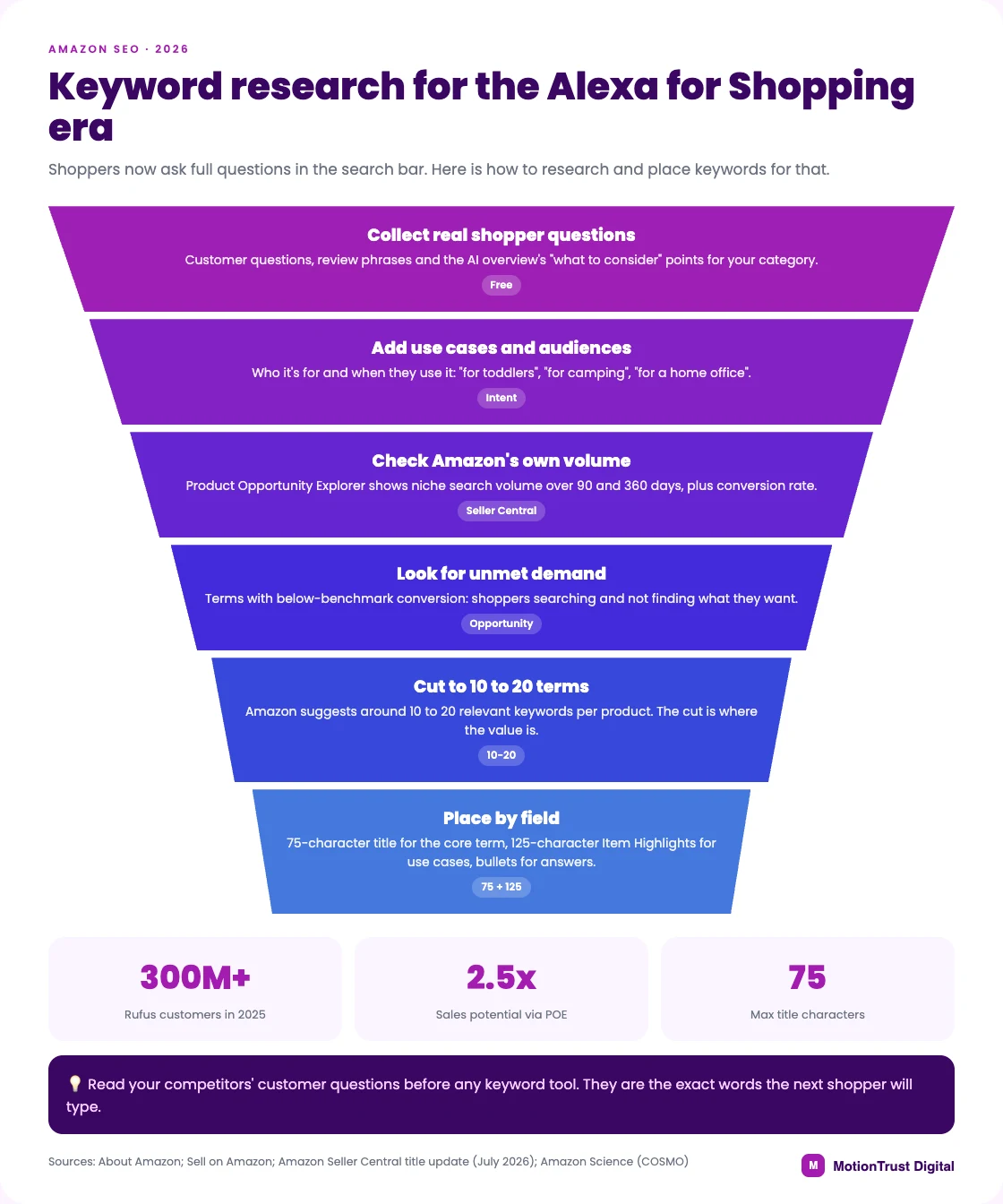
Mine the questions shoppers now type
Rufus helped more than 300 million customers in 2025, so this is not a niche habit. Alexa for Shopping answers comparison and advice questions, and shows AI overviews at the top of search results.
If you're working out how to find keywords for an Amazon listing today, collect questions as well as phrases:
- The customer questions on your page and on your three closest competitors.
- Review lines that start with "I needed something for…" or "works with…".
- The "what to consider" points in the AI overview for your category.
Those questions become your long-tail keywords. "Quiet blender for a small apartment" is a use case your listing should state in plain words.
Research use cases and audiences, not just attributes
Amazon's COSMO research describes a system that learns everyday shopping intent from shopper behaviour. It covers 18 major categories and is deployed in Amazon search features. In practice, the listing should say who the product is for and when they use it. "For toddlers", "for camping" and "for a home office" now pull their weight next to size and material.
Use Product Opportunity Explorer for Amazon's own numbers
Product Opportunity Explorer sits under Growth in Seller Central and is free with a selling account. It groups search terms into niches and shows search volume over 90 and 360 days, growth, click share and conversion rate per term. That is Amazon's data, not a tool's estimate, which makes it the best free starting point for Amazon keyword research.
Look for its unmet demand view. These are search terms with conversion below the benchmark, where shoppers search and do not find what they want. Amazon says products launched from niches viewed in the tool had 2.5x higher sales potential in their first three months.
Where conversational phrasing goes
Questions don't belong in a 75-character title. Keep the title for brand, product and the deciding attribute. Put use cases in the 125-character Item Highlights field and answer the questions in your bullets. Amazon itself suggests around 10 to 20 relevant keywords per product.
If you'd rather hand this over, our keyword research service maps terms to fields per ASIN. Our keyword mapping tool helps you do it yourself, and our Amazon SEO agency team can rewrite the listings.
Amazon SEO
Listings written for shoppers and search
If you'd like a hand, we'll research your keywords, rewrite your listings to the 2026 limits and check in Search Query Performance that the changes worked.
See how our Amazon SEO worksQuestions people also ask
What is the best free tool for Amazon keyword research?
Amazon Brand Analytics, which is free with Brand Registry and uses Amazon’s own measurement rather than a model. Search Query Performance and your advertising search term report are the other two. Between them they cover discovery, validation and measurement — the only job they cannot do is show you a competitor’s keywords.
Should I put keywords in the title or backend search terms?
The title, if the term is one a shopper needs to see to click. Since 27 July 2026 you have 75 characters there, so only the primary keyword and one or two deciding attributes fit. Backend is for synonyms, misspellings and alternate spellings — things that help Amazon match you but would look wrong to a human.
How many keywords should I target per listing?
Eight to twenty. Most listings are carried by far fewer terms than the export suggests, and with titles capped at 75 characters the scarce resource is placement rather than discovery. A four-hundred-row list is a research artefact, not a plan.
Does A+ Content help with keyword indexing?
A+ Content text is not indexed for search in the way title, bullets and backend terms are, so treat it as a conversion asset rather than a ranking one. It earns its place by answering objections and reducing returns, which improves conversion — and conversion does feed ranking.
How do I know if a keyword change worked?
Record a Search Query Performance baseline before you edit. Two to four weeks later compare impressions, click share and purchase share for the terms you targeted. Impressions up with click share flat means the listing is being shown and not chosen, which is an image, title or price problem rather than a keyword one.
How long does a new backend keyword take to index?
Usually 24 to 72 hours, sometimes longer during high-traffic periods. Check by searching the exact phrase plus your ASIN in the Amazon search bar: if the product appears, the term is associated with the listing.
What happens to my keywords if Amazon rewrites my title?
You can lose them. When Amazon cut titles to 75 characters on 27 July 2026, brand owners were given 14 days to review AI-generated title and Item Highlights recommendations, and titles still over the limit were updated to the AI version gradually afterwards. If you did not review yours, check what it says now before planning any keyword work.
Do keywords in A+ Content get indexed?
Not in the same way as title, bullet and backend terms. Write A+ modules for the shopper rather than the algorithm — the ranking benefit comes indirectly, through better conversion, not through the words being indexed.
Should my PPC keywords and my listing keywords match?
They should overlap, not match. Advertising is where you test terms you are not yet sure about, so it should always be broader than the listing. Terms that convert in ads earn a place in the listing; terms that never convert get added as negatives rather than optimised into the title.
Can I use competitor brand names as keywords?
Not in backend search terms — Amazon prohibits it, and it is a trademark exposure as well as an easy thing for a rival to report. You can bid on competitor brand terms in advertising, which is permitted and a normal tactic, but that is a different field with different rules.
How is Amazon keyword research different from Google keyword research?
Every Amazon query is a shopping query, so there is no informational tier and the long tail is made of product attributes rather than questions. Conversion feeds ranking, so indexing for loosely relevant terms actively harms you. And you have a fixed, small amount of space, which makes Amazon keyword research an allocation problem more than a discovery one.
What is the Amazon backend search term character limit in 2026?
249 bytes, not characters — accented and non-Latin characters consume more than one byte each. Exceeding the limit can cause the whole field to be ignored rather than truncated, so keep it comfortably inside, with no commas, no repetition of words already in the listing, and no brand names you do not own.
Does Amazon show search volume for keywords?
Yes, in two places inside Seller Central. Product Opportunity Explorer, under Growth, shows search volume for terms in a niche over 90 and 360 days, plus growth, click share and conversion rate. Brand Analytics shows search frequency rank and click and conversion share for brand-registered sellers. Volume in third-party tools is modelled, so use it to compare terms, not as an exact count.
How do I find keywords for Alexa for Shopping?
Read the questions shoppers already ask: customer questions on your listing and competitors' listings, review phrases about use cases, and the points Amazon's AI overview lists for your category. Turn them into plain statements about who the product is for and when they use it. Then place those in Item Highlights and bullets, where there is room for natural phrasing.
Written by Monjur Hossain, Founder & Amazon Strategy Lead at MotionTrust Digital, from the agency’s day-to-day work on client Amazon accounts and checked against the primary documentation listed under Sources below. Primary sources for this guide: Amazon Seller Central, Amazon and Amazon Ads.
Every figure attributed to Amazon or to another named organisation links to that organisation’s own page, with the month it was accessed. Anything drawn from our own client accounts is labelled as ours rather than presented as an industry figure, and where no primary source publishes a number this guide says so instead of estimating one. Last reviewed .
- Amazon Seller Central — Updates to improve your product titles, from 27 July 2026, accessed September 2026.
- Amazon Seller Central — Answers to your product title update questions, accessed September 2026.
- Amazon — Amazon keyword research, accessed September 2026.
- Amazon Ads — Sponsored Products, accessed September 2026.
- About Amazon — Meet Alexa for Shopping, your personalized, agentic AI assistant on Amazon, accessed October 2026.
- Sell on Amazon — Product Opportunity Explorer, accessed October 2026.
- Amazon Science — COSMO: A large-scale e-commerce common sense knowledge generation and serving system at Amazon, accessed October 2026.
Monjur Hossain
Founder & Amazon Strategy Lead, MotionTrust Digital
Monjur incorporated MotionTrust Digital in September 2022 and leads Amazon strategy across the client base. Eight years in e-commerce and marketplace marketing, now on Amazon only — keyword strategy, listing architecture and advertising structure for growing brands.
MonjurAgency