
Reverse ASIN research: mining competitor keywords
 By Monjur HossainFounder & Amazon Strategy Lead
·
Published
·
Last reviewed
·18 min read
By Monjur HossainFounder & Amazon Strategy Lead
·
Published
·
Last reviewed
·18 min read
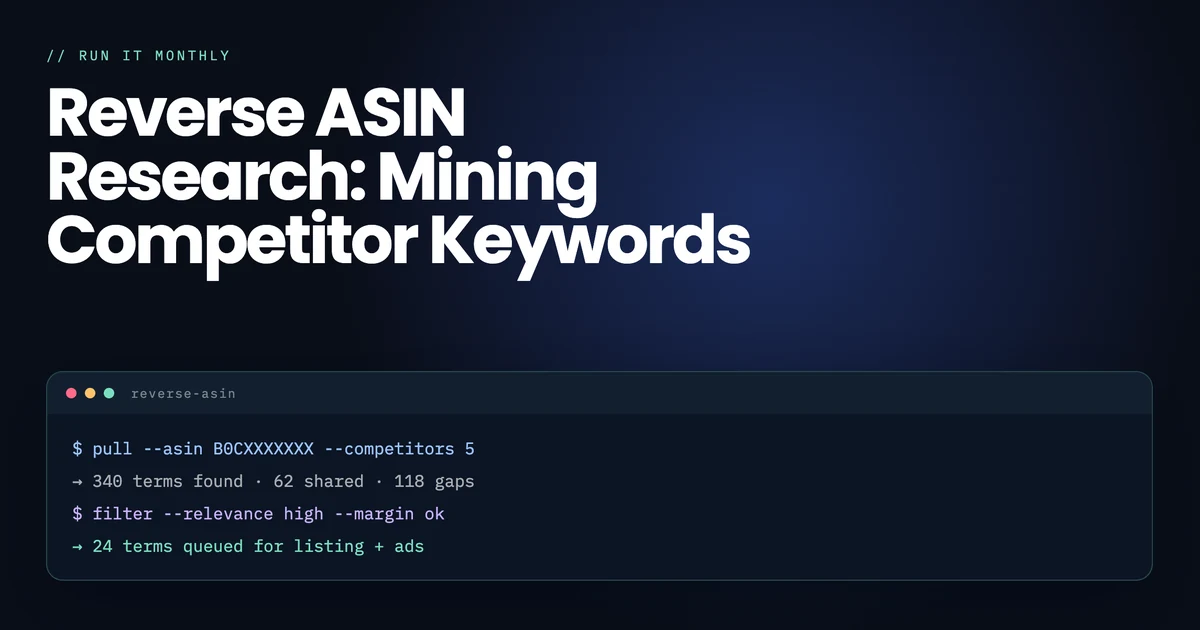
Reverse ASIN research means entering a competitor's ASIN into a tool and getting back the keywords it ranks for. Pick three to five true substitutes, then sort the results into shared terms, gaps and terms you own. Test the gaps with exact-match Sponsored Products ads before rewriting your listing around them.
What a reverse ASIN lookup actually shows you
Normal keyword research goes forwards: you start with a phrase and ask how much demand it has. A reverse ASIN lookup goes backwards. You start with a product and ask which phrases Amazon currently associates with it, and where it sits for each.
That matters because it is the one thing Amazon’s own free reports cannot do. Brand Analytics, Search Query Performance and your advertising search term report are all excellent and all describe your products. None of them will tell you that the competitor outselling you is ranking on page one for a phrase you have never indexed for. That gap is the entire reason a third-party tool subscription exists.
A typical export returns, for each keyword: an estimated search volume, the ASIN’s organic rank, its sponsored rank, and often title density and the number of competing products. Three of those columns carry almost all the useful information, and it is not the one everybody sorts by.
Organic rank versus sponsored rank
The most decision-relevant pair in the whole export, and routinely ignored. A competitor sitting at organic position three earned it: they have a listing Amazon considers highly relevant and a sales history behind it, and taking that position is a quarter of work. A competitor at sponsored position one and organic position forty is renting the spot. The term is far more open than the results page implies, and whoever is paying for it will stop at some point.
Title density
How many of the page-one products carry the exact phrase in their title. Low density on a keyword with real demand is the clearest opportunity signal in Amazon SEO: shoppers are searching for it and nobody has claimed the words. High density means the phrase is contested by people who already decided it mattered, and a listing edit alone will not move you.
Everything else
Competing products is nearly meaningless in isolation — 40,000 competing products with no title density is an easier target than 800 with full density. Proprietary relevancy or opportunity scores are the vendor’s opinion rather than data, and none of them publish the calculation. Use them to sort a first pass, never to justify a decision.
Which competitor ASINs should you pick?
Garbage in, confidently-formatted garbage out. The single most common reason reverse ASIN research produces a useless keyword list is that the inputs were chosen by revenue rather than by substitution.
Pick true substitutes. A product a shopper would genuinely buy instead of yours: same use case, comparable price band, similar pack size or capacity, same buyer. Not the category’s best seller, unless that happens to also be a substitute.
Three to five is enough. Ten ASINs produce an export nobody finishes reading. The marginal keyword from a sixth competitor is almost never the one that changes your quarter.
Mix the sample deliberately. Take one dominant incumbent, two or three direct peers at your price and review count, and one recent entrant that is clearly climbing. The incumbent shows you the ceiling, the peers show you the realistic target set, and the climber shows you which terms are currently working for a listing with no sales history — which is the most actionable group of the three.
The mistakes that poison the export
Choosing the category giant. A brand with a decade of sales history ranks for terms through authority you cannot replicate. You will copy a keyword list that works because of who they are, not because of what their listing says.
Choosing across price bands. A $12 product and a $60 product in the same category attract different searches, and the cheaper one’s keyword set will drag your listing towards traffic that will not pay your price.
Choosing a variation parent when you sell a single. Parent listings aggregate the search relevance of every child, so the export includes size, colour and count terms you cannot satisfy.
Choosing a bundle. Bundles rank for both the component terms and the gifting terms, and neither set transfers cleanly to a single unit.
Spend ten minutes on this step. It determines the quality of everything downstream more than any filter you apply afterwards.
Amazon keyword research
Want the shortlist instead of the export?
We do this sort for clients every week and hand back the twenty or so terms worth testing. If that saves you an afternoon, we'd be glad to help.
See how we research keywordsThe method: share, gap, defend
An export of 600 to 900 rows is normal and useless as it stands. Sort every row into one of three buckets and the work becomes obvious.
| Bucket | Definition | What to do |
|---|---|---|
| Share | You and at least one competitor both rank | Contested ground. Improve position rather than discover — usually a placement and conversion problem, not a keyword one |
| Gap | Two or more competitors rank, you do not appear at all | The actual output of the exercise. Test before you commit |
| Defend | You rank, competitors do not | Leave alone, and know which they are so you notice when someone arrives |
Two refinements make the Gap bucket usable.
Require two competitors, not one. A keyword only one competitor ranks for is as likely to be their accident as your opportunity. Requiring two independent listings to hold it filters out most of the noise in a single step.
Then apply relevance, ruthlessly. For every surviving row, ask whether a shopper typing that phrase would be pleased to land on your product. Not "could it plausibly match" — pleased. If the honest answer is no, delete the row whatever the volume says. Indexing for terms you satisfy poorly buys clicks that do not convert, and because conversion feeds ranking on Amazon, that damage spreads to the terms you legitimately own. Irrelevant traffic is not free here.
From 900 rows you should end with somewhere between twenty and forty Gap candidates. That is a list a person can actually act on, and it is roughly what our keyword research work delivers per ASIN rather than the raw export.
Which reverse ASIN tool should you use, and is there a free route?
Reverse ASIN is a paid feature almost everywhere, because it is the one keyword job Amazon’s free reports genuinely cannot do.
Helium 10 Cerebro is the deepest. It separates organic from sponsored rank, reports title density, and compares up to ten ASINs in one view, which is what makes the share-gap-defend sort a filter rather than a spreadsheet exercise. Platinum is $129 a month at list.
Jungle Scout Keyword Scout does the same job with a lower entry price and a monthly search cap — 50 on Starter at $29, 250 on Growth Accelerator, unlimited on Brand Owner. If you are researching products as well as keywords it is the better single subscription.
Data Dive at $39 calls the operation a "Dive" rather than a reverse ASIN lookup, which is why it is missed in comparisons. ASINs go in, a master keyword list comes out, and the output is closer to a raw matrix than a report — which is what you want if you are doing this across many products.
SellerApp publishes a free standalone reverse ASIN tool with no price stated on the page, which is a reasonable way to run a single check without a subscription.
One correction worth carrying: Sonar is discontinued. It was the free Sellics keyword tool everyone recommended, and after Perpetua absorbed Sellics its page now says the feature is no longer available. It still appears on page one of several "best free tool" lists, which tells you how recently those were checked. There is a fuller breakdown in our comparison of Amazon keyword tools.
The free approximation
You can do a crude version with no subscription at all. Search your main terms and record which ASINs appear on page one. Open each competitor’s listing and read the title, bullets and Item Highlights — those are indexed fields, so the phrasing there is a direct statement of what they are targeting. Add the related searches strip and the "customers frequently viewed" carousel, both of which are Amazon publicly naming which products it treats as substitutes.
It is slower and it misses backend terms entirely. For one product launch it is genuinely enough, and it has one advantage over the export: you are reading the competitor’s actual positioning rather than a list of strings, so you notice what they are claiming as well as what they are indexing for.
Amazon PPC management
Rather have someone run the tests?
We set up the exact-match and ASIN campaigns, watch the clicks and move winners into your listing. You keep the say on budget at every step.
See how we manage PPCWhere the keywords actually go
Finding them was the easy half. Placement changed materially in 2026 and most published guides have not caught up.
Amazon cut product titles to 75 characters in all categories except media on 27 July 2026, and introduced a 125-character Item Highlights field that began displaying beneath the title on 10 August. Amazon states both are inputs for search and neither is prioritised over the other.
So a thirty-term Gap list now meets far less prime real estate than it would have done eighteen months ago. Tier the survivors before you write:
| Tier | Goes in | How many |
|---|---|---|
| What the product fundamentally is | Title, 75 characters | One to three terms, and the brand |
| Attributes a buyer filters on | Item Highlights, 125 characters | Five to ten |
| Objection-answering phrasing | Bullets, in real sentences | As many as read naturally |
| Synonyms, misspellings, regional wording | Backend search terms, 249 bytes | The rest |
Three rules that save more grief than any keyword choice. Do not repeat a term across fields — Amazon indexes the listing, not each field separately, so a word in the title does not need to be in the backend.
Backend is measured in bytes, not characters, so accented and non-Latin characters cost more than one each and going over can cause the whole field to be ignored rather than truncated. And do not put competitor brand names in backend search terms: Amazon prohibits it, it is a trademark exposure, and it is one of the easiest things for a rival to report.
Test in advertising first
The best use of a Gap list is not a listing rewrite. It is an exact-match Sponsored Products campaign across the twenty to forty candidates, run for two to four weeks on a modest budget. Terms that convert have earned a place in the listing and you now have evidence rather than a tool’s estimate. Terms that take clicks and never convert go straight into your negatives, which is cheaper than discovering the same thing after you rebuilt a title around one.
A worked example
An insulated water bottle, 750ml, $29, eleven months old, stuck at around forty units a day and not climbing. Here is what the process actually looks like.
The inputs. One incumbent at $34 with 18,000 reviews. Three peers between $25 and $32 with review counts within a factor of two of ours. One entrant four months old at $27 that is clearly climbing. Deliberately excluded: a $9 unbranded bottle, because its traffic will not pay our price, and a variation parent covering four capacities, because its keyword set includes sizes we do not sell.
The export. 740 rows across the five ASINs. Sorted into buckets: 180 Share, 240 Gap on at least one competitor, and 62 Defend. Requiring two competitors on the Gap bucket cut it from 240 to 96 in one step, which is the highest-value filter in the whole exercise.
The relevance pass. Of those 96, about half went straight in the bin. Terms about coffee carafes, hydration packs and gym shakers all appeared because competitors index for them, and a shopper typing any of them would be disappointed by a plain insulated bottle. Chasing "gym shaker bottle" because a competitor ranks for it would buy clicks from people who wanted a mixing ball. Thirty-one candidates survived.
What the survivors looked like. Three clusters. Capacity and measurement phrasing — 750ml, 25oz, the two used interchangeably by different buyers. Use-case phrasing — school, cycling, work desk, each attracting a different price sensitivity. And a compatibility cluster nobody would have guessed from a volume-sorted list: whether the bottle fits a standard car cup holder, which turned out to be the most consistent theme in the incumbent’s own reviews as well.
What happened to them. Two went into the title, because capacity is what the product fundamentally is. Seven into Item Highlights as attributes. The compatibility cluster went into a bullet as a real sentence, because it answers an objection rather than just matching a string. The remainder — misspellings, the ounces-versus-millilitres variants, regional wording — went to the backend field. All thirty-one ran as an exact-match advertising test for three weeks first, and six of them never converted and became negatives rather than listing copy.
The point of the example is the shape of the funnel: 740 rows, 96 after a structural filter, 31 after judgement, 25 after evidence. Every step that cut the list added more value than the step that produced it.
How often, and what to watch
Reverse ASIN research is not a one-off, and it is also not monthly busywork. The useful cadence is tied to events rather than the calendar.
Every quarter, as maintenance. Re-run the same three to five ASINs and compare the Gap bucket to last time. Terms that appear in two consecutive quarters for two competitors are real; terms that flicker in and out are noise.
When a new competitor reaches page one. Add them to the set immediately. A listing that climbed recently without a sales history behind it is the clearest available evidence of what is working in your category right now.
After any Amazon change of the kind July 2026 brought. When the rules about where keywords live change, everyone’s placement changes, and the competitive picture is genuinely different rather than drifting.
Before a marketplace expansion. Run it against competitors in the destination marketplace, not a translation of your domestic list. US and UK English diverge in ways that cost real money — diaper and nappy, flashlight and torch — and the substitution set is often different too.
Measuring whether it worked
Check indexing first: search the exact phrase plus your ASIN in the Amazon search bar, and if your product appears, the term is now associated with the listing. That usually takes 24 to 72 hours after a change.
Then wait two to four weeks and open Search Query Performance, which shows impressions, clicks, adds to cart and purchases per query with your share of each. Impressions up and click share flat means you are being shown and not chosen, which is an image, title or price problem rather than a keyword one.
If you would rather have the twenty-term shortlist than the 900-row export, that is what our keyword research produces, and a free written audit will tell you which of your ASINs has the widest gap before you spend anything.
How do you turn reverse ASIN research into Amazon PPC campaigns?
Most guides stop at the keyword list. But reverse ASIN research gives you two things to advertise against: the competitors' keywords and the competitors themselves. Here is how we split them across Sponsored Products.
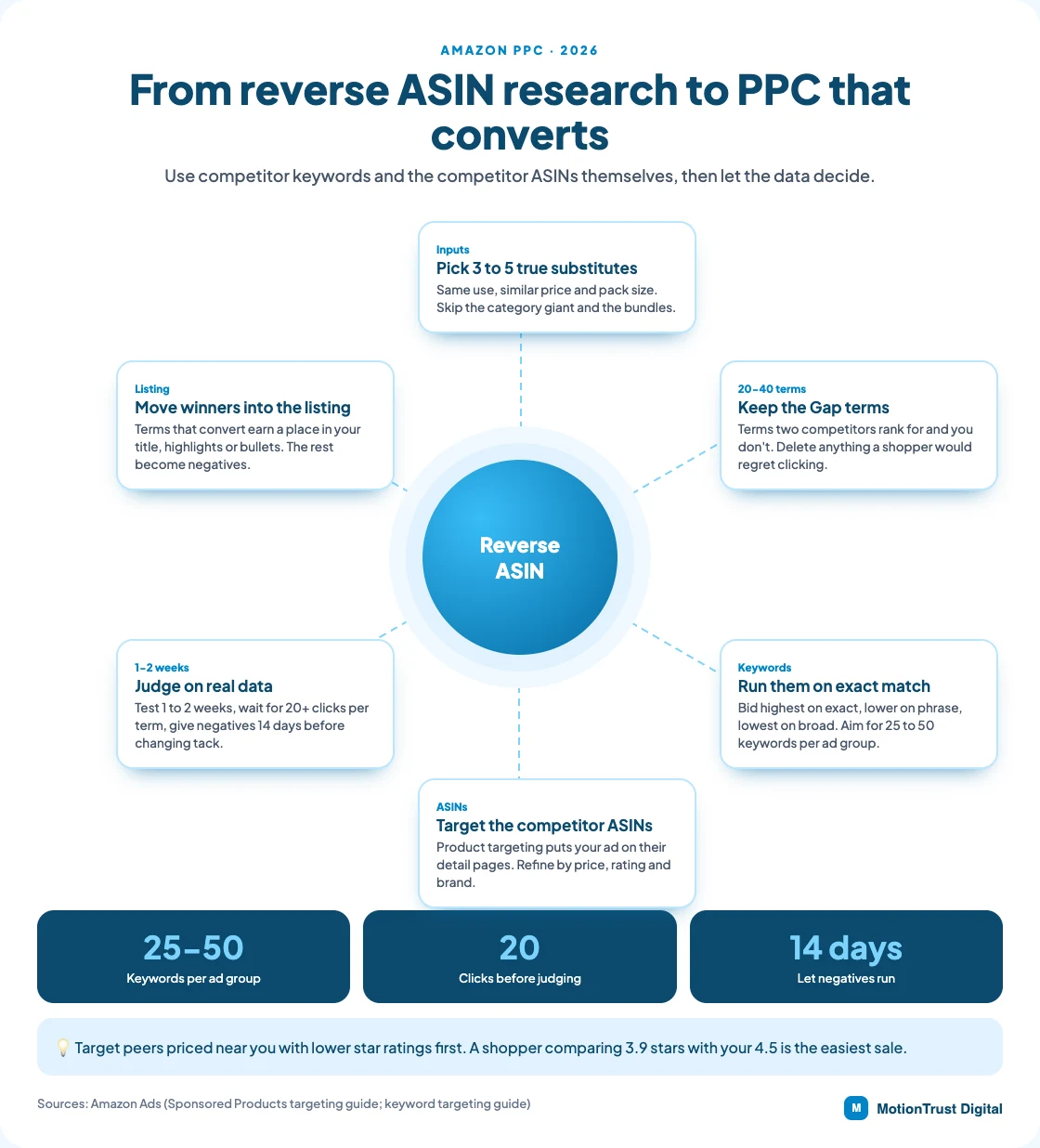
Keyword targeting: exact first, then phrase
Put your Gap candidates in a manual campaign on exact match. Amazon's own guide says exact match tends to give the highest conversion rates. Bid highest on exact, lower on phrase and lowest on broad.
Amazon suggests 25 to 50 relevant keywords per ad group. A typical Gap list of 20 to 40 terms fits one or two ad groups neatly. Add phrase match only for the clusters that convert, so you catch close variants without paying for every stray search. Keep the test in its own campaign so the budget and results stay easy to read.
Product targeting: bid on the ASINs you researched
The competitor ASINs you picked are already a target list. Sponsored Products lets you target individual products, then refine by brand, price, star rating and Prime eligibility. Your ad then appears on those detail pages. Give these targets their own ad group, so you can see which competitor pages send buyers rather than browsers.
Start with the peers priced near you and rated lower. A shopper comparing a 3.9-star bottle with your 4.5-star one is easy to win. A cheaper, better-rated incumbent rarely is.
Defending your own ASINs
Your rivals can run reverse ASIN research on you too. Two simple defences help:
- Target your own ASINs in a small product-targeting campaign, so your other products fill ad slots on your own pages.
- Add negative product targets where an ad keeps showing on pages that never convert.
- Watch the search term report for your brand name appearing under competitors' campaigns.
Give each test enough data
Amazon's guidance is to test each match type for 1 to 2 weeks before pausing anything. Judge a keyword only after at least 20 clicks. Then let new negatives run for 14 days or more before changing strategy again.
That patience matters. A term with five clicks and no sale tells you very little. Cutting it early is how good reverse ASIN research gets thrown away.
If you'd rather not build this yourself, our Amazon PPC management team runs keyword and ASIN targeting from your research. Already running ads? An Amazon PPC audit will show where spend leaks. Need the list first? Try our Amazon keyword research service.
Free Amazon PPC audit
See where your ad spend is leaking
Run your campaigns through our free PPC audit tool. It shows wasted spend and missing targets, so you know what to fix before adding new keywords.
Run the free PPC auditQuestions people also ask
What is reverse ASIN lookup?
A search that runs backwards: you enter a competitor’s ASIN and get back the keywords Amazon currently associates with that product, usually with its organic rank, sponsored rank and an estimated search volume for each. It is the one keyword job Amazon’s own free seller reports cannot do, because those only describe your own products.
Is reverse ASIN lookup free?
Mostly not. SellerApp publishes a free standalone reverse ASIN tool, and Helium 10 has a free tier, but ongoing work needs a subscription — Jungle Scout from $29 a month, Data Dive from $39, Helium 10 Platinum at $129 at list. You can approximate it free by reading competitors’ titles, bullets and Item Highlights directly, which misses backend terms.
Is there a free reverse ASIN keyword tool?
SellerApp publishes one with no price stated on the page, which is fine for a one-off check. Note that Sonar, still recommended on several page-one listicles, has been discontinued — its own page says the feature is no longer available.
How many competitor ASINs should I analyze?
Three to five. Beyond that the export gets long enough that nobody finishes reading it, and the marginal keyword from a sixth competitor rarely changes anything. Mix one dominant incumbent, two or three direct peers at your price and review count, and one recent entrant that is clearly climbing.
Can I use reverse ASIN for PPC keyword research?
It is the best use of it. Rather than rewriting a listing around unproven terms, run your gap list as an exact-match Sponsored Products campaign for two to four weeks. Terms that convert have earned a place in the listing; terms that take clicks and never convert become negatives.
How often should I run reverse ASIN research?
Quarterly as maintenance, plus whenever a new competitor reaches page one, before a marketplace expansion, and after any Amazon change that alters where keywords live — as the 75-character title limit did in July 2026.
Does copying competitor keywords guarantee better rankings?
No, and copying the list wholesale usually hurts. Competitors rank for terms by accident, for variations you do not sell, and through sales authority you cannot replicate. Treat the export as candidates and apply relevance ruthlessly: a term you satisfy poorly buys clicks that do not convert, and poor conversion damages the terms you legitimately own.
How long does reverse ASIN keyword research take?
For one product, about two hours done properly: ten minutes picking substitutes, thirty minutes pulling and sorting the export, and an hour applying relevance and tiering the survivors. The measurement afterwards runs two to four weeks, which is when you find out whether the work was right.
Can reverse ASIN lookup help if your product is new?
It is most valuable when your product is new, because you have no search term data of your own yet. Weight the sample towards recent entrants that are climbing rather than established best sellers — a listing ranking without a long sales history tells you what is working on merit right now.
What is the best reverse ASIN tool?
Helium 10 Cerebro, for the organic-versus-sponsored rank split and title density, which are what make the results a filter rather than a spreadsheet. Jungle Scout is cheaper to start and capped by plan; Data Dive is the choice if you want the raw matrix across many products.
How accurate is reverse ASIN data?
The rank data is reasonably reliable because it is observable. The search volume attached to it is modelled, since Amazon does not publish volume to third parties, so trust the ratio between two terms rather than the absolute figures — and expect accuracy to fall outside the US marketplace and on long-tail phrases.
What's the difference between Cerebro and Magnet?
They are now one tool. Helium 10 has merged Magnet into Cerebro, so you can search by ASIN or by keyword in the same place, with no features removed. The rollout is staged, so some accounts may still see both names for a while. The workflow is unchanged: start from competitor ASINs, then expand the terms worth pursuing from a seed keyword.
Can I target a competitor's ASIN in Amazon ads?
Yes. Sponsored Products product targeting lets you target individual ASINs or whole categories, refined by brand, price, star rating and Prime eligibility. Your ad can then appear on that competitor's detail page. It works best against similar products priced near yours with lower ratings, where your offer is clearly the better buy.
Is reverse ASIN lookup allowed by Amazon?
Yes. Reverse ASIN tools estimate keywords from publicly visible search results, and using them breaks no Amazon rule. The risk is in what you do next. Amazon prohibits competitor brand names in your backend search terms, so keep rival brands out of the listing and use product targeting in ads instead.
Written by Monjur Hossain, Founder & Amazon Strategy Lead at MotionTrust Digital, from the agency’s day-to-day work on client Amazon accounts and checked against the primary documentation listed under Sources below. Primary sources for this guide: Helium 10, Jungle Scout, Data Dive, SellerApp, Perpetua and Amazon Seller Central.
Every figure attributed to Amazon or to another named organisation links to that organisation’s own page, with the month it was accessed. Anything drawn from our own client accounts is labelled as ours rather than presented as an industry figure, and where no primary source publishes a number this guide says so instead of estimating one. Last reviewed .
- Helium 10 — Cerebro, accessed September 2026.
- Helium 10 — Pricing, accessed September 2026.
- Jungle Scout — Catalyst plans, accessed September 2026.
- Data Dive — Pricing, accessed September 2026.
- SellerApp — Free reverse ASIN tool, accessed September 2026.
- Perpetua — Sonar — feature no longer available, accessed September 2026.
- Amazon Seller Central — Product title updates from 27 July 2026, accessed September 2026.
- Amazon Ads — A guide to targeting with Sponsored Products, accessed October 2026.
- Amazon Ads — Keyword targeting guide, accessed October 2026.
- Helium 10 Knowledge Base — Magnet Has Been Merged Into Cerebro: Everything You Need to Know, accessed October 2026.
Monjur Hossain
Founder & Amazon Strategy Lead, MotionTrust Digital
Monjur incorporated MotionTrust Digital in September 2022 and leads Amazon strategy across the client base. Eight years in e-commerce and marketplace marketing, now on Amazon only — keyword strategy, listing architecture and advertising structure for growing brands.
MonjurAgency