
How to Respond to Negative Amazon Reviews in 2026 (When You Can't Reply)
 By Monjur HossainFounder & Amazon Strategy Lead
·
Published
·
Last reviewed
·18 min read
By Monjur HossainFounder & Amazon Strategy Lead
·
Published
·
Last reviewed
·18 min read

To respond to negative Amazon reviews in 2026, work around the review rather than under it. Public review comments were retired in 2020, and contacting 1–3 star reviewers has been removed. Triage each review, report genuine guideline breaches, fix the listing or product, and reply helpfully when buyers message you first.
If you want to respond to negative Amazon reviews in 2026, the first thing to know is that the old advice no longer works. Most guides still tell you to "reply publicly" or "use Contact Customer". Both routes have gone. This guide covers what you can actually do today, step by step, without putting your account at risk.
We work with brands on amazon.com, amazon.co.uk and the European marketplaces. The pattern is the same everywhere. A fresh 1-star review lands, the team panics, and someone starts looking for a "reply" button that doesn't exist. Slow down. A calm, structured way to respond to negative Amazon reviews does far more for your star rating than a fast, emotional one.
Can you still respond to negative Amazon reviews in 2026?
Short answer: not directly, and not publicly. You cannot write a reply under a product review, and you cannot open a conversation with the reviewer from the review itself. What you can do is fix the cause, report reviews that break the rules, and reply properly when a buyer contacts you.
That still counts as a response. It's just aimed at the next thousand shoppers rather than the one who left the review.
What happened to review comments (retired December 2020)
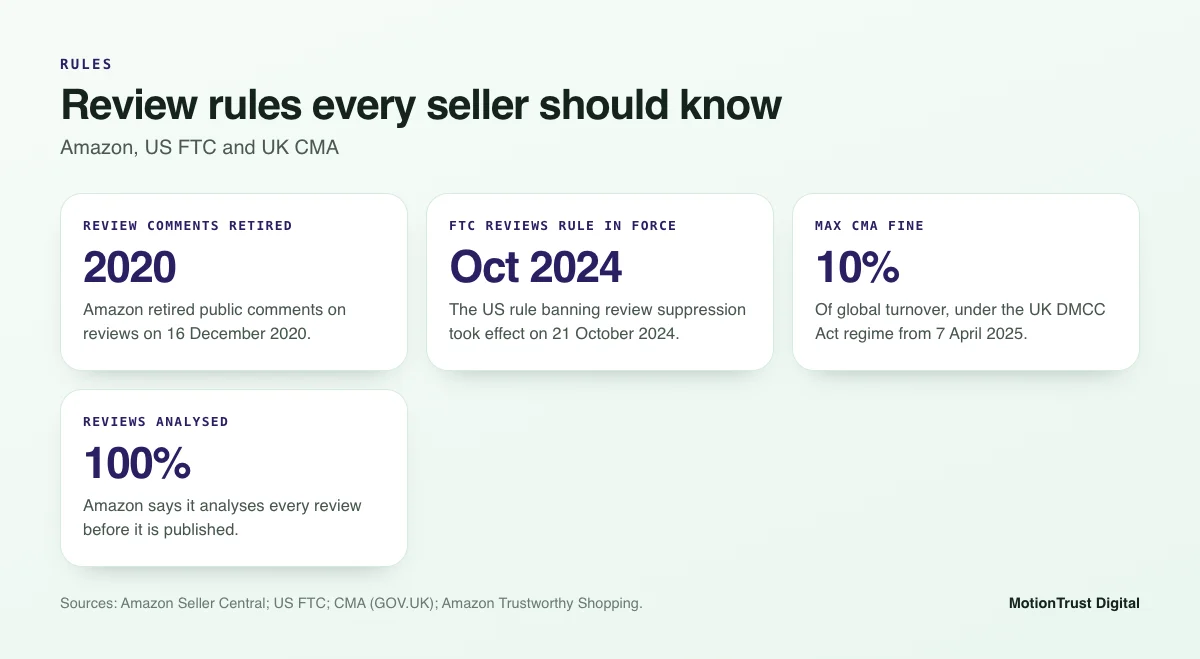
For years, anyone could leave a comment under a review, including the brand. Sellers used it to post apologies and offer help. Amazon switched it off. In its Seller Central announcement, Amazon said the comments feature "was rarely used" and that it was retiring the feature on 16 December 2020.
So when a guide tells you to click "Comment" and post a public reply, it is describing a tool that has not existed for almost six years. Any statistic about shoppers reading brand replies to Amazon reviews comes from before that change.
What happened to Contact Customer for critical reviews
After comments went, Brand Registry sellers got a different tool. From the Customer Reviews dashboard, you could send a templated "Contact Customer" message to buyers who left 1–3 star reviews. It offered a refund or help, and it was the closest thing to a reply.
That tool has now been removed. A notice quoted on the Amazon Seller Forums says: "The ability to initiate customer contacts on critical reviews has been removed to align with Amazon's communication policies." It adds: "You can still respond when customers contact you first via the Messages."
The route there was bumpy. According to sellers on the SellersAskSellers community, Amazon announced the change in mid-June 2025, rescinded it on 5 September 2025, then removed the capability "effective immediately" in a notice discussed in June 2026. Because Amazon has reversed itself once, check your own Seller Central before you plan around any single tool.
What you can still do today
Here is the honest picture of how you can respond to negative Amazon reviews as of October 2026. Features can differ by marketplace, so confirm them in your own account.
| Action | Available now? | Where |
|---|---|---|
| Public reply under a product review | No (retired 16 Dec 2020) | n/a |
| Start contact with a 1–3 star reviewer | No (removed 2026) | n/a |
| Reply when the buyer messages you first | Yes | Buyer-Seller Messaging |
| Report a review that breaks the rules | Yes | "Report" link on the review; Brand Registry tools |
| Public reply to seller feedback | Yes | Performance > Feedback (Feedback Manager) |
| Fix the listing, product or packaging | Yes | Catalogue tools, A+ Content, your supplier |
Product reviews vs seller feedback: which one did you get?
Before you do anything, check what kind of rating you received. Sellers mix these up all the time, and the right response depends on it. If you want a deeper look at the rules on both sides of the Atlantic, our guide to Amazon review rules covers them in detail.
Product reviews: about the item, no seller reply
Product reviews sit on the product detail page. They describe the item: quality, size, how it works. They belong to the ASIN, not to you as a seller, so every seller on that listing shares them. They follow Amazon's Community Guidelines. There is no reply option for anyone.
Seller feedback: about service, public reply in Feedback Manager
Seller feedback is about the transaction: delivery speed, packaging, communication. You find it in Seller Central under Performance > Feedback. Here you can still post a short public reply, and you can ask Amazon to remove feedback in some cases. Examples include feedback that is entirely a product review or contains obscene language or personal details. Feedback about delivery on an order Amazon fulfilled is usually struck through by Amazon rather than deleted.
Why the difference changes your response
A buyer who writes "arrived late, box crushed" in seller feedback can get a public, polite reply from you. The same words in a product review cannot. Equally, a product complaint left as seller feedback may qualify for removal from your feedback score, while the same complaint as a product review is usually fair comment.
Get this step right and you avoid wasted reports and wasted hours.
Step 1: Triage the review in the first 48 hours
When you can't reply directly, you need a process instead. We use a simple four-step loop to respond to negative Amazon reviews for every brand we manage: triage, report if justified, fix the cause, then monitor. The steps below show how to respond to bad reviews on Amazon without stepping outside the rules.
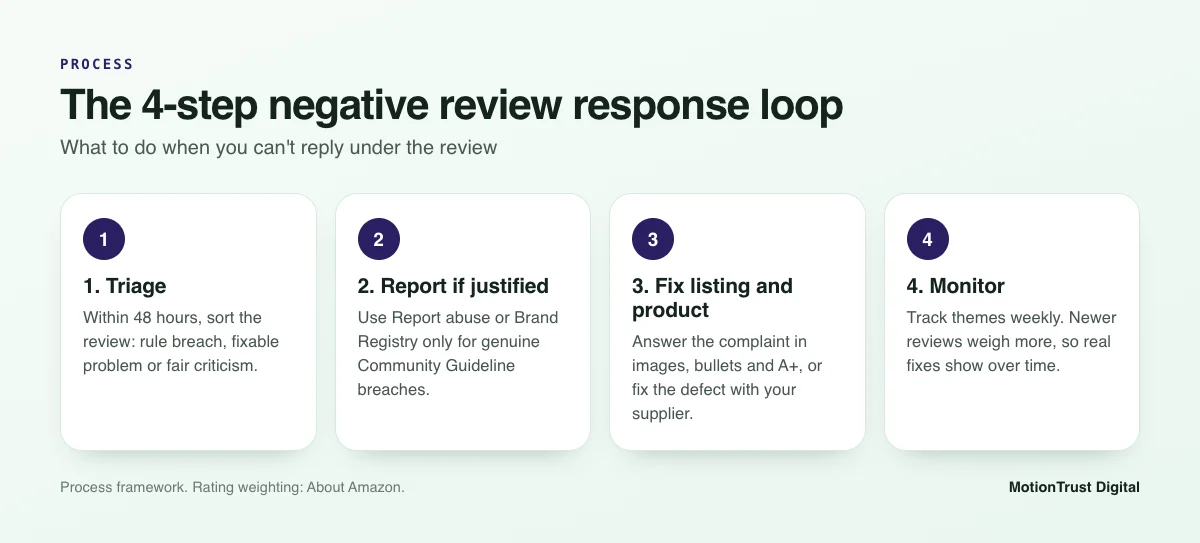
Start by reading the review twice. Then put it in one of three buckets. This takes five minutes and decides everything that follows. Aim to triage within two working days, so a fixable problem doesn't keep producing new complaints while you wait.
Does it break Amazon's Community Guidelines?
Some reviews shouldn't be there at all. Common examples include reviews that:
- contain hateful, obscene or threatening language;
- include personal information, links or promotional content;
- are clearly about a different product, or about seller service rather than the item;
- come from a competitor or someone with an obvious conflict of interest;
- appear to belong to a different product through catalogue abuse.
These go to Step 2. Everything else stays and gets worked on.
Is it a product, listing or fulfilment problem?
Most 1-star reviews are honest. They usually point to one of three causes. The product itself failed (it broke, leaked, didn't fit). The listing set the wrong expectation (the colour looked different, the size wasn't clear). Or fulfilment went wrong (damaged in transit, missing parts). Check the order where you can, look at returns reasons for the ASIN, and note which cause you're dealing with.
Is it fair criticism you need to learn from?
Some reviews sting because they're right. "Works fine, but the instructions are useless" is not a policy breach. It's free product research. Treat it as a task for the product or content team, not an attack to be removed.
Example triage, using a made-up kitchen scale. Review A says "Rubbish, the seller is a scammer" with no detail: possible guideline breach, check it. Review B says "Display stopped working after a week": product problem. Review C says "Smaller than it looked in the photos": listing problem.
Free Amazon account audit
Not sure which bucket your reviews fall into?
We'll look at your review themes, returns reasons and listing gaps, and tell you which fixes are worth doing first.
Request your free auditStep 2: Report reviews that break the rules (and leave the rest)
Reporting is the right move only for reviews that genuinely break Amazon's rules. We cover the full process in our guide on how to remove negative Amazon reviews, so here we'll keep it brief.
Report abuse on the product page
Every review has a "Report" link. Use it, choose the reason that fits, and keep a note of the date and the review text. Amazon says it analyses 100% of reviews before they are published, using machine learning and human investigators, and that customers can flag problems with the Report abuse link (Amazon, How Amazon maintains a trusted review experience).
Brand Registry reporting routes
If you're enrolled in Amazon Brand Registry, you have extra routes. The Report a Violation tool and Brand Registry support can look at review issues on your own ASINs, including reviews that appear to belong to a different product. Menu names change, so search Brand Registry help for "customer reviews" if you can't find them.
In the UK, Amazon has given undertakings to the CMA. They include tackling "catalogue abuse", where reviews from a well-performing product are hijacked onto a different one, and easy reporting routes for businesses (CMA).
What Amazon will not remove
Amazon will not remove a review because it's negative, harsh or bad for sales. Honest opinions about the product stay up. Mass-reporting fair reviews wastes time, and it can draw attention to your account for the wrong reasons. Report the clear breaches once, accurately, and move on to fixing the cause.
Step 3: Respond through the listing, not the review
This is where most of your real response happens. You can't answer the reviewer, but you can answer the question their review raises for every future shopper. Here's how to respond to negative Amazon reviews where shoppers will actually see it: on the detail page.
Amazon now shows AI-generated review highlights that summarise what customers say across written reviews (About Amazon). Shopping assistants such as Rufus also draw on your listing and reviews together. If ten reviews mention the same problem and your listing ignores it, shoppers will notice the gap.
Answer the complaint in images and bullets
Turn the complaint into content. If reviews say "smaller than expected", add a scale image with the product in a hand or next to a common object, and put exact dimensions in the first bullet. If reviews say "hard to set up", add a three-panel setup image. If they say "not compatible with my model", list compatible models plainly.
Our guide on how to optimise an Amazon listing walks through image order, bullets and backend fields in more detail.
Use A+ Content to set expectations
A+ Content is a good place for comparison charts, care instructions and "what's in the box" modules. These answer the questions that turn into 2-star reviews. Keep it factual. Don't claim the product is "the best", and don't mention reviews or ratings in A+ Content.
Fix variation and compatibility confusion
A common cause of unfair-looking reviews is a buyer picking the wrong variation. Clear variation names, a size chart image and consistent titles across the family reduce this. If the reviews belong to a variation that doesn't fit with the rest, raise it with Seller Support or Brand Registry, as merged review pools can mislead shoppers.
Example: say your phone case sells for $19.99 and three recent reviews complain it "doesn't fit". You check and find all three bought the Pro size for a standard phone. Renaming the variations and adding a fit image addresses the cause. Nothing about the review itself changes, but fewer buyers make the same mistake.
Step 4: Respond through the product and the packaging
Listing changes fix expectation problems. Real defects need a product fix. This is the slowest response, but it's the one that protects your rating over months.
Read the pattern, not the single review
One review saying the zip broke might be bad luck. Five in a month is a pattern. Group reviews by theme each week (fit, durability, missing parts, damage) and compare them with your returns reasons in Seller Central. When both point the same way, you have a product problem, not a review problem.
Inserts and instructions that prevent repeat complaints
Clear instructions, a quick-start card and a support contact route through Amazon messaging can stop a confused buyer becoming an angry reviewer. Inserts must not ask for a positive review, offer anything for a review, or steer unhappy buyers away from reviewing. A neutral line such as "Questions about setup? Message us through Amazon" is fine. "Happy? Leave 5 stars. Unhappy? Contact us instead" is not.
When to pause a batch or raise it with the supplier
If reviews and returns both point to a defect, stop sending the affected batch where you can. Share the review themes, photos and order dates with your supplier and agree a corrective action. Document what you changed and when. You'll need that date later to judge whether the fix worked.
Amazon listing optimisation service
Turn review complaints into a clearer listing
We rewrite bullets, images and A+ Content so the questions behind your negative reviews are answered before the buyer clicks Add to Cart.
See how listing optimisation worksHow should you reply when the buyer messages you first?
Buyer messages are the one direct channel left when you respond to negative Amazon reviews. If a buyer who is unhappy (and may have reviewed) contacts you through Buyer-Seller Messaging, you can and should reply. The aim is to solve their problem. It is not to get the review changed.
Response structure: acknowledge, resolve, confirm
- Acknowledge. Name the problem in their words. Apologise once, without "but".
- Resolve. Offer the fix your policies and Amazon's allow: a replacement, a refund, a missing part, or clear instructions.
- Confirm. Tell them exactly what happens next and when. Then do it.
Keep it short, polite and specific to the order. Reply promptly, as Amazon tracks how quickly sellers respond to messages.
Example wording (compliant)
Hi Sam, thank you for letting us know the lid on your blender cracked after two weeks. I'm sorry, that shouldn't happen. We can send you a replacement lid free of charge, or arrange a full refund through Amazon, whichever you prefer. Just reply with your choice and we'll sort it today.
Notice what the message doesn't say. It doesn't mention the review, ratings or stars. It doesn't hint that the refund depends on anything. That's deliberate, and it's what keeps the message within Amazon's communication rules.
Use this as a negative review response template for messages only. Adjust the details to each order, because copy-pasted replies read as cold.
Phrases you must never use
- "We'll refund you if you update your review."
- "Could you consider changing your rating now that it's resolved?"
- "We'll send a free replacement in exchange for removing your review."
- "Please contact us at [external email or phone] instead of reviewing."
- "If you don't remove the review, we'll report you" or anything that sounds like a threat.
If the buyer chooses to update their review after a good experience, that's their decision. You don't ask, prompt or reward it.
What a response must never do: Amazon, FTC and CMA rules
When you respond to negative Amazon reviews, the urge to "make the review go away" is where sellers get into trouble. Three sets of rules apply, and Amazon's are the strictest.
Amazon: no incentives, no requests to change reviews
Amazon bans offering anything of value for a review, outside its own Vine programme. You can read more about Vine in our post is Amazon Vine worth it. Asking a buyer to change or remove a review, or only asking happy buyers for reviews, also breaks the rules.
Amazon says enforcement can include revoking review permissions, suspending selling privileges, withholding payments and legal action. It also says it proactively stopped more than 250 million suspected fake reviews in 2023 (Amazon).
US: FTC rule on review suppression
The FTC's Consumer Reviews and Testimonials Rule went into effect on 21 October 2024. The FTC confirms businesses may respond to negative reviews and contact customers to resolve issues. What the rule bans is suppressing reviews through tactics such as unfounded legal threats, intimidation or false public accusations (FTC).
The FTC also notes that asking only happy customers for reviews isn't specifically banned by the rule but "could violate the FTC Act". On Amazon, it breaks platform policy anyway.
UK: CMA and the DMCC Act banned practices
From 6 April 2025, the Digital Markets, Competition and Consumers Act regime came into force. The CMA can now fine businesses up to 10% of global turnover for consumer law breaches, and the Act includes "an explicit ban on the posting and commissioning of fake reviews" (CMA). The banned practices also cover presenting reviews in a misleading way, so hiding or gating negative feedback is risky in the UK too.
Before you send any customer message or insert, run the wording through our Amazon review compliance checker. It flags phrases that link help to reviews.
How do negative reviews affect your star rating and account health?
Negative reviews affect two things at once: the star rating shoppers see, and the Voice of the Customer (VoC) signals in Seller Central that feed your account health.
Reviews are one input to NCX
VoC gives each offer a CX Health rating based on its Negative Customer Experience (NCX) rate, compared with similar offers. NCX draws on several signals, including returns, buyer messages and reviews. Offers rated Poor or Very poor can be at risk of being closed. Our guide to Amazon Voice of the Customer explains the dashboard in full.
Spotting the review-to-return link
Open VoC, find the ASIN with a fresh negative review, and read the return comments. If the same complaint appears in both places, fix that first. A theme showing up in reviews, returns and messages is the clearest sign of where your time pays off.
Do negative reviews hurt your star rating for good?
No. Amazon says it uses "advanced models to calculate star ratings, not just a simple average" (About Amazon). Newer reviews carry more weight than older ones. Reviews from verified purchases are weighted higher. Ratings update as new reviews arrive and older ones become less important.
That has a practical meaning. A fixed product followed by steady, honest reviews from new buyers can lift the rating over time. You can model different scenarios with our Amazon review calculator, bearing in mind that Amazon's real model isn't a simple average.
The way to bring in those new reviews is the compliant way: the Request a Review button, Vine where it fits, and a product that deserves them. Our guide on how to get Amazon reviews compliantly covers each route.
Building a weekly routine to respond to negative Amazon reviews
One-off firefighting doesn't scale. A short weekly routine does. Here's the version we'd suggest for a brand with a handful of ASINs. Larger catalogues can split it by category.
Monitoring cadence and tools
Check new reviews for your top ASINs at least weekly, and daily during launches or after a product change. Use the Customer Reviews page in Brand Registry if you have it, plus VoC and your returns reports. Third-party review alerts help with larger catalogues.
Logging themes and owners
Keep one shared log. For each negative review, record the ASIN, date, star rating, theme, bucket (policy, fixable, fair), action and owner.
| Task | Who | When | Output |
|---|---|---|---|
| Read new 1–3 star reviews | Account manager | Weekly (daily at launch) | Triage bucket per review |
| Report clear guideline breaches | Account manager | Same day as triage | Report logged with date |
| Update images, bullets or A+ | Content lead | Within the next sprint | Listing change logged |
| Raise defects with supplier | Product owner | When a theme repeats | Corrective action agreed |
| Reply to buyer messages | Customer service | Same working day | Issue resolved, no mention of reviews |
| Review themes and fixes | Whole team | Monthly | Themes closed or escalated |
Measuring whether fixes worked
Compare the share of reviews mentioning a theme before and after your change date. Watch the VoC NCX rate and returns reasons for the same ASIN. Because newer reviews weigh more, a real fix should show in the trend over the following weeks. If the theme keeps appearing, the fix wasn't enough, and that trend is the honest test of how well you respond to negative Amazon reviews.
When to get help with negative reviews
Most single-product sellers can respond to negative Amazon reviews themselves with this loop. It gets harder when you have dozens of ASINs, several marketplaces, and review themes spread across languages. That's when a managed process tends to pay for itself in time saved.
Our Amazon review management service runs the monitoring, triage, reporting and listing fixes for you, inside Amazon's rules. If the issue is wider, such as account health, seller feedback and brand protection together, our Amazon reputation management agency team looks at the full picture. We don't promise review removals, and nobody honest can.
Amazon review management
Let us run your negative review routine
We monitor reviews, report genuine breaches and fix the listing and product issues behind them, all within Amazon's policies.
Talk to us about review managementFrequently asked questions
Can Amazon sellers respond to product reviews?
Not publicly. Amazon retired the comments feature on reviews on 16 December 2020, so nobody can post a reply under a product review. You can respond by fixing the listing and product, reporting reviews that break the Community Guidelines, and replying helpfully when a buyer messages you first. Seller feedback is different and still allows a public reply.
Is the Contact Customer button for critical reviews still available?
At the time of writing (October 2026), no. Amazon's notice says the ability to initiate customer contacts on critical reviews has been removed to align with its communication policies. Amazon announced a similar change in 2025, then reversed it, so check your own Seller Central. You can still reply when a customer messages you first.
What is the difference between seller feedback and a product review?
A product review is about the item and sits on the detail page, shared by every seller on that ASIN. Seller feedback is about your service, such as delivery and packaging, and sits on your seller profile. You can reply publicly to seller feedback in Feedback Manager and ask for removal in limited cases. Product reviews allow no reply.
Can I ask a buyer to change or remove a negative review?
No. Amazon prohibits asking buyers to change or remove reviews, and offering a refund, replacement or anything else in exchange is a serious breach. In the US, the FTC also bans suppressing reviews through threats or intimidation. In the UK, the CMA can fine up to 10% of global turnover for consumer law breaches. Solve the problem and leave the review to the buyer.
Should I report a negative review to Amazon?
Only if it breaks the Community Guidelines, for example abusive language, personal information, promotional content, or a review clearly about a different product. Use the Report link on the review, or Brand Registry routes if you're enrolled. Amazon won't remove honest negative opinions, and repeatedly reporting fair reviews wastes time you could spend fixing the cause.
How quickly should I act on a negative Amazon review?
Triage it within a day or two. That's enough time to decide whether it breaks the rules, points to a fixable product or listing problem, or is fair criticism. Reply to any related buyer message the same working day. Listing fixes can follow within your next content update, and product fixes on the timeline your supplier can realistically meet.
Do negative reviews hurt Amazon ranking?
They can affect conversion, and conversion influences how products perform in search. Amazon doesn't use a simple average for star ratings: newer reviews and verified purchase reviews carry more weight, and older reviews matter less over time. Negative reviews also feed Voice of the Customer, so repeated complaints can affect account health as well as sales.
Sources
- Amazon Seller Central — Upcoming removal of comments feature on reviews
- SellersAskSellers (seller community) — Ability to initiate customer contacts on critical reviews removed
- About Amazon — How Amazon customer reviews and star ratings work
- Amazon — How Amazon maintains a trusted review experience
- US FTC — The Consumer Reviews and Testimonials Rule: Questions and Answers
- CMA (GOV.UK) — New consumer protection regime comes into force
- GOV.UK — What businesses need to know about unfair commercial practices
Monjur Hossain
Founder & Amazon Strategy Lead, MotionTrust Digital
Monjur incorporated MotionTrust Digital in September 2022 and leads Amazon strategy across the client base. Eight years in e-commerce and marketplace marketing, now on Amazon only — keyword strategy, listing architecture and advertising structure for growing brands.
MonjurAgencyTry the free tools
Seven Amazon tools that run in your browser — profit and ACoS calculator, PPC auditor, listing checker and more. No account, nothing uploaded.
Try the free toolsLast reviewed . We update articles in place rather than republishing at a new URL, so the link you have keeps working.
Keep your ACoS target working for you
Break-even ACoS is the starting point. One email a week with our newest PPC articles on targets, bids and wasted spend, plus listings and SEO if you want them. Email us to join.