
How to Remove Negative Amazon Reviews: What Qualifies and How to Report It
 By Monjur HossainFounder & Amazon Strategy Lead
·
Published
·
Last reviewed
·19 min read
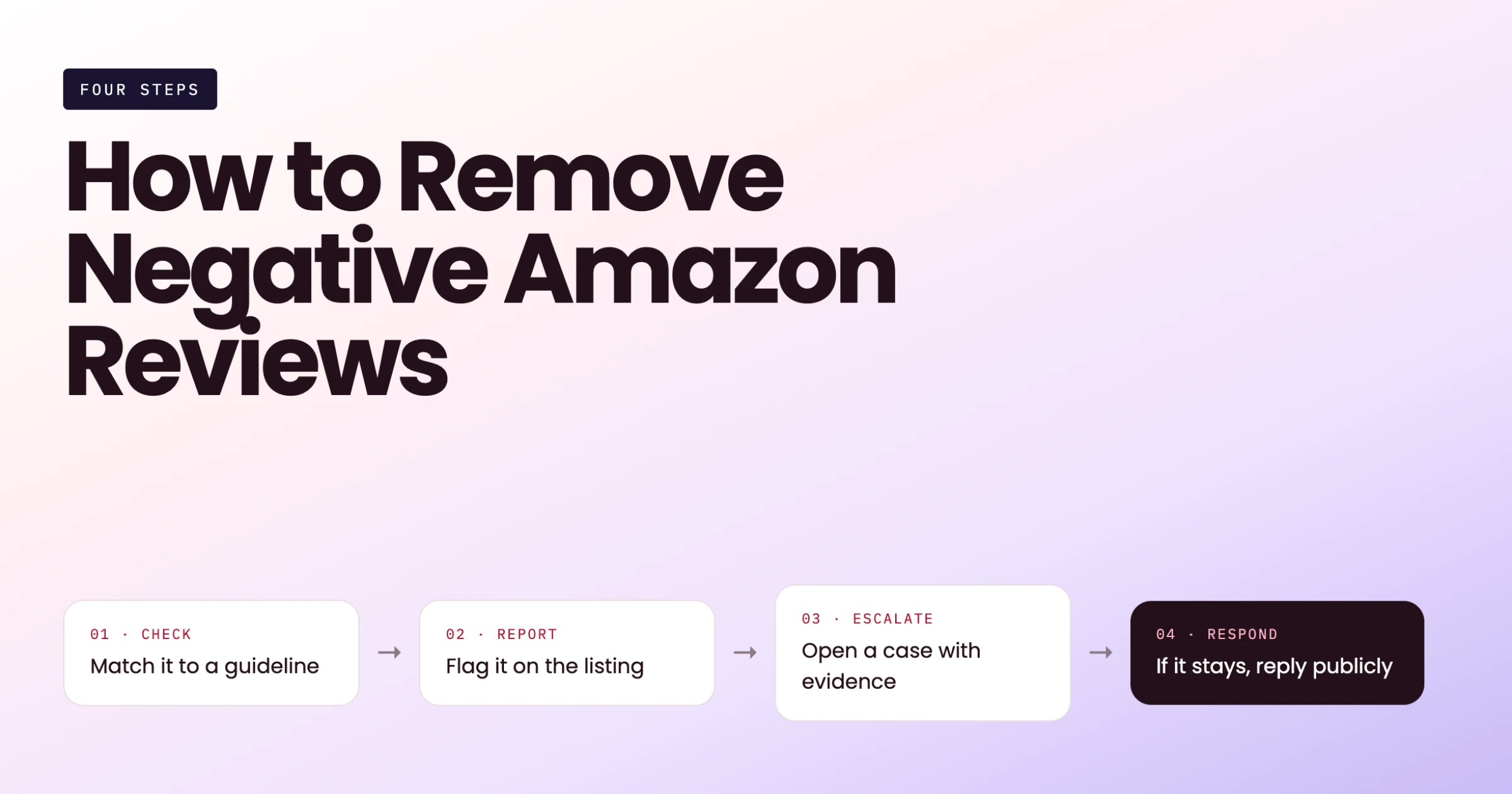
You can't remove negative Amazon reviews yourself: only Amazon can, and only when a review breaks its Community Guidelines. Report rule-breaking reviews through Report abuse or Brand Registry's Report a Violation, with clear evidence. Honest negative reviews stay up, so fix the cause and earn newer, compliant reviews to rebalance your star rating over time.
If you want to remove negative Amazon reviews, start with one hard truth: you never delete anything yourself. Only Amazon removes reviews, and it does so when a review breaks its rules, not when a review feels unfair. That still leaves you a lot of room. Plenty of one-star reviews on amazon.com and amazon.co.uk are about couriers, the seller, a different product or a competitor's agenda, and those can be reported.
This guide is written for brand owners and sellers who want to do this properly. We'll cover which reviews qualify, how to report them through the product page, Brand Registry and Seller Support, what evidence to attach, and how seller feedback differs from product reviews.
We'll also be blunt about the risky side. Some "removal services" use tactics that can get your account suspended and, in the US and UK, break consumer law.
Can you remove negative Amazon reviews?
Yes, but only in a narrow sense. You can ask Amazon to take down a review that breaks its rules. You can't remove negative Amazon reviews simply because they hurt sales, and you can't pay, persuade or pressure a buyer into deleting one.
The short answer: only Amazon removes reviews
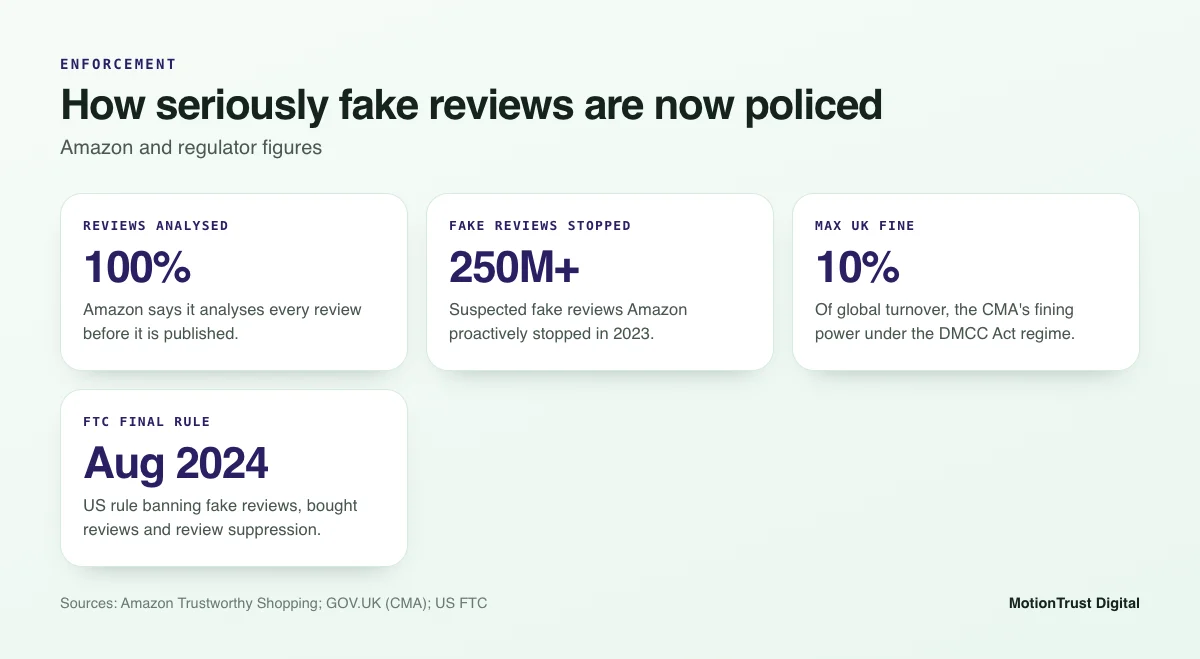
Amazon says it analyses 100% of reviews before they are published, using machine learning models alongside human investigators. Reviews that look suspicious are blocked before customers see them. Once a review is live, the main way to get it reviewed again is a report.
That report goes to Amazon. Amazon checks it against its Community Guidelines and decides. A seller, an agency or a software tool has no button that deletes a review, whatever their sales page claims.
Removal is for rule-breaking reviews, not unfair ones
This is where most sellers get frustrated. A buyer might misuse your product, ignore the size guide or compare it with something twice the price. The review can feel wrong. But if it is an honest account of their experience and it follows the guidelines, Amazon will keep it.
So when you try to remove negative Amazon reviews, the question is never "Is this review fair?" It is "Does this review break a specific rule?" If you can point to the rule, you have a case.
Product reviews, seller feedback and Q&A are different things
Sellers often mix these up, and each one has its own process:
| Type | What it rates | Where it shows | How to challenge it |
|---|---|---|---|
| Product review | The product itself | The product detail page, shared by every seller on that ASIN | Report abuse, or Report a Violation in Brand Registry |
| Seller feedback | Your service as a seller: shipping, packaging, communication | Your seller profile and Feedback Manager | Removal request in Feedback Manager, then Seller Support |
| Customer questions and answers | Answers to shopper questions | The Q&A area of the listing, where shown | Report the answer from the listing |
Which negative reviews break Amazon's rules?
Amazon's Community Guidelines set out what customers may and may not post. The wording is updated from time to time, so check the current version on your marketplace before you quote it in a report. The categories below are the ones that come up most often for sellers.
Seller, delivery or pricing feedback in a product review
Product reviews are meant to describe the product. Comments about a late parcel, a rude courier, a damaged box or your returns process belong in seller feedback, not on the product page. The same goes for reviews that only complain about the price or about the seller rather than the item.
Many of these reviews mix product and delivery comments. "Arrived late and the handle snapped on day two" is partly about the product, so expect Amazon to keep it. A review that is entirely about shipping has a much stronger case.
Offensive, personal or promotional content
Amazon does not allow reviews with obscene or hateful language, harassment, threats or personal information such as phone numbers, email addresses or a named employee. It also does not allow promotional content, such as links to other websites, adverts for a competing product or requests to contact the reviewer elsewhere.
Conflicts of interest and competitor sabotage
People with a financial or personal interest in a product may not review it. That includes competitors writing negative reviews about you, and family, friends or staff writing positive reviews for themselves. Amazon's guidelines also ban reviews that were paid for or given in exchange for something, outside its own Amazon Vine programme.
Fake negative reviews from a competitor are one of the hardest cases to prove. You rarely know who wrote a review. What you can show is a pattern: several reviews with similar wording, timing that lines up with a competitor's launch, or reviews that name a rival brand as the better choice. We show what to collect in the evidence section.
Reviews for a different product (catalogue abuse and variation mismatch)
Sometimes a negative review is genuinely about another product. That can happen innocently, for example when variations are merged and reviews of one colour or size sit on a listing they don't describe. It can also be deliberate.
The UK's Competition and Markets Authority highlighted catalogue abuse in undertakings Amazon gave in June 2025. The CMA described it as hijacking the reviews of a well-performing product and moving them onto a different product. Amazon committed to better detection, sanctions on businesses that do this and easy reporting routes for consumers and businesses.
If you spot reviews on your ASIN that clearly describe another item, or a variation family that has been merged with an unrelated product, report it. Brand owners can also raise the catalogue issue itself through Brand Registry.
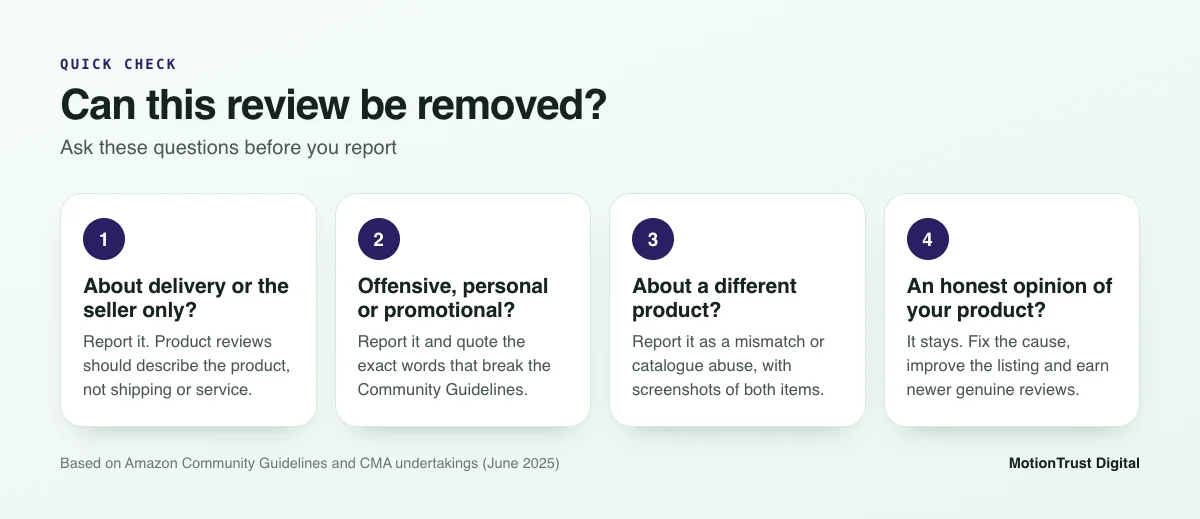
Before you report anything, run each review through a quick check like the one below. It keeps your reports focused on cases Amazon can act on.
Which negative reviews will Amazon not remove?
Knowing what will be refused saves you hours of reports that go nowhere.
Honest but harsh opinions
"Cheap plastic, not worth $30." "Smells odd, sent it back." "Smaller than I expected." These are opinions based on experience. They can be blunt, even rude in tone, and still be within the rules. Amazon will not take them down because you disagree.
Reviews you believe are wrong about the product
A buyer may say your blender can't crush ice when it can, or that a cable is not compatible when the listing says it is. Factual errors in an honest review are not normally a guideline breach. The fix is in your listing: clearer images, a compatibility chart or a short "how to use" section in the description or A+ content.
Old reviews about a product you have since improved
If you changed supplier or redesigned a part, older reviews about the old version usually stay. That feels harsh, but there is good news. Amazon says it uses advanced models to calculate star ratings, not a simple average. Newer reviews carry more weight than older ones, and reviews from verified purchases carry more weight too.
In practice, that means a better product plus a steady flow of genuine reviews moves your rating, even when the old complaints remain on the page. You can model how many reviews it takes with a simple calculator.
Free tool: Amazon review calculator
See how many reviews it takes to lift your rating
If an honest review is staying put, work out how many new ratings you need to reach your target. It takes a minute and needs no sign-up.
Open the review calculatorHow to report and remove negative Amazon reviews step by step
There are three routes. Which one you use depends on whether you own the brand, how serious the problem is and whether it involves one review or a pattern. In each case you are asking Amazon to decide. You are not removing the review yourself.
Report abuse from the product page
This is the quickest route and works for anyone, including resellers without Brand Registry:
- Open the product detail page on the marketplace where the review appears, for example amazon.com or amazon.co.uk.
- Find the review and click Report (some layouts show it as Report abuse).
- Choose the reason that matches the guideline breach as closely as possible.
- Submit, and note the date, the reviewer name and the first line of the review in your tracking sheet.
Amazon's own pages describe the Report abuse link as the way customers flag reviews. It gives you no space for evidence, so it suits clear-cut cases such as profanity, personal information or a review that is only about delivery.
Report a Violation in Brand Registry
If your brand is enrolled in Brand Registry, use Report a Violation. In July 2026 Amazon described it as one guided experience for intellectual property infringement, store policy violations and regulatory compliance concerns. Any Brand Registry user of an enrolled brand can report store policy violations, and a Submission History tab shows the status and outcome of each report.
Amazon doesn't list reviews as a separate named category in that announcement, so pick the store policy option that best fits your case and explain it clearly. This route lets you add context and evidence, which matters for catalogue abuse, suspected competitor reviews and patterns across several reviews. The menus can differ by marketplace, so check the options in your own account.
A note on an older tactic: the Brand Registry option to start a customer contact from a critical review has been removed. Amazon said the change was made to align with its communication policies. Some guides still recommend it, so ignore that advice.
When to use Seller Support
Seller Support in Seller Central is useful when you aren't brand registered, when a reported review is still live after a reasonable wait, or when the issue is really a catalogue problem, such as merged variations. Open a case under the help section, give the ASIN and the review details, and explain which rule is broken.
Support may point you back to Report abuse for simple review cases. Keep the case number in case you escalate later.
Writing a report Amazon can act on
Amazon's teams look at a huge number of reports. A good one is short, specific and tied to a rule. Use this structure:
- What: the ASIN, marketplace, reviewer name, review date and the first line of the review.
- Which rule: name the guideline category, such as "comments about the seller and delivery only" or "review describes a different product".
- Evidence: quote the sentence that breaks the rule and attach screenshots or order data where relevant.
- Ask: request that Amazon reviews the content against its Community Guidelines.
Keep the tone neutral. Don't claim a review is fake just because it's negative. Accusing a genuine customer of lying weakens your report and, in the US, the FTC treats unfounded accusations used to suppress reviews as a problem in its own right.
What evidence should you include in a review report?
Evidence is what helps you remove negative Amazon reviews that genuinely break the rules. The right evidence depends on the breach, so collect it before you report.
Evidence checklist by violation type
| Violation type | What to collect | What to say in the report |
|---|---|---|
| Seller or delivery comments only | Screenshot of the review; order ID if you can match it; tracking showing a carrier issue | The review describes delivery or the seller, not the product |
| Offensive or personal content | Screenshot with the offending text highlighted | Quote the exact words and name the rule |
| Promotional content or links | Screenshot showing the link, brand name or contact details | The review promotes another product or site |
| Different product or merged variation | Screenshots of the review and your listing; images or specs that show the mismatch; variation history if you have it | The review describes an item that isn't sold on this ASIN |
| Suspected competitor or coordinated reviews | Dates, wording overlaps, reviewer profile patterns, any mention of a rival brand | Describe the pattern factually and ask Amazon to investigate |
Order and ASIN details
Always give the ASIN, the marketplace and the review date. If the review mentions a detail you can tie to an order, such as a delivery date or a specific complaint you handled, include the order ID. If there's no matching order at all and the review is not marked as a Verified Purchase, say so plainly.
Patterns that suggest coordinated abuse
One odd review is easy to dismiss. Five with the same structure are harder to ignore. Look for:
- Several one-star reviews posted within a short window, with no matching rise in returns or complaints.
- Repeated phrases, the same unusual spelling or the same photo across reviews.
- Reviews that recommend a specific competing brand by name.
- A sudden drop in rating straight after a competitor launches or after you win the Buy Box.
Write these up as observations, not accusations. Amazon has data you can't see, such as account links and purchase history. Your job is to point it in the right direction.
Amazon review management
Let us monitor and report review abuse for you
We track new reviews across your ASINs, file evidence-based reports for the ones that break the rules and flag product issues behind the honest ones.
See how review management worksHow to remove negative seller feedback (a different process)
Seller feedback rates you, not the product. It affects your Order Defect Rate and how buyers see your storefront, so it's worth managing closely. The process is separate from the one you use to remove negative Amazon reviews on a product page.
Feedback Manager removal requests
In Seller Central, go to Performance and then Feedback to open Feedback Manager. Find the rating and choose the option to request removal. Amazon reviews the request against its feedback policy. Feedback is typically eligible for removal when it:
- contains obscene or abusive language;
- includes personal information about you or your staff;
- is entirely a product review rather than a comment on your service.
That last point is the mirror image of product reviews. A product complaint in seller feedback can often be removed, just as a delivery complaint in a product review can be reported. If an automated request is declined but you believe it qualifies, open a Seller Support case with the order ID and a short explanation.
If you want to reply publicly or resolve the buyer's issue, our guide on how to respond to negative Amazon reviews covers what you can and can't say.
When Amazon strikes through FBA fulfilment feedback
If the order was Fulfilled by Amazon and the complaint is about delivery or fulfilment, Amazon generally takes responsibility. Instead of deleting the feedback, it usually leaves the text visible with a strike-through and a note that Amazon fulfilled the order. Struck-through feedback should not count against your seller metrics.
How long does Amazon take to remove a review?
Sellers who try to remove negative Amazon reviews ask this more than anything else. There's no fixed answer, so be wary of anyone who gives you one.
Why there is no published timeline
Amazon doesn't publish a service level for review reports. Some guides quote a set number of days or a success rate. We haven't seen an official Amazon source for those figures, so we won't repeat them. In our experience, simple cases can be handled fairly quickly, while patterns and catalogue issues take longer because they need investigation.
Brand Registry's Submission History shows where a report stands. With Report abuse, you usually just check whether the review is still there.
How to follow up without spamming reports
Reporting the same review again and again doesn't help and can bury your useful reports. A calmer approach works better:
- Log every report with the date, route and case or submission number.
- Wait a sensible period, such as one to two weeks, before following up. This is our working habit, not an Amazon rule.
- If the review is still live and you're sure it breaks a rule, escalate once through a different route with stronger evidence. For example, move from Report abuse to Report a Violation.
- If Amazon declines with a clear reason, accept it and move on to the recovery steps below.
Are review removal services legal in the US and UK?
Some are fine. Some are not. The difference is what they actually do. A service that monitors reviews and files honest, evidence-based reports is doing what you could do yourself. A service that promises to remove negative Amazon reviews by contacting, paying or pressuring buyers is a different story.
US: the FTC rule on fake reviews and review suppression
In August 2024 the US Federal Trade Commission announced a final rule banning fake reviews and testimonials. Among other things, it bans buying positive or negative reviews, certain insider reviews, and review suppression through unfounded legal threats, intimidation or false accusations. The rule allows civil penalties against people who knowingly break it.
That matters for removal. Threatening a reviewer, or accusing them of fraud without grounds to get a review taken down, can fall under review suppression. Amazon's own rules go further than the FTC: it bans any compensation for reviews outside Vine, whatever the sentiment.
UK: DMCC Act banned practices and CMA fines
In the UK, the Digital Markets, Competition and Consumers Act 2024 brought in a new consumer protection regime from April 2025. The CMA says the Act includes an explicit ban on posting and commissioning fake reviews, and it can now fine businesses up to 10% of global turnover for consumer law breaches.
The CMA's fake reviews guidance also treats presenting reviews in a misleading way as a banned practice. If a service manipulates which reviews shoppers see, it carries real risk for any UK seller who hires it. Our guide to Amazon review rules in the UK goes into more detail.
Amazon's own enforcement against review abuse
Amazon says it proactively stopped more than 250 million suspected fake reviews in 2023. Its enforcement can include revoking review permissions, suspending selling privileges, withholding payments and taking legal action. In the CMA undertakings, Amazon also committed to sanctions against businesses that manipulate reviews, including selling bans.
The risk of a dodgy service sits with your account, not the service. Watch for these red flags:
- A guaranteed number of removals, or "pay per review removed" pricing.
- Any mention of contacting reviewers outside Amazon, finding their identity or offering them refunds or gifts.
- Claims of "inside contacts" at Amazon.
- Requests for your Seller Central login rather than proper user permissions.
- Vague answers when you ask exactly how reviews get removed.
If you're unsure whether a past tactic or a supplier's approach is safe, run it through our free Amazon review compliance checker before you go any further.
The figures below show how seriously Amazon and regulators now treat review manipulation.
What to do when a negative review stays up
Most negative reviews are honest. When you can't remove negative Amazon reviews, make them matter less: fix the cause and earn more genuine reviews.
Fix the root cause and update the listing
Read your one- to three-star reviews together, not one by one. Group them by theme: size, durability, missing parts, instructions, expectations. Then cross-check with your return reasons in Seller Central. If the same complaint shows up in both, it's a product or listing problem, not a review problem.
Say your $24.99 water bottle keeps getting reviews about leaks. Before reporting anything, check whether the lid design or the seal supplier changed. If buyers say a jacket "runs small", add a size chart image and a line in the bullets. Small listing fixes often stop the next ten reviews saying the same thing.
Respond within the rules
Where a customer contacts you first through Buyer-Seller Messages, help them fully: a replacement, a refund or clear instructions. Do not ask them to change or delete their review, and never link a refund to a review. Under the FTC rule you may contact customers to resolve problems, but Amazon's own policies are stricter about review requests.
Grow compliant review volume to rebalance
The healthiest way to dilute an unfair-feeling review is more honest ones. Use the Request a Review button in Seller Central or an automated tool that sends Amazon's standard request. Don't filter requests so only happy buyers get them. For new products, Amazon Vine can help; see whether Amazon Vine is worth it for your margins.
For a full list of safe methods, read our guide to getting Amazon reviews compliantly.
Track the rating as newer reviews weigh more
Because newer reviews count for more, your rating should start to reflect a better product over time. Track it monthly, alongside return rate and conversion rate, so you can tell whether a fix is working. Our guide on how to improve your Amazon star rating covers this in detail.
Example: a product sits at 3.9 stars after a bad batch. You fix the supplier issue and keep sending standard review requests. Over the following months, newer, higher ratings carry more weight and the average moves up, even with the old one-star reviews still visible.
Do you need an agency to handle review removal?
Not always. If you sell a handful of ASINs and get the odd rule-breaking review, the steps above are enough. You don't need anyone to remove negative Amazon reviews for you; you need a clear process and some patience.
An agency earns its fee when the volume or the risk goes up. That might be dozens of ASINs across amazon.com, amazon.co.uk and EU stores, a suspected competitor attack, catalogue abuse on your best seller, or a rating slide you can't explain. A good partner should:
- be clear that only Amazon decides what comes down;
- file reports through Amazon's own routes, with evidence;
- spot the product and listing issues behind honest reviews;
- keep every review request and buyer message within Amazon policy, the FTC rule and the DMCC Act.
If review problems have already led to a warning or a suspension, act fast. Our Amazon account reinstatement team can help you write a plan of action, and our article on an Amazon account suspended in the UK explains the first steps.
Amazon reputation management
Protect your rating without risking your account
We combine review monitoring, abuse reporting and listing fixes into one plan, all within Amazon's rules. Tell us about your brand and we'll show you where to start.
Talk to our reputation teamFrequently asked questions
Can a seller remove a negative review on Amazon?
No. Sellers can't delete product reviews; only Amazon can. What you can do is report a review that breaks Amazon's Community Guidelines, for example one that only talks about delivery, contains offensive language or describes a different product. Amazon then decides whether it comes down. Honest negative opinions about your product stay, however harsh they feel.
How do I report a fake negative review from a competitor?
Collect evidence first: dates, repeated wording, mentions of a rival brand and any pattern across reviews. If you're brand registered, use Report a Violation and choose the store policy option that fits, explaining the pattern factually. Otherwise, use Report abuse and, if needed, a Seller Support case. Describe what you see without accusing anyone you can't identify.
How long does Amazon take to remove a reported review?
Amazon doesn't publish a timeline for review reports, so treat any fixed figure with caution. Clear-cut cases can be handled quickly, while patterns or catalogue abuse need investigation and take longer. Brand Registry's Submission History shows the status of reports filed there. Wait a sensible period before escalating once, rather than reporting the same review repeatedly.
Can I pay someone to remove Amazon reviews?
You can pay an agency to monitor reviews and file evidence-based reports through Amazon's own tools. You should never pay a service that contacts reviewers, offers them refunds or gifts, or claims inside access to delete reviews. Those tactics can breach Amazon policy and, in the US and UK, consumer law on review suppression and misleading reviews.
What is the difference between removing seller feedback and product reviews?
Seller feedback rates your service and is managed in Feedback Manager under Performance in Seller Central, where you can request removal of abusive, personal or product-only comments. Product reviews rate the item and are reported through Report abuse or Brand Registry. For FBA orders, Amazon usually strikes through fulfilment-related feedback rather than deleting it.
What happens if Amazon refuses to remove a review?
Accept the decision unless you have new, stronger evidence, in which case escalate once through a different route. Then focus on recovery: fix the product or listing issue behind the complaint, keep sending standard review requests to all buyers, and track your rating. Newer reviews carry more weight, so improvements show up over time.
Is it illegal to buy review removal services in the UK?
Hiring a firm to file honest reports is lawful. But the DMCC Act bans commissioning fake reviews and presenting reviews in a misleading way, and the CMA can fine businesses up to 10% of global turnover. A service that manipulates which reviews shoppers see, or pressures buyers, could put both you and your Amazon account at serious risk.
Sources
- Amazon — How Amazon maintains a trusted review experience
- About Amazon — How Amazon customer reviews and star ratings work
- Sell on Amazon — Report brand violations faster with one guided experience
- Competition and Markets Authority — Amazon gives undertakings to CMA to curb fake reviews
- Competition and Markets Authority — New consumer protection regime comes into force
- US Federal Trade Commission — Final rule banning fake reviews and testimonials
Monjur Hossain
Founder & Amazon Strategy Lead, MotionTrust Digital
Monjur incorporated MotionTrust Digital in September 2022 and leads Amazon strategy across the client base. Eight years in e-commerce and marketplace marketing, now on Amazon only — keyword strategy, listing architecture and advertising structure for growing brands.
MonjurAgencyTry the free tools
Seven Amazon tools that run in your browser — profit and ACoS calculator, PPC auditor, listing checker and more. No account, nothing uploaded.
Try the free toolsLast reviewed . We update articles in place rather than republishing at a new URL, so the link you have keeps working.
Keep your ACoS target working for you
Break-even ACoS is the starting point. One email a week with our newest PPC articles on targets, bids and wasted spend, plus listings and SEO if you want them. Email us to join.