
Amazon Negative Keywords: A Practical Guide to Cutting Wasted Ad Spend
 By Monjur HossainFounder & Amazon Strategy Lead
·
Published
·
Last reviewed
·19 min read
By Monjur HossainFounder & Amazon Strategy Lead
·
Published
·
Last reviewed
·19 min read

Amazon negative keywords tell your ads which shopper searches to skip, so you stop paying for clicks that will never turn into orders. Amazon offers two types, negative exact and negative phrase, set at campaign or ad group level. Add them once a term has enough data and has spent more than one order is worth to you.
Amazon negative keywords are the cheapest fix in most ad accounts. Every week, sellers pay for clicks from shoppers who were never going to buy: someone searching "plastic chopping board" when you sell bamboo, or "free" anything. Negatives tell Amazon to stop showing your ads on those searches. Done well, they cut wasted spend without touching the traffic that sells.
Done badly, they quietly choke your campaigns. Most guides stop at "find bad terms and block them". This one gives you a decision rule tied to your own margins, a way to use negatives to stop your own campaigns competing, and a list of things you should never negate. We use these exact steps when we take over an account.
What are Amazon negative keywords?
A negative keyword is a word or phrase you add to a campaign or ad group to exclude it. When a shopper's search matches that negative, your ad in that campaign or ad group is not eligible to show. You do not pay for the impression or the click, because neither happens.
Positive keywords say "show my ad here". Negatives say "but not here". They work together. A broad match keyword like "cutting board" can match hundreds of searches, and negatives trim the ones that do not fit your product. Amazon's keyword targeting guide confirms negatives can be set at campaign or ad group level.
How negatives work in Sponsored Products and Sponsored Brands
In Sponsored Products, you can add negative keywords to both automatic and manual campaigns. That matters, because auto campaigns are where most irrelevant searches creep in. You cannot choose the keywords in an auto campaign, but you can exclude them.
Sponsored Brands campaigns accept negative keywords too, and they are easy to forget. Headline and video ads often run on broad match keywords with bigger budgets, so a stray term can burn money fast. If you only clean up Sponsored Products, you have done half the job. Our guide to Amazon ad types compared covers how each format targets shoppers.
Amazon negative keywords vs negative product targeting
Negative keywords exclude searches. Negative product targeting excludes placements: specific ASINs or whole brands whose detail pages you do not want your ad on. Amazon's Sponsored Products best practices describe using negative products and brands to keep ads off pages that do not meet your goals.
You need both. An auto campaign using the substitutes or complements groups will place your ad on other product pages. If one competitor's page eats budget and never converts, a negative keyword will not stop it. A negative ASIN will.
One thing negatives do not do: they do not change your organic ranking directly. They only control where your ads appear. The indirect effect is through sales. If you negate a term that was driving ad sales, you lose that sales velocity, and organic rank for that term can soften over time.
Negative exact vs negative phrase: which should you use?
Amazon gives you two negative match types: negative exact and negative phrase. Amazon's guide to targeting with Sponsored Products lists only these two. Picking the right one is the difference between a surgical cut and an accidental block on half your traffic.
Negative exact explained with examples
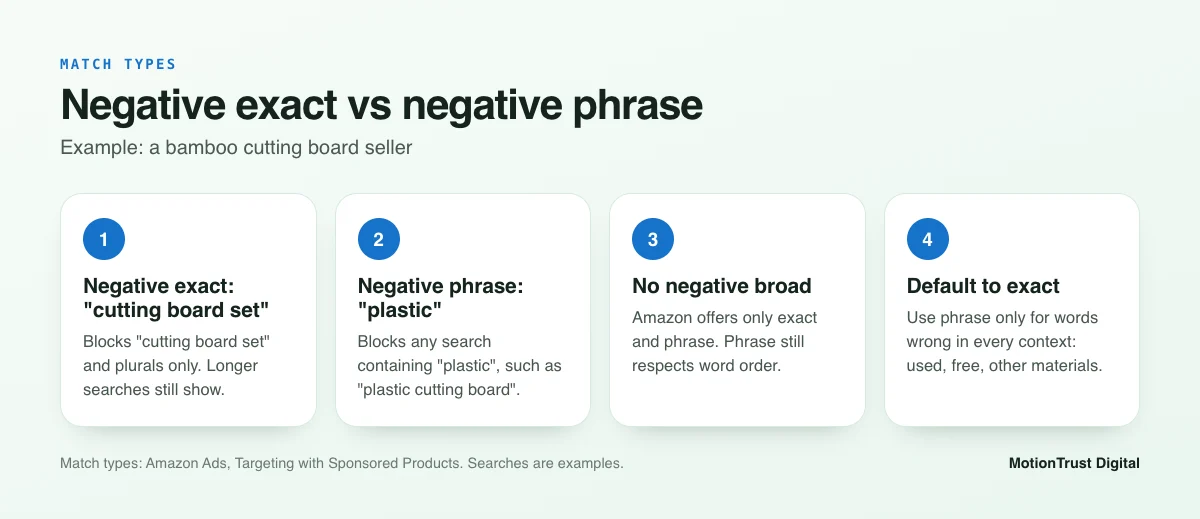
Negative exact blocks a search only when it matches your negative term exactly, along with very close variants such as plurals. Anything with extra words still gets through.
Say you sell a single bamboo cutting board and you do not sell sets. You add "cutting board set" as negative exact. Your ad stops showing for "cutting board set" and "cutting board sets". It can still show for "bamboo cutting board set with juice groove", because that search contains extra words. That is precise, and low risk.
Negative phrase explained with examples
Negative phrase blocks any search that contains your phrase, in that word order, with anything before or after it. It is much wider.
Same bamboo board. You add "plastic" as negative phrase. Now your ad is blocked on "plastic cutting board", "plastic chopping board large" and "cutting board plastic dishwasher safe". That is exactly what you want, because no one searching for plastic is buying bamboo. But a careless phrase like "board set" would also block "bamboo board set gift", which might be a buyer.
Here is how the two compare across a handful of example searches.
| Example search | Negative exact: "cutting board set" | Negative phrase: "plastic" |
|---|---|---|
| cutting board set | Blocked | Shows |
| cutting board sets | Blocked (plural variant) | Shows |
| bamboo cutting board set for kitchen | Shows | Shows |
| plastic cutting board | Shows | Blocked |
| cutting board plastic dishwasher safe | Shows | Blocked |
Why there is no negative broad on Amazon
Google Ads offers negative broad match. Amazon does not. If you come from Google, this catches people out: you cannot add one word and have it block every search containing that word in any order. Negative phrase is the closest you get, and it still respects word order.
Our rule of thumb: use negative exact by default. Use negative phrase only for words that are wrong in every context for that product, such as a material you do not use, a size you do not make, "used", "free" or "refurbished". Before adding any negative phrase, search your search term report for that word and check nothing that converts contains it.
Where do you find negative keyword candidates?
You do not guess Amazon negative keywords. You find them in your own data, then confirm them. Four sources cover nearly everything.
The search term report
This is your main source. Amazon's best practices guide explains that the search term report shows the shopping searches that led to at least one click on your ads. It shows the actual searches, not the keywords you bid on, so you see exactly what broad and phrase match keywords are pulling in.
Download it from the Reports section of the Amazon Ads console, or from Advertising > Campaign Manager in Seller Central. Sort by spend, then filter for zero orders. Our walkthrough of the Amazon search term report covers the columns and filters step by step.
Automatic campaign search terms
Auto campaigns find searches for you through four targeting groups: close match, loose match, substitutes and complements. Amazon lists these in its targeting guide. Loose match and complements tend to produce the most irrelevant terms, because they cast the widest net.
Amazon's keyword strategy advice suggests using the search term report from automatic campaigns to learn which terms perform, and considering which searches you do not want ads to show against. That second half is your negative list.
ASINs appearing in your search term report
In auto and product targeting campaigns, some rows in the search term report are ASINs rather than words. Those are product pages where your ad showed and got clicked. If an ASIN has taken real spend with no orders, it is a candidate for negative product targeting, not a negative keyword.
To understand why a rival page attracts your clicks but not your sales, look at its price, reviews and offer. Reverse ASIN research can also show which keywords that competitor ranks for, which often reveals searches you should exclude.
Brand Analytics Search Query Performance
If you are brand registered, the Search Query Performance dashboard in Brand Analytics shows searches customers used to find your brand, with query volume, impressions, clicks, cart adds and purchases. Amazon says it needs a Professional selling account and a Brand Representative role in Brand Registry.
It is useful for the opposite job too. Before you negate a term, check whether it shows purchases for your brand organically. If it does, think twice. Our Amazon keyword research guide explains how to read these numbers alongside your ad data.
Free PPC audit tool
Find the search terms wasting your budget
Upload your search term report and the tool flags high-spend, zero-order terms worth reviewing, so you start with the biggest leaks.
Run the free PPC auditHow many clicks before you add a negative keyword?
This is the question that matters most, and it is where most advice goes vague. Negate too early and you kill terms that would have converted with a little more data. Negate too late and you keep paying for dead clicks. You need a floor and a ceiling.
Amazon's 20-click guideline
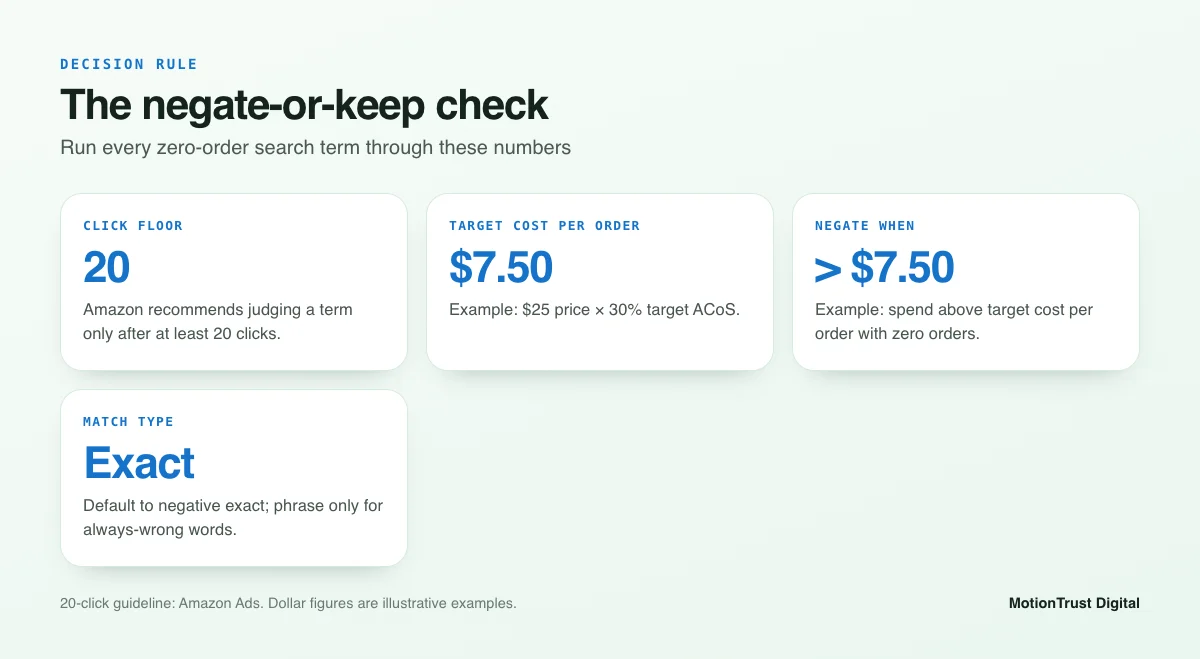
Amazon gives a clear floor. Its Sponsored Products targeting guide says: "Before deciding to add a keyword as a negative target, we recommend evaluating its performance after it has received at least 20 clicks."
Treat 20 clicks as the minimum, not an automatic trigger. A term with 20 clicks and no sales on a product that converts at 5% is unremarkable. On a product that normally converts at 20%, it is a strong signal. Your own conversion rate tells you how much patience a term deserves.
A spend-based rule using your break-even ACoS
Clicks ignore price. Twenty clicks on a $12 phone case and twenty clicks on a $180 coffee grinder are very different stakes. So add a spend rule tied to your economics.
- Work out your target ACoS. For profit, start from break-even ACoS: your margin before ad spend, as a percentage of price.
- Turn it into a target cost per order: selling price × target ACoS.
- Flag any term that has spent more than your target cost per order with zero orders, once it has at least 20 clicks.
- Flag terms that do convert, but at a cost per order well above target, for a bid cut rather than a negative.
If ACoS is new to you, our explainer on what ACoS is covers the maths, and the Amazon profit calculator will give you a break-even figure in a minute. For context on what is normal in different categories, see our ACoS and TACoS benchmarks.
Worked example
Here is an illustrative example, not real account data. You sell a bamboo cutting board for $25. Your margin before ads is 40%, so break-even ACoS is 40%. You want profit, so your target ACoS is 30%.
Target cost per order = $25 × 30% = $7.50. Now look at three search terms from the last 30 days.
| Search term (example) | Clicks | Spend | Orders | Decision |
|---|---|---|---|---|
| plastic cutting board | 24 | $19.20 | 0 | Negate (phrase: "plastic") |
| large wooden chopping board | 22 | $11.00 | 0 | Negate (exact) after checking relevance |
| bamboo board for meat | 9 | $6.30 | 0 | Keep: too little data |
| cutting board with handle | 31 | $24.80 | 2 | Keep, lower the bid ($12.40 per order) |
The first two have passed 20 clicks and spent more than $7.50 with no order. The third is under both thresholds, so it waits. The fourth converts, just too expensively, so the fix is a bid change, not a block. Negatives are for terms that do not sell. Bids are for terms that sell at the wrong price.
How to add Amazon negative keywords
The Amazon Ads console and Seller Central both lead to Campaign Manager. Menu labels shift from time to time, so look for the tab names below rather than exact button positions.
Adding negatives at campaign level
- Open Campaign Manager and click into the campaign.
- Find the Negative keywords tab (in Sponsored Products it sits under the campaign's targeting settings).
- Click Add negative keywords, choose negative exact or negative phrase, and paste your terms, one per line.
- Save, then spot-check the list to make sure the match type is what you meant.
You can also add negatives while building a new campaign, in the Negative keyword targeting section. For an auto campaign, this is a good moment to block words you already know are wrong, like "used" or a material you do not sell.
Adding negatives at ad group level
Click into the ad group instead of the campaign and open its Negative keywords tab. The steps are the same. The difference is scope: the negative only applies to that ad group, so other ad groups in the same campaign can still show for the term.
Bulk operations for large accounts
Once you manage more than a handful of campaigns, adding negatives by hand is slow and error-prone. Bulk operations let you download a spreadsheet of your campaigns, add rows for negative keywords with the right campaign, ad group and match type, and upload them in one go.
Download a fresh bulk file before each upload, so you work from current IDs. Keep the edit file small and focused, and check the upload results for rejected rows. A typo in the match type column is the most common cause of errors.
Campaign-level or ad group-level negatives?
Both levels block traffic. The question is how wide you want the block to be.
When campaign level is right
Use campaign-level negatives for terms that are wrong for every product in the campaign. Words like "free", "used", "repair", "DIY" or a material none of your products use belong here. One entry covers every ad group, so there is less to maintain.
When ad group level is safer
Use ad group negatives when a term is wrong for one product but right for another in the same campaign. If one ad group sells a small board and another sells a large one, "large" is a negative for the first and a buyer term for the second. Amazon's best practices recommend separate campaigns or ad groups for each product group, which makes this much easier.
| Campaign-level negative | Ad group-level negative | |
|---|---|---|
| Scope | Every ad group in the campaign | One ad group only |
| Best for | Terms irrelevant to all products | Terms wrong for one product, right for another |
| Examples | free, used, refurbished, wholesale | "large" in a small-board ad group |
| Maintenance | One list per campaign | One list per ad group |
| Risk | Blocking a term another product needs | Missing the term in a new ad group |
Building an Amazon negative keywords funnel across campaigns
Most sellers think of negatives as a junk filter. The bigger win is using them to direct traffic between your own campaigns. Without this, your auto, broad and exact campaigns all bid on the same search, and you lose control of which bid and which ad wins.
Auto to broad to exact: isolating winners
Amazon's keyword targeting guide recommends starting with broader match types to discover search terms, then adding high-performing queries as exact match keywords. Its common mistakes article also flags mixing and misusing match types as a frequent problem.
The funnel works like this:
- Discover. Auto and broad campaigns find new searches at modest bids.
- Harvest. When a search converts at or below your target cost per order, add it as an exact match keyword in a dedicated exact campaign with its own bid.
- Isolate. Add that same search as negative exact in the auto and broad campaigns it came from.
- Repeat. Discovery campaigns keep looking for new terms instead of re-spending on ones you already own.
Step 3 is the one people skip. Without it, the auto campaign keeps bidding on your best term, often at a bid you did not set for it. Use negative exact, not phrase, for isolation. Negative phrase would also block longer variants your discovery campaigns should still find. More on layouts in our guide to Amazon PPC campaign structure.
Separating branded and non-branded traffic
Searches for your own brand convert well and cheaply, because the shopper already wants you. If they run inside your generic campaigns, they flatter the ACoS and hide how your non-branded keywords really perform.
Run a separate branded campaign. Then add your brand name as negative phrase in your generic campaigns, so branded searches go to the branded campaign. Two checks first: make sure the branded campaign is live and funded, and make sure your brand name is not a common word. If your brand is "Oak", negating "oak" would block "oak cutting board".
Negative product targeting for ASIN campaigns
The same funnel applies to product targeting. If an ASIN converts well from your auto campaign, target it in a manual product targeting campaign and add it as a negative product in the auto campaign. If you sell several variations, consider negating your own ASINs in campaigns where showing on your own page only moves a sale from one listing to another.
Amazon PPC management
Want your campaign funnel built for you?
We set up discovery, harvest and isolation across Sponsored Products and Sponsored Brands, then maintain the negatives every week.
See how our PPC management worksWhat should you never add as a negative keyword?
Here is the part most guides skip. Amazon negative keywords remove traffic for good, until someone takes them off. Over-negation starves campaigns slowly, and because blocked searches never appear in reports, you rarely notice. These are the terms to leave alone.
Converting misspellings and variants
Shoppers misspell. "Cuting board" or "bambo board" can convert as well as the correct spelling. If the search term report shows orders on a misspelling, keep it. The same goes for regional vocabulary. A shopper on amazon.co.uk may search "chopping board" or "colour", while one on amazon.com searches "cutting board" or "color".
If you sell in more than one marketplace, build negatives per marketplace. A term that is junk in the US can be a buyer term in the UK. "Trainers" means sports shoes in the UK and something else entirely to many US shoppers.
Terms with too little data
A term with eight clicks and no orders has not failed. It has not been tested. Unless it is plainly irrelevant, like "plastic" for a bamboo product, wait for Amazon's 20-click minimum and your spend threshold. During a launch, give terms more room, as new listings with few reviews usually convert below their long-run rate.
Seasonal terms out of season
"Christmas gift for dad" will look awful in March. It has spent a little, sold nothing, and has clicks. Negate it and you will have to remember to remove it by October. Lower the bid or pause the keyword in the off-season instead. Negatives are for terms that are permanently wrong, not temporarily quiet.
Your own best organic terms
Some searches convert poorly in ads but well organically, or the reverse. Before negating a high-volume category term, check Search Query Performance or your Business Reports. If the term drives organic sales, the ad clicks may be supporting the sales history behind your rank. Consider a lower bid rather than a block, then watch what happens.
Common mistakes with negative keywords (and how to audit your list)
Amazon's own list of common sponsored ads mistakes includes misusing match types and misaligned keywords, with the advice to review search term reports for impressions with poor click-through rate. Here is how those show up with negatives.
Negating too early
Weekly checks are good. Acting on every zero-order term each week is not. Check each candidate against the 20-click floor and your spend threshold before it goes on the list.
Using phrase where exact was needed
A seller negates "board" as phrase to stop "board game" searches. They have now blocked "cutting board" too. Always ask what else contains the phrase. If you cannot be sure, use negative exact on the specific searches.
Forgetting Sponsored Brands
Sponsored Brands keeps its own negative lists. A term you blocked in Sponsored Products can still spend in a headline or video campaign. When you add a campaign-level negative to Sponsored Products, check whether the same term needs blocking in Sponsored Brands.
Never reviewing old negatives
Negatives pile up. Products change, you add a large size, you launch in a new colour, and an old negative now blocks a buyer term. Once a quarter, export your negative lists and read them against your current catalogue.
- Remove negatives that block words now in your titles or variations.
- Remove seasonal negatives that should have been bid changes.
- Convert risky negative phrases to negative exact where only one search was the problem.
- Check for brand names in generic campaigns that no longer have a branded campaign behind them.
A weekly Amazon negative keywords routine
Little and often beats a big clean-up every six months. A steady weekly habit keeps wasted spend low without over-cutting. For most accounts, this takes about 30 minutes.
Your 30-minute weekly checklist
- Download the Sponsored Products and Sponsored Brands search term reports for the last 30 days.
- Filter to zero orders and sort by spend, highest first.
- Mark anything plainly irrelevant for a negative now, whatever the click count.
- For the rest, apply the 20-click floor and your target cost per order.
- Choose negative exact by default, and phrase only for words wrong in every context.
- Decide the level: campaign if wrong for all products, ad group if wrong for one.
- Harvest converting terms to exact campaigns and negate them as exact in their source campaigns.
- Review ASIN rows for negative product targets.
- Log what you negated and why, with the date, so the quarterly review is easy.
Run the routine separately for each marketplace. Spelling and vocabulary differ between amazon.com and amazon.co.uk, and between English and non-English stores, so a single shared list will be wrong somewhere.
Give changes time. Amazon's keyword strategy advice notes that sellers who ran a Sponsored Products campaign continuously for a year saw on average 11.2% higher ROAS than in that campaign's first month. Consistency pays, so avoid tearing a campaign apart every week.
When to bring in an agency
The routine above works well for a handful of products. It gets harder with dozens of ASINs, several marketplaces and a mix of ad types. If the search term review is taking hours, or you are unsure whether negatives are blocking good traffic, a second pair of eyes helps. You can see what our help costs on our agency pricing page.
Free Amazon account audit
Get a second opinion on your negatives
We review your search terms, negative lists and campaign structure, and send you a plain list of what to fix first.
Request your free account auditFrequently asked questions
What are negative keywords on Amazon?
Amazon negative keywords are words or phrases you add to an ad campaign or ad group so your ads do not show when a shopper's search matches them. They work in Sponsored Products and Sponsored Brands, in both automatic and manual campaigns. They save money by stopping clicks from shoppers looking for something you do not sell, and they only affect ads, not your organic listing.
What is the difference between negative exact and negative phrase match?
Negative exact blocks only the exact search, plus close variants such as plurals. Negative phrase blocks any search that contains the phrase in the same word order, with other words around it. Exact is precise and low risk. Phrase is wider and useful for words that are wrong in every context, such as a material you do not use. When in doubt, choose exact.
Is there a negative broad match on Amazon?
No. Amazon advertising only offers negative exact and negative phrase. Unlike Google Ads, you cannot block every search containing certain words in any order. Negative phrase is the closest option, but it still respects word order. To block a word wherever it appears, add it as negative phrase on its own, after checking it is not inside any converting search terms.
How many clicks before adding a negative keyword on Amazon?
Amazon recommends evaluating a term after it has received at least 20 clicks. Use that as a floor, then add a spend rule: if a term has spent more than your target cost per order with zero orders, it is a candidate. For example, a $25 product at a 30% target ACoS gives $7.50 per order. Plainly irrelevant terms can be negated sooner.
Should I add negative keywords at campaign or ad group level?
Add them at campaign level when a term is wrong for every product in the campaign, such as "free" or "used". Use ad group level when a term is wrong for one product but right for another in the same campaign, such as a size word. Separate ad groups for each product group make ad group negatives far easier to manage.
Do negative keywords affect organic ranking on Amazon?
Not directly. Amazon negative keywords only control where your ads appear and have no direct effect on organic search results. There can be an indirect effect: if you negate a term that was producing ad sales, you lose that sales velocity, which may soften organic rank for that term over time. Check organic performance before blocking high-volume category terms.
Can you add negative keywords to auto campaigns?
Yes. Automatic Sponsored Products campaigns accept negative exact and negative phrase keywords at campaign and ad group level, plus negative product targets for ASINs and brands. This is where negatives are most useful, because you cannot choose the searches an auto campaign matches. Add known irrelevant words at launch, then review the search term report weekly.
Should I negate my own brand name in generic campaigns?
Usually yes, once you have a separate branded campaign that is live and funded. Adding your brand as negative phrase in generic campaigns sends branded searches to the branded campaign and gives you clean data on non-branded performance. Do not do it if your brand name is also a common product word, as it would block relevant generic searches.
Sources
- Amazon Ads — A guide to targeting with Sponsored Products
- Amazon Ads — What is keyword targeting? How it works, benefits, examples
- Amazon Ads — Best practices for your Sponsored Products ads
- Amazon Ads — Ad Intel: 5 common sponsored ads campaign mistakes (and how to fix them)
- Amazon Ads — How to start and improve your keyword strategy on Amazon Ads
- Sell on Amazon — Amazon Brand Analytics
Monjur Hossain
Founder & Amazon Strategy Lead, MotionTrust Digital
Monjur incorporated MotionTrust Digital in September 2022 and leads Amazon strategy across the client base. Eight years in e-commerce and marketplace marketing, now on Amazon only — keyword strategy, listing architecture and advertising structure for growing brands.
MonjurAgencyTry the free tools
Seven Amazon tools that run in your browser — profit and ACoS calculator, PPC auditor, listing checker and more. No account, nothing uploaded.
Try the free toolsLast reviewed . We update articles in place rather than republishing at a new URL, so the link you have keeps working.
Keep your ACoS target working for you
Break-even ACoS is the starting point. One email a week with our newest PPC articles on targets, bids and wasted spend, plus listings and SEO if you want them. Email us to join.