
How to Reduce Amazon Advertising Costs Without Losing Sales
 By Monjur HossainFounder & Amazon Strategy Lead
·
Published
·
Last reviewed
·20 min read
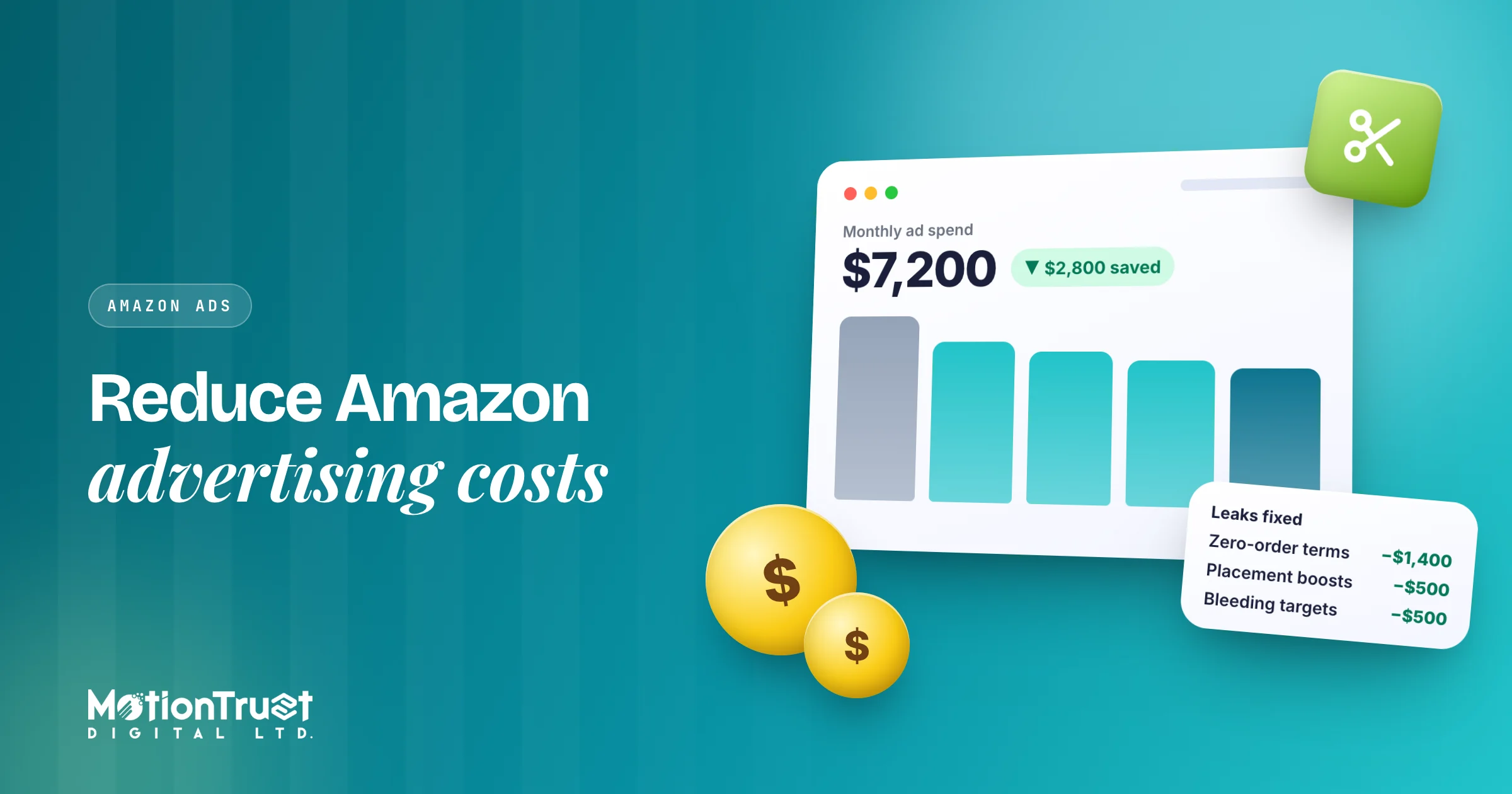
To reduce Amazon advertising costs without losing sales, cut the spend that never sells first: search terms with clicks and no orders, overlapping targets and expensive placements. Then lower bids gradually on targets above your break-even ACoS, move proven terms into exact match, and lift conversion rate so the same budget buys more orders.
To reduce Amazon advertising costs without losing sales, cut the spend that never sells first: search terms with clicks and no orders, overlapping targets and expensive placements. Then lower bids gradually on targets above your break-even ACoS, move proven terms into exact match, and lift conversion rate so the same budget buys more orders.
The order matters. Most sellers start by slashing bids across the board, which lowers spend but also sales, and often organic rank with it. This guide gives you a prioritised plan instead, a worked example on a $10,000-a-month account and a 30-day plan. Amazon features and limits come from Amazon Ads' own pages, linked as we go; our own rules of thumb are labelled.
What is the fastest way to reduce Amazon advertising costs?
The fastest safe saving is removing spend that has produced no orders, because it carries no sales you can lose. After that, work through the levers from lowest risk to highest.
The order we work in when we take over an account:
- Negate zero-order search terms with enough clicks to judge.
- Stop paying twice for the same search term across auto, broad and exact campaigns.
- Check bidding strategy and placement adjustments, which can quietly double what you pay per click.
- Taper bids on bleeding targets that sell above break-even ACoS.
- Harvest winners into exact match and give them the budget you freed up.
- Raise conversion rate on the listing, so every click is worth more.
- Judge the result on TACoS and profit, not on ACoS alone.
Steps 1 to 3 usually save money with almost no loss of sales. Step 6 keeps saving every month.
Why are my Amazon ads so expensive?
Amazon ads feel expensive when each order costs more in clicks than your margin can carry. Three numbers decide it: cost per click, clicks per order and order value.
You can write it as a formula: ACoS = CPC ÷ (conversion rate × average order value). Amazon defines ACoS as ad spend divided by ad revenue, multiplied by 100, in its ACoS guide. The breakdown above is the same thing seen from the click side. A $1.00 CPC, a 10% conversion rate and a $28 order give an ACoS of 1.00 ÷ (0.10 × 28) = 35.7%.
So there are three directions to push: lower CPC, higher conversion rate and higher order value. Only one of them is "pay less per click".
Amazon also says break-even ACoS is directly linked to your profit margin: your ACoS needs to be lower than your margin before ad costs to make money on ad-driven sales. If you have not worked out that number for each product, start there. Our guide to ACoS walks through the calculation, and the profit calculator does it for you.
Your bid is a ceiling. Amazon's pricing transparency guide says it weighs the keywords you bid on, your bid and customers' expected interest in your offer, and its Sponsored Products best practices say the final CPC never exceeds your maximum adjusted bid.
"Adjusted bid" is the phrase to notice: bidding strategy and placement adjustments can raise the ceiling well above what you typed in.
Where does Amazon ad spend usually leak?
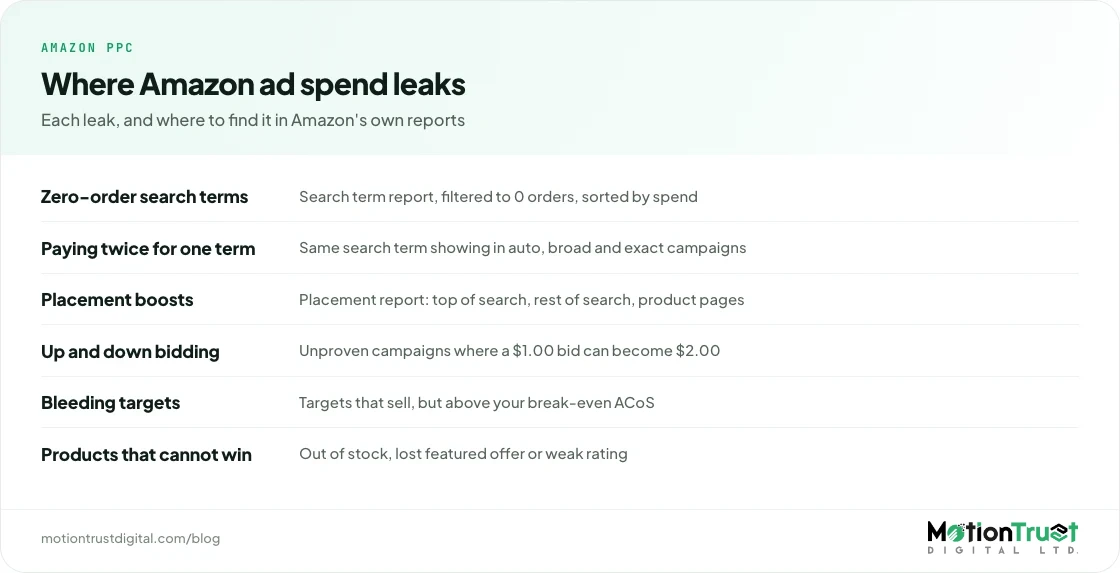
In the accounts we audit, wasted spend sits in the same handful of places almost every time. Fixing these leaks is how most sellers reduce Amazon advertising costs fastest.
| Where the money leaks | How to find it | Usual fix |
|---|---|---|
| Search terms with clicks and no orders | Sponsored Products search term report, filtered to 0 orders and sorted by spend | Negative exact (or phrase for a clearly wrong word) |
| Same search term bought in several campaigns | Search term report pivoted by search term, showing every campaign that paid for it | Keep it in one exact-match campaign, negate it in auto and broad |
| Placement boosts on weak placements | Placement report by campaign: top of search, rest of search, product pages | Lower or remove the adjustment where ACoS is far above target |
| Up and down bidding on unproven campaigns | Campaign settings, bidding strategy column | Switch to Dynamic bids – down only until the campaign proves itself |
| Targets that sell, but above break-even | Targeting report, ACoS against your product's break-even ACoS | Taper bids in steps, protect rank-critical terms |
| Product targeting on the wrong ASINs | Search term report for ASIN-shaped terms, targeting report | Negative product targeting for ASINs that never convert |
| Advertising products that cannot win | Business reports: out-of-stock, poor ratings, low unit session percentage | Pause until the listing or stock is fixed |
The first two rows hold most of the safe savings. The rest need judgement, because some of that spend also buys sales you want to keep.
How do I find wasted spend in the search term report?
Download the Sponsored Products search term report, filter to search terms with zero orders, and sort by spend. Anything with enough clicks to judge and no sales is your first list of negatives.
Amazon's best practices guide says the report shows the shopping terms that resulted in at least one click on your ad: the real words people typed, what each cost and whether it sold. Our search term report guide covers reading it step by step.
How many clicks before you call a term a loser?
Amazon's targeting guide recommends evaluating a keyword after at least 20 clicks before adding it as a negative. We also compare it with break-even clicks:
Break-even clicks = (price × break-even ACoS) ÷ average CPC
Take a $28 product with a 30% break-even ACoS and a $1.00 CPC. You can afford $8.40 of ad spend per order, which is 8.4 clicks. A search term with 20 clicks and no orders has spent more than twice what a sale is worth to you. A $90 product with a $3 CPC may need more data.
What to do with each search term
- Clearly irrelevant: negate straight away, even under 20 clicks.
- Relevant but zero orders at 20+ clicks: negative exact where it wastes money; re-test later.
- Relevant, a few orders, high ACoS: do not negate. This is a bid problem, covered below.
- Converting well: harvest it into exact match.
Look at single words across terms too. If "replacement" appears in 40 zero-order terms, one negative phrase can do the work of 40 negative exacts, as long as the word never appears in your converting terms.
How do negative keywords cut costs without cutting sales?
Negative keywords stop your ads from showing on searches you have already proved do not sell, so the money goes to searches that do. Because those searches produced no orders, blocking them removes cost without removing sales.
Amazon's targeting guide recommends phrase or exact match for negatives. With negative phrase, ads will not show on queries containing the complete phrase or close variations. With negative exact, they will not show on the exact phrase or close variations. For product targeting, you can add a negative list of ASINs so your ads stop appearing on product pages that never convert for you.
Amazon suggests letting negatives run for two weeks or more before changing strategy again. Re-test old negatives too: a term that failed at 3.9 stars and 40 reviews may convert at 4.5 stars and 400, so we review the list every quarter.
Our full guide to Amazon negative keywords covers match-type behaviour and the common mistakes in more depth.
Free Amazon PPC audit tool
How much of your ad spend never sells?
Upload your search term report and the tool finds zero-order terms, duplicate spend and targets above break-even. You get the list in minutes.
Find my wasted ad spendWhich match types and campaign structure waste the least?
Exact match wastes the least because you pay only for the search you chose. Broad, phrase and auto targeting are for finding new search terms, and they should run on smaller budgets with steady negative work behind them.
In Amazon's targeting guide, broad match covers your terms in any order plus synonyms and related terms, phrase match needs all parts in the same order, and exact match is word for word (plurals included). Amazon notes exact tends to have the highest conversion rates.
Automatic campaigns have four targeting groups (close match, loose match, substitutes and complements), each bid separately. In our audits, loose match and complements are often where an auto campaign spends most and sells least, so lower those before pausing the whole campaign.
Harvest winners, then stop paying twice
Harvesting means moving a search term that converts in an auto, broad or phrase campaign into its own exact-match target. Amazon's own guidance is to check the search term report for terms with higher sales and conversion rate, increase the bid on those, and add them as exact match.
The step most people skip: add that same term as a negative exact in the campaign it came from. Otherwise several of your own campaigns keep buying the same search. One home for each proven search term is the rule.
A simple structure that keeps costs visible
Run research campaigns (auto and broad) on lower bids and budgets, give exact-match performance campaigns most of the budget, and keep brand defence and competitor targeting in their own campaigns. A blended ACoS of 25% can hide a brand campaign at 8% and a generic one at 45%. You cannot fix what the average hides.
Which bidding strategy lowers Amazon PPC costs?
Dynamic bids – down only is the most cost-controlled strategy, because Amazon can lower your bid on clicks less likely to convert but never raises it. Up and down can double your bid, and placement adjustments add more on top.
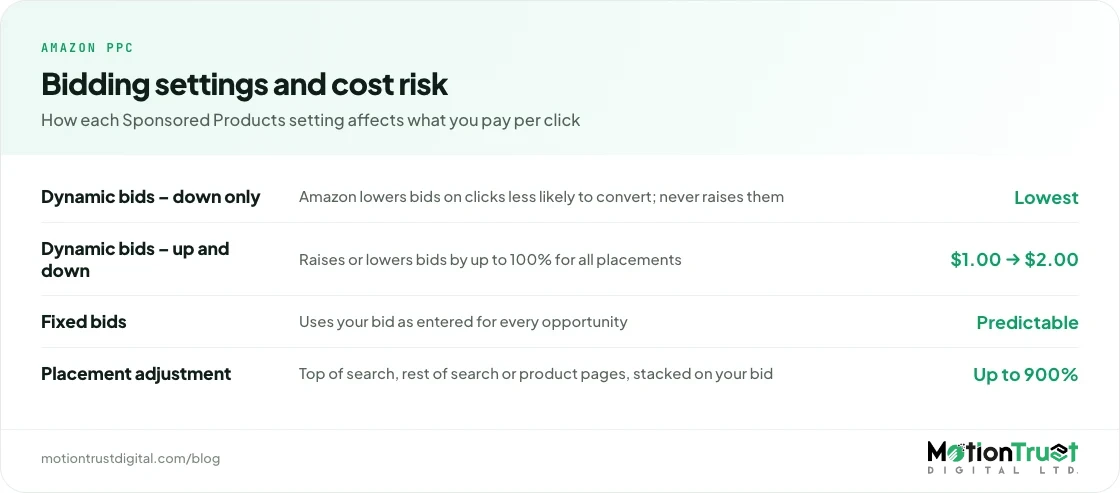
Sponsored Products offers three campaign bidding strategies. Amazon's dynamic bidding guide explains how each behaves:
| Setting | What Amazon does | Cost risk | When we use it |
|---|---|---|---|
| Dynamic bids – down only | Reduces your bid for impressions less likely to convert to a sale | Lowest: never above your bid | Research campaigns, new campaigns, anything over target |
| Dynamic bids – up and down | Raises or lowers bids by up to 100% for all placements based on performance | Highest: a $1.00 bid can become $2.00 | Proven exact-match terms where you want more share |
| Fixed bids | Uses your bid as entered, without adjusting for likelihood of conversion | Predictable, but pays the same for weak and strong clicks | Tests where you need a clean read on one variable |
| Placement adjustment | Raises bids for top of search, rest of search or product pages by up to 900% | Can multiply CPC on a whole campaign | Only where the placement report proves it pays |
Amazon's guide warns that with up and down you should be prepared to spend double the bid you enter. Fine on a proven term; costly on a research campaign.
Placement adjustments: check before you cut
Amazon added a rest-of-search control in January 2024, and its announcement confirms you can adjust bids by up to 900% for rest of search, the same as top of search and product pages. Amazon's best practices point you to the placement report to see how each placement performs.
Compare ACoS by placement for your biggest campaigns. A common pattern in the accounts we audit is a large top-of-search boost added during a launch and never removed. If that placement runs at twice your target ACoS, a smaller boost saves money. The boost and up and down bidding work together, so the real ceiling can sit far above the bid in the targeting tab.
Should I use budget rules and dayparting to save money?
Amazon's budget and bid rules are built to increase spend at good times, not to cut it. To save money, set conservative base bids, then let rules raise them only in the hours, days or events that convert.
Amazon's budget guide says your daily budget is averaged over the calendar month, and on any given day you could spend up to 25% more than your average daily budget. A $10 daily budget could spend $12.50 on one day, balancing out to about $300 over a month. When a campaign runs out of budget, its ads stop until the budget resets at midnight.
What the rules can do
- Schedule-based budget rules raise a campaign's budget by a percentage during a date range or event you choose, according to Amazon's budget rules guide.
- Performance-based budget rules raise the budget when a campaign hits a threshold such as ROAS, click-through rate or conversion rate. Amazon's example is raising the budget by 20% when ROAS reaches 5.
- Schedule-based bid rules for Sponsored Products, announced on 6 November 2023, let you increase bids at specific times of day, days of the week and date ranges, with hourly performance reporting to find your best times.
So the cost-saving pattern is "low base, raise when it works": set base bids where your weak hours are close to break-even, and add a bid rule that lifts them in the hours that convert. This only makes sense with enough volume; at ten orders a week, hourly data is mostly noise.
What role should Sponsored Brands and display ads play?
Sponsored Products should carry most of a cost-conscious budget because it ties spend most directly to orders. Sponsored Brands and display ads are better judged on what they add, such as new customers and brand defence, than on ACoS alone.
Sponsored Brands needs Brand Registry. Amazon's Sponsored Brands guide lists collection, Store spotlight and video formats, CPC or vCPM billing, and new-to-brand metrics: orders from customers who have not bought from your brand in the last 12 months. If its ACoS looks high but many orders are new to brand, cutting it may cost repeat sales the ACoS column never shows.
Sponsored Brands wastes money the same way Sponsored Products does, so run the same search term review on it.
Display ads: Amazon now calls Sponsored Display simply display ads. For cost control, keep remarketing and detail-page defence; broad audience campaigns are where we most often see spend with little to show, so trim there first. Our comparison of Amazon ad types shows where each format earns its keep.
How does improving conversion rate lower ad costs?
A higher conversion rate means fewer clicks per order, so the same spend produces more sales and ACoS falls without touching a bid. It is the only lever that cuts cost per order on every campaign at once.
Go back to the formula. At a $1.00 CPC and a $28 order, a 10% conversion rate gives an ACoS of 35.7%. Lift conversion to 12% and ACoS drops to 1.00 ÷ (0.12 × 28) = 29.8%, below a 30% break-even, with the same bids and the same traffic.
What to fix on the listing first
- Stock and the featured offer. Amazon's best practices state your products need to be in stock to be the featured offer and eligible for advertising. Ads on a product about to go out of stock are wasted.
- Main image and price, checked against the listings beside you in search.
- Title and bullets. Titles are now capped at 75 characters in most categories, so the key benefit has to land fast. Our listing optimisation guide covers the 2026 rules.
- Reviews and rating. A product under 4 stars often has a conversion problem no bid strategy can fix.
- Which variation you advertise: the one that sells best, not the default child.
If clicks are steady but unit session percentage in Business Reports is falling, the problem is on the page, not in the campaign.
How do I pause bleeding keywords safely?
Taper bids on bleeding keywords in steps of about 15–25%, wait a week or two between steps, and only pause once a term is still above break-even after two or three cuts. Before touching any of them, check whether the keyword is one you rank for organically.
A bleeder sells, but each sale costs more than the product earns. Pausing it removes those sales, and on a main search term it can remove sales velocity that, in our experience, supports organic position. Amazon does not publish its ranking factors; our article on the Amazon ranking algorithm explains what is confirmed.
Our process for each bleeder:
- Classify it: core relevance term, long-tail, or competitor term.
- Check organic position for core terms. If the ad is your only page-one visibility, cut more slowly.
- Cut the bid 15–25% and switch the campaign to down only if it is on up and down.
- Wait 7–14 days. Amazon recommends testing for at least 1–2 weeks before pausing keywords.
- Repeat or pause if ACoS is still well above break-even after two or three steps, unless you are deliberately paying to rank.
Halving a bid to halve ACoS rarely works: orders often fall faster than spend.
Will cutting ad spend hurt my organic ranking?
It can. Cutting spend on your product's main keywords lowers sales on those searches, which can weaken organic rank over the following weeks. Cutting waste does not carry that risk, because waste was not producing sales.
Sellers describe this tension in their own words. One on r/AmazonFBA wrote: "lately feel like I'm burning through profit via PPC – but reducing spend is killing my rank." On the Amazon Seller Forums, a seller asked whether ads were becoming too expensive to be worth it; one reply argued total ad spend as a share of total sales tells you more than ACoS.
Both are right. Cut in the right order:
- Cut first: zero-order search terms, duplicate spend, unproven placement boosts, weak auto targeting groups, broad display audiences.
- Cut carefully: long-tail bleeders and competitor targets.
- Protect: core relevance keywords where ads are holding your page-one visibility, and launches still building sales history.
Then watch total sales. If they drop more than ad-attributed sales, you cut something that was supporting organic. Our Amazon SEO vs PPC article covers how the two interact.
Why should TACoS, not ACoS, be the goal?
TACoS (total advertising cost of sales) is ad spend divided by total sales, ads plus organic. It tells you whether advertising is growing the whole business, which ACoS cannot, because ACoS only sees the sales an ad claims.
TACoS is not an Amazon-defined metric, but it uses Amazon's numbers: spend from the ads console, total sales from Business Reports. Amazon itself says ACoS shouldn't be the sole campaign metric you focus on.
Say you cut ads and ACoS falls from 36% to 27%. If total sales also fell 15%, profit could be lower. The aim is a lower TACoS with total sales steady or growing. Our ACoS and TACoS benchmarks give typical ranges by goal and stage.
The number that settles every argument is profit after ads: total sales × margin before ads, minus ad spend.
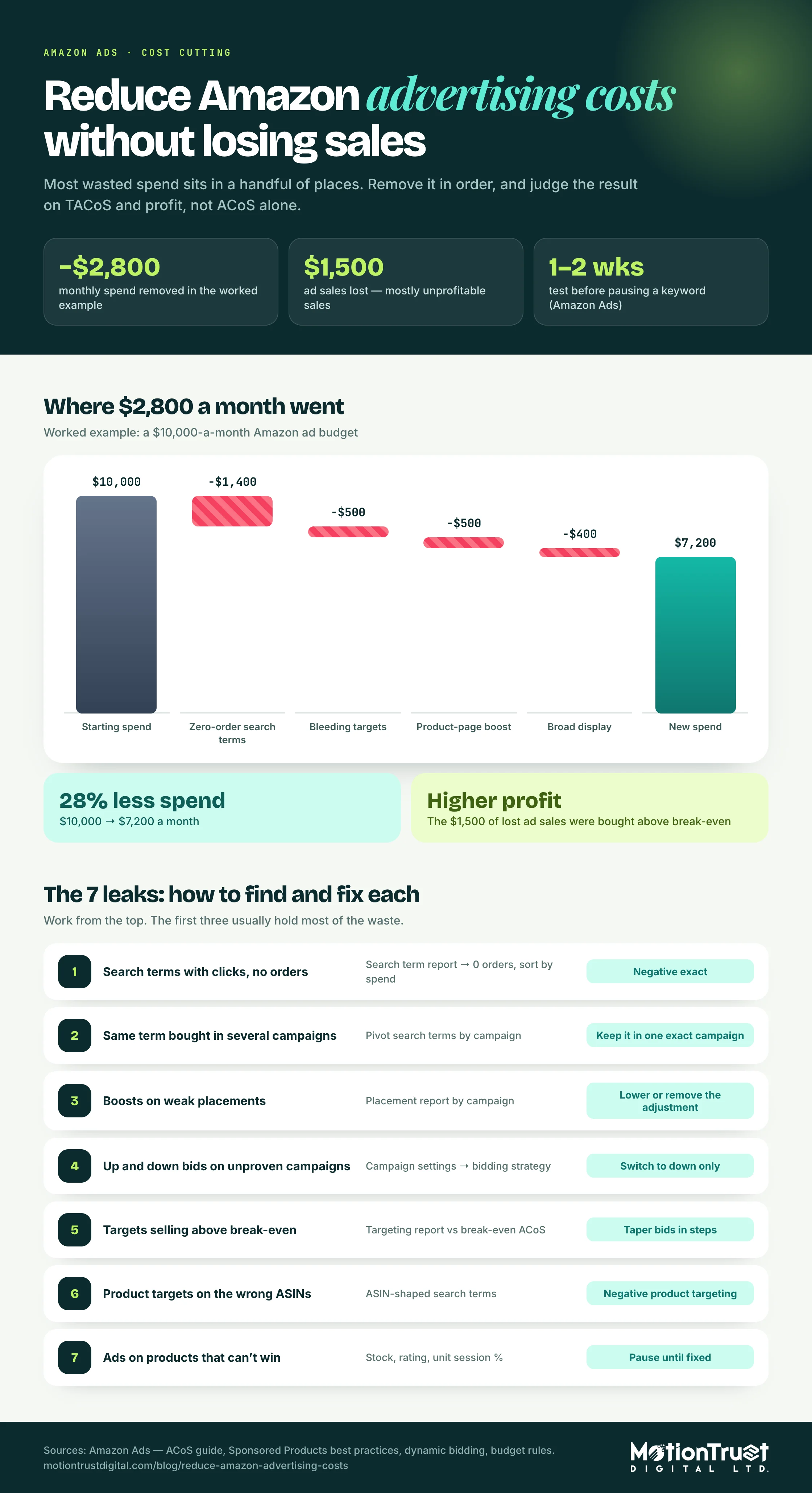
Worked example: cutting a $10,000-a-month Amazon ad budget
This illustrative account shows how to reduce Amazon advertising costs step by step. It is built from patterns we see in audits, not one client's figures.
Starting point (30 days):
- Ad spend: $10,000. Ad-attributed sales: $28,000. ACoS: 35.7%.
- Average order value $28, average CPC $1.00, conversion rate 10%, so 10,000 clicks and 1,000 ad orders.
- Total sales (ads plus organic): $56,000. TACoS: 10,000 ÷ 56,000 = 17.9%. Margin before ads 30%, so break-even ACoS is 30%.
- Profit after ads: $56,000 × 30% − $10,000 = $6,800.
The audit finds four leaks. Here is what changes:
| Leak | Spend before | Action | Spend after | Ad sales lost |
|---|---|---|---|---|
| Search terms with 20+ clicks and 0 orders | $1,600 | Negative exact; keep $200 on relevant terms under watch | $200 | $0 |
| Bleeding targets ($1,800 sales, 66.7% ACoS) | $1,200 | Bids tapered about 30% over two steps | $700 | $500 |
| Product-page placement boost on generic campaigns ($3,000 sales, 50% ACoS) | $1,500 | Boost removed, campaigns moved to down only | $1,000 | $600 |
| Broad display audiences ($1,200 sales, 66.7% ACoS) | $800 | Half paused, remarketing kept | $400 | $400 |
| Total | $5,100 | $2,300 | $1,500 |
After the cuts: spend falls by $2,800 to $7,200. Ad sales fall by $1,500 to $26,500. ACoS: 7,200 ÷ 26,500 = 27.2%. Assuming organic sales hold at $28,000, total sales are $54,500 and TACoS is 13.2%. Profit after ads: $54,500 × 30% − $7,200 = $9,150, up $2,350.
Then reinvest part of it. Put $1,000 of the saving into harvested exact-match winners running at about 20% ACoS, which adds roughly $5,000 in ad sales. Spend is now $8,200, ad sales $31,500, ACoS 26.0%. Total sales reach $59,500 and TACoS is 13.8%. Profit after ads: $59,500 × 30% − $8,200 = $9,650.
The account now spends $1,800 less, sells $3,500 more in total and makes $2,850 more profit a month. Most of the gain came from the first row, which cost no sales.
The assumption to check is organic sales holding at $28,000. If the bleeder or placement cuts touched core ranking keywords, organic could slip, which is why the 30-day plan watches total sales weekly.
Amazon PPC management
Want this done on your account every week?
We run search term reviews, negatives, bid tapering and harvesting on a fixed weekly cycle, and report on TACoS and profit rather than ACoS alone.
See our PPC management serviceWhat does a 30-day plan to reduce Amazon advertising costs look like?
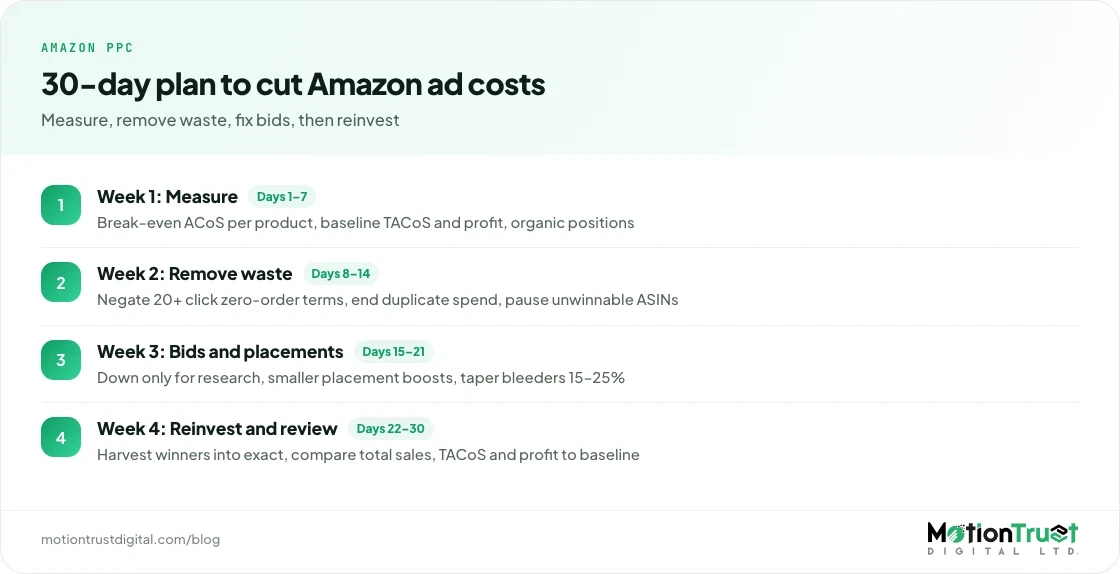
Week one measures, week two removes waste, week three fixes bids and placements, and week four reinvests and checks total sales. Changes need one to two weeks to show, so a month is the shortest fair test.
Week 1: measure
- Work out break-even ACoS for every advertised product (price × margin before ads).
- Record your baseline: ad spend, ad sales, ACoS, total sales, TACoS, and profit after ads.
- Note organic page-one positions for your five to ten core keywords.
Week 2: remove waste
- Negate zero-order search terms with 20+ clicks, or above twice break-even clicks for expensive products.
- Find search terms bought in more than one campaign; keep one exact home and negate the rest.
- Pause ads on products that are out of stock or have lost the featured offer.
Week 3: bids and placements
- Move research and unproven campaigns from up and down to down only.
- Reduce placement adjustments where the placement runs well above target ACoS.
- Taper bids 15–25% on bleeding targets, leaving core rank keywords for last.
- If you have enough volume, set conservative base bids and a schedule-based bid rule for your best hours.
Week 4: reinvest and review
- Harvest converting search terms into exact match and give them part of the saving.
- Compare against the week 1 baseline: total sales, TACoS and profit after ads.
- If organic positions for core keywords slipped, restore bids on those terms first.
- Set the ongoing rhythm: search terms weekly, placements and bids every two weeks, negatives re-tested quarterly.
When is it worth paying someone to manage Amazon ad costs?
It is worth paying for help to reduce Amazon advertising costs when the waste you can find is larger than the fee, or you have no time for a weekly search term review.
Our own published pricing for PPC management alone is $799 a month for ad spend up to $5,000, $1,199 a month up to $15,000, and $1,799 a month up to $30,000. The first big saving rarely repeats at the same size; after that, the value is steady harvesting, conversion work and keeping TACoS down as you grow.
Whoever does it, ask for TACoS and profit after ads, not ACoS alone. Our breakdown of what Amazon PPC management costs compares agency, freelancer and software fees in more detail.
Free Amazon audit
Not sure where your ad budget is leaking?
We review your campaigns, search terms and listings, then send a short list of fixes ranked by how much they save. No obligation.
Get my free audit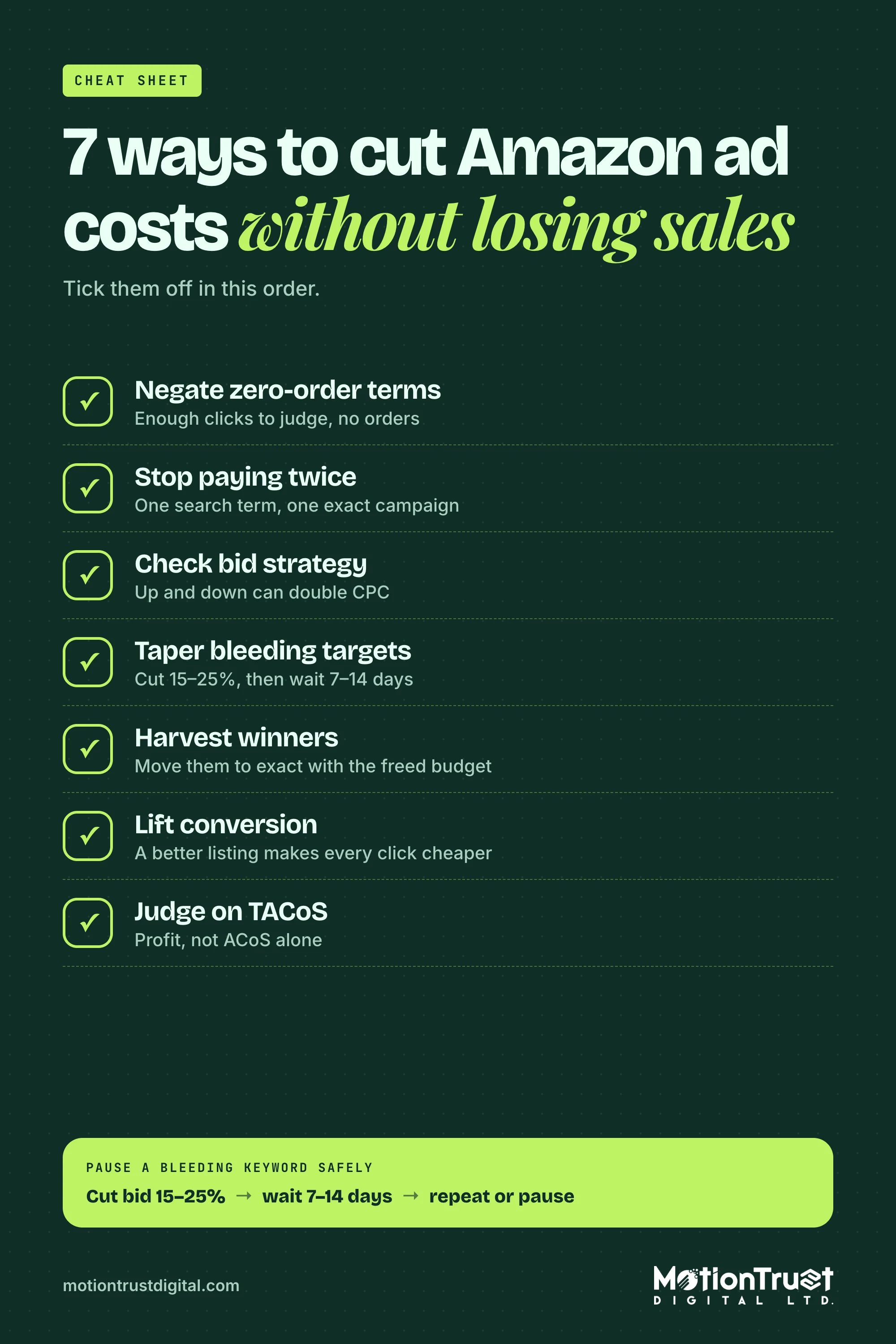
Frequently asked questions
How do I lower my ACoS on Amazon without losing sales?
Start with spend that has no sales attached: negate search terms with 20 or more clicks and zero orders, and stop several campaigns bidding on the same term. Then check placement boosts and up and down bidding. Only after that should you taper bids on targets that sell above break-even, in 15–25% steps, while watching total sales and the organic position of your core keywords.
Should I turn off Amazon PPC if it is too expensive?
Usually not all at once. Turning ads off removes the waste but also the profitable sales, and on core keywords it can weaken organic rank as sales fall. Cut zero-order spend and bleeders first, then measure TACoS and profit after ads for two to four weeks. If total profit is still negative after that, the problem is more likely price, margin or the listing than the ads.
What is a good ACoS for Amazon ads?
A good ACoS is below your break-even ACoS, which equals your profit margin before ad costs. A product with a 30% margin breaks even at 30% ACoS. Launches and ranking pushes can justify running above it for a while, and brand defence campaigns usually run far below it. Judge the overall account on TACoS and profit after ad spend, not one ACoS figure.
How many clicks before adding a negative keyword on Amazon?
Amazon's targeting guide recommends evaluating a keyword after at least 20 clicks. We also compare that with break-even clicks: price times break-even ACoS, divided by CPC. A $28 product at 30% break-even and $1.00 CPC affords about 8.4 clicks per order, so 20 clicks without a sale is well past it. Clearly irrelevant terms can be negated straight away.
Which Amazon bidding strategy saves the most money?
Dynamic bids – down only is the most cost-controlled, because Amazon can lower your bid on clicks less likely to convert but never raises it. Up and down can raise bids by up to 100%, so a $1.00 bid can cost up to $2.00, before placement adjustments of up to 900%. Use up and down only on proven, profitable exact-match terms.
Why do I get clicks on my Amazon ads but no sales?
Either the clicks come from the wrong searches or the listing is not converting the right ones. Check the search term report first: if the terms are irrelevant, add negatives. If they are relevant, look at the page: price against the products beside you, main image, rating, stock and whether you hold the featured offer. Amazon states products must be in stock to be advertised.
Sources
- Amazon Ads — What is advertising cost of sales (ACOS)? Calculation and tips
- Amazon Ads — Your guide to Amazon Ads pricing transparency
- Amazon Ads — Best practices for your Sponsored Products ads
- Amazon Ads — A guide to targeting with Sponsored Products
- Amazon Ads — Guide to dynamic bidding – up and down with Sponsored Products
- Amazon Ads — Rest of search bid adjustment for Sponsored Products (9 January 2024)
- Amazon Ads — Sponsored Products budget basics and best practices
- Amazon Ads — A complete guide to budget rules
- Amazon Ads — Schedule-based bid rules now available for Sponsored Products (6 November 2023)
- Amazon Ads — Your complete guide to Sponsored Brands
- Amazon Ads — Sponsored Display (now display ads)
Monjur Hossain
Founder & Amazon Strategy Lead, MotionTrust Digital
Monjur incorporated MotionTrust Digital in September 2022 and leads Amazon strategy across the client base. Eight years in e-commerce and marketplace marketing, now on Amazon only — keyword strategy, listing architecture and advertising structure for growing brands.
MonjurAgencyTry the free tools
Seven Amazon tools that run in your browser — profit and ACoS calculator, PPC auditor, listing checker and more. No account, nothing uploaded.
Try the free toolsLast reviewed . We update articles in place rather than republishing at a new URL, so the link you have keeps working.
Keep your ACoS target working for you
Break-even ACoS is the starting point. One email a week with our newest PPC articles on targets, bids and wasted spend, plus listings and SEO if you want them. Email us to join.