
Amazon Rufus Optimization: How to Get Recommended by Amazon's AI Shopping Assistant
 By Monjur HossainFounder & Amazon Strategy Lead
·
Published
·
Last reviewed
·18 min read
By Monjur HossainFounder & Amazon Strategy Lead
·
Published
·
Last reviewed
·18 min read

Amazon Rufus optimization means making your listing easy for Amazon's AI shopping assistant, now called Alexa for Shopping, to understand, trust and quote. In practice that means complete product attributes, titles and bullets that answer real buyer questions, clear images and A+ Content, and fixing the review themes the assistant summarises.
Amazon Rufus optimization is the job of making sure Amazon's AI shopping assistant can answer a shopper's question with your product, and explain why. The assistant reads your listing, your reviews and your Q&A, then writes its own summary. If those sources are thin, vague or contradictory, it either skips you or describes you badly.
A lot has been written about this, much of it guesswork. Some guides quote shopper numbers and sales lifts nobody can trace back to Amazon. Others were written before Rufus became Alexa for Shopping in May 2026.
This guide does it differently. We separate what Amazon has actually published from what the industry assumes, then turn it into a field-by-field audit you can run on one ASIN this week. Where we give numbers, they come from Amazon's own pages or are clearly marked as examples.
What is Amazon Rufus, and why is it now called Alexa for Shopping?
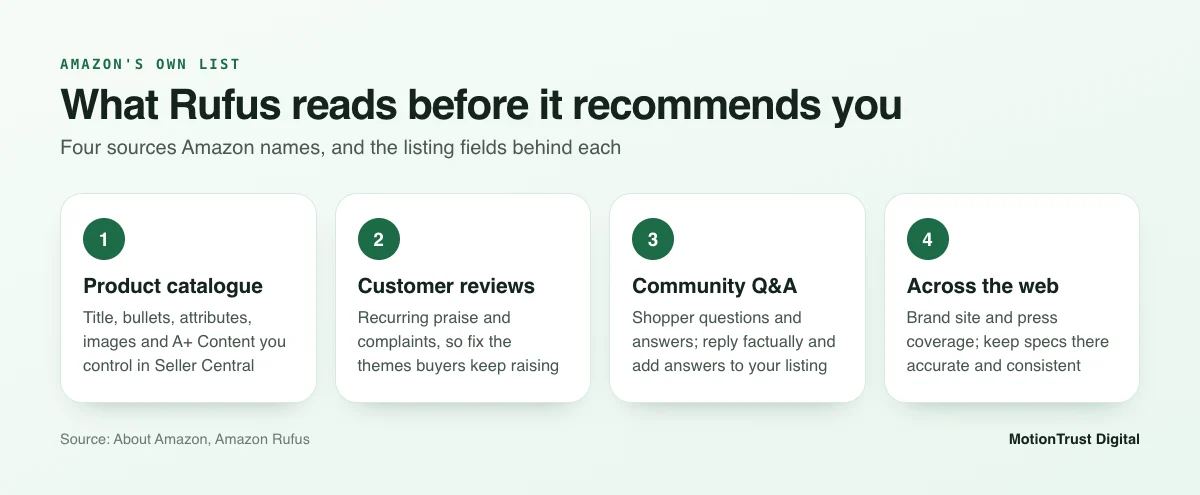
Rufus is Amazon's generative AI shopping assistant. Shoppers type or speak a question, such as "what's a good running shoe for flat feet?", and get a written answer with products attached. According to Amazon's Rufus page, it was trained on Amazon's product catalogue, customer reviews, community Q&As and information from across the web.
What Rufus does for shoppers
Think of it as a shop assistant who has read every listing and every review. A shopper can ask it to compare two products, explain a feature, suggest something for a specific use, or summarise what buyers say about a product.
That changes the job of your listing. It is no longer only a page people scroll. It is also source material that an AI quotes, paraphrases and compares against your competitors.
The May 2026 rebrand and what changed
On 13 May 2026, Rufus was renamed Alexa for Shopping. Amazon's Alexa for Shopping announcement says it rolled out to US customers across the Amazon Shopping app, the website and Echo Show, with no Prime membership or Echo device needed.
The announcement also describes features that matter to sellers:
- Shoppers can ask questions straight from the main search bar.
- AI overviews appear on search results and product pages.
- The assistant builds dynamic comparisons between products.
- Shoppers can see up to a year of price history.
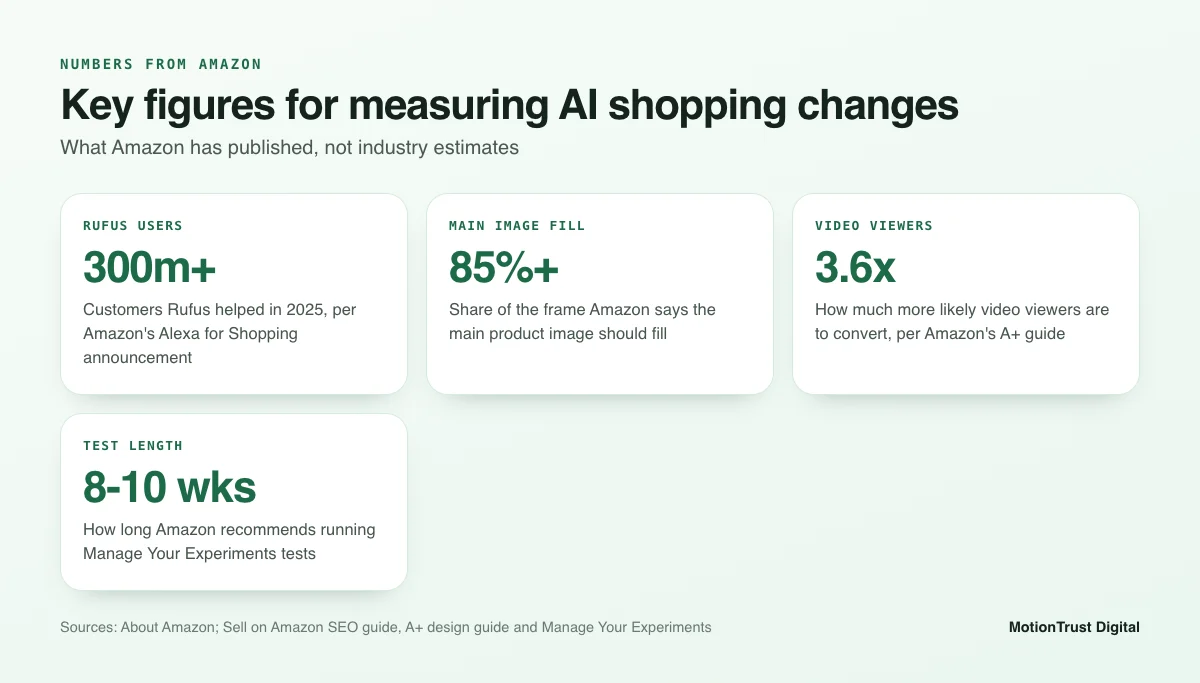
Amazon also says Rufus helped over 300 million customers in 2025. That is a scale worth taking seriously, even if Amazon has not said how many purchases it influenced.
In this guide we use "Rufus" and "Alexa for Shopping" for the same assistant. Most sellers and tools still say Rufus, and the underlying listing work is identical.
Which marketplaces have it?
Amazon's announcement is about US customers. Rufus itself is available to all UK customers in the Amazon Shopping app and on desktop, but Amazon has not announced Alexa for Shopping outside the US.
Our advice for sellers on amazon.co.uk, amazon.de or amazon.ca is simple. Do the work now. The listing changes that help an AI assistant also help shoppers reading the page, so nothing is wasted if the rollout takes longer in your marketplace.
How does Amazon Rufus work when it picks products?
Here is the honest answer. Amazon has not published a Rufus ranking formula. Anyone who tells you the exact weighting of reviews versus attributes is guessing.
What we do have is Amazon's own description of the data sources, plus published research from Amazon Science. Together they tell you a lot about where to focus.
Catalogue data, reviews, Q&A and the web
Amazon names four sources. Each one maps to something you can work on:
- Product catalogue. Your title, bullets, description, attributes, images and A+ Content.
- Customer reviews. What buyers praise and complain about, in their own words.
- Community Q&A. Questions shoppers asked and the answers given.
- Information from across the web. Your brand site, press coverage and other public sources about your product.
The first three sit on Amazon, so they are where most of your effort should go. The fourth is slower to influence, but a clear brand website with accurate specs does no harm.
COSMO and the move from keywords to meaning
In 2024 Amazon Science described COSMO, a system that uses large language models to mine commonsense relationships from customer behaviour. Those relationships include what a product is for, who uses it and where it is used.
In Amazon's tests, a COSMO-enhanced model scored a 60% increase in macro F1 over the baseline on the Shopping Queries Dataset. That is a research accuracy measure, not a sales figure, so do not read it as "60% more sales".
For Amazon Rufus optimization, the useful lesson is direction. Amazon is building systems that understand that "shoes for standing all day" relates to nurses, comfort and cushioning, even if those words never appear in the query. Your listing should state those links clearly so the system does not have to guess.
Amazon's earlier semantic product search research made the same point. Its authors wrote that pure lexical matching falls short because of synonyms, word variants and spelling errors. Meaning has mattered for years. Generative AI just makes it visible to shoppers.
Why the A10 basics still matter
None of this replaces classic search. Shoppers still type keywords, products still need to be indexed, and sales history still matters. Our guide to the Amazon ranking algorithm covers how relevance and performance work together.
So you are not choosing between keywords and questions. You need both. Amazon Rufus optimization sits on top of good keyword work. It does not replace it.
Amazon Rufus optimization vs classic Amazon SEO: what is different?
The inputs are mostly the same. What changes is how they are used and what "good" looks like. This table sums it up.
| Area | Classic Amazon SEO | Rufus and Alexa for Shopping |
|---|---|---|
| Shopper input | Short keyword queries | Full questions and follow-ups |
| What the system does | Indexes and ranks listings for a query | Answers, compares and summarises reviews |
| What wins | Relevance plus sales performance | Clear, consistent facts it can quote with confidence |
| Main risk | Not indexed for a valuable term | Described inaccurately, or left out of a comparison |
| Key fields | Title, bullets, backend search terms | Attributes, bullets, images, A+, reviews, Q&A |
| How you measure | Rank tracking, Search Query Performance | No direct report; proxy metrics and manual checks |
Keywords vs questions
A keyword shopper types "insulated water bottle 1 litre". A Rufus shopper asks "which water bottle keeps drinks cold all day at work and fits a car cup holder?"
The second query contains a use (all day at work), a need (cold drinks) and a constraint (cup holder). If your listing never mentions cup holder fit, the assistant cannot confidently recommend you for that question.
Relevance vs confidence
Classic search asks, "is this listing relevant to the query?" An AI assistant also has to decide whether it can say something true about your product. Vague copy like "premium quality, perfect for everyone" gives it nothing to say.
Specific copy like "holds 1 litre, keeps drinks cold for up to 24 hours in our tests, base 7.3 cm wide" gives it facts it can repeat. Those numbers are only an example, but the principle holds.
What stays the same
Good images, accurate specs, solid reviews, competitive pricing and stock availability helped before Rufus and still help now. If you want the wider comparison of search systems, read Amazon SEO vs Google SEO.
Step 1: Fill every product attribute properly
Most Amazon Rufus optimization work starts here, in the structured fields behind your listing: material, size, colour, compatible devices, target audience, recommended uses and many more. Shoppers rarely see most of them directly, but they are exactly the kind of clean data an AI system can use.
Why structured attributes feed AI answers
A bullet point is free text. An attribute is a labelled fact. When a shopper asks for "a dishwasher-safe bottle under 500 ml", a filled "dishwasher safe" field and a correct capacity value are far easier to match than a phrase buried in bullet four.
Empty fields are a missed opportunity. Wrong fields are worse, because the AI may repeat them.
Which attributes to prioritise
Start with the attributes that answer common buying questions in your category. For most products, these come first:
- Product type and item type keyword (the right browse node matters)
- Material and key components
- Dimensions, weight and capacity, with units
- Compatibility (devices, models, sizes)
- Target audience, such as age range or user type
- Specific uses and recommended settings
- Care instructions and included components
Use the dropdown values Amazon offers where they exist. Creative wording in a field that expects a standard value can stop the data matching anything.
Checking for missing attributes
In Seller Central, open Catalog > Manage All Inventory, choose Edit on the ASIN and work through every tab, including the advanced view. The Listing Quality dashboard also flags missing attributes Amazon considers important.
Do not stuff keywords into attribute fields. It can trigger errors or, in some cases, problems with the listing itself. If a listing ever drops out of search, our guide to an Amazon listing being suppressed covers the usual causes.
Step 2: Rewrite titles and bullets to answer real questions
This is where most of the visible Amazon Rufus optimization work happens. Your title should identify the product clearly. Your bullets should answer the questions buyers actually ask.
Turning customer questions into bullet points
Collect questions from four places: your reviews, your community Q&A, your PPC search term report, and the assistant itself. Ask Alexa for Shopping (or Rufus, where it still runs) the questions a buyer might ask about your category, and note what it says about you and your competitors.
Group the questions into themes such as size, durability, use case and care. Then make sure each major theme is answered in a bullet, in plain words. Our Amazon keyword research guide shows how to pull search term data that feeds this step.
Use cases, audiences and specifications
Each strong bullet usually does three things. It states a fact, explains what it means for the buyer, and names who or where it suits. Here is an example rewrite for a fictional bottle that sells for $24.99.
Before: "PREMIUM QUALITY – Our amazing bottle is perfect for everyone and every occasion."
After: "Keeps drinks cold for up to 24 hours – double-wall vacuum insulation suits long shifts, school days and gym sessions; the 7.3 cm base fits most car cup holders."
The second version answers at least three questions an AI assistant might get. The first answers none.
Titles follow the same logic. Since 27 July 2026 Amazon has capped titles at 75 characters in all categories except media, with a separate 125-character Item Highlights field for materials and use cases, according to Amazon’s announcement. Its earlier Sell on Amazon SEO guide already recommended no more than 60. Category style guides vary, so check yours, but put brand, product type and the most important attribute first.
For a fuller walk-through, read how to optimise an Amazon listing.
Mobile-first wording
Most AI shopping conversations happen on phones, where titles are cut short and bullets sit below the fold. Lead each bullet with the fact, not the adjective. Keep sentences short enough to quote.
Backend search terms still have a job. Amazon says they are not visible to shoppers but can help a product rank, and suggests using them for spillover terms such as synonyms and alternative spellings. They feed classic indexing. They will not explain your product to an AI.
Free Amazon Listing Checker
See how your listing reads before Rufus does
Run your ASIN through our free checker to spot thin bullets, missing details and title issues in a couple of minutes.
Check my listing for freeStep 3: Make images and A+ Content readable to AI and to people
Images and A+ Content are often the most neglected part of Amazon Rufus optimization. They sell to people first. But they also carry facts, and the assistant's AI overviews and comparisons are only as good as the facts it can find.
Images that show use, scale and specs
Amazon's SEO guide says main images should fill 85% or more of the frame. Beyond that, use your secondary images to remove doubt:
- A scale image with the product in a hand or next to a familiar object
- A dimensions graphic with clear units
- Lifestyle shots that show the real use case and setting
- A "what's in the box" image
- A short video demonstrating the main benefit
Video is worth the effort. Amazon's A+ Content design guide states that customers who view videos are 3.6 times more likely to convert than those who do not.
A+ comparison charts and Q&A modules
A+ Content costs nothing extra for brands enrolled in Brand Registry, though you need a Professional selling plan. Basic A+ allows up to five modules and Premium A+ up to seven, according to Amazon's design guide.
Two modules are especially useful here. A comparison chart across your own range helps the assistant answer "which model should I buy?" Premium A+ Q&A modules let you answer common questions in your own words, in text the system can read.
Mind the rules. Amazon's guide bans "best-selling" or "top-rated" claims, pricing, promotions, shipping details, links, contact details, warranty information and comparisons with competitors in A+.
Alt text
Amazon's design guide advises against embedding important text inside images because it is hard to read on mobile. Put key facts in live text modules and write descriptive alt text for each A+ image, such as "1-litre steel bottle in a car cup holder" rather than "image 3".
Whether AI reads image text directly is not something Amazon has confirmed. Live text is the safer bet either way.
Step 4: Fix the review and Q&A signals Rufus summarises
Amazon says Rufus draws on customer reviews and community Q&A. That means the assistant can tell a shopper, in effect, "buyers like the cold retention but say the lid leaks". You cannot write that summary yourself. You can change what it is based on.
Reading your reviews the way Rufus does
Export or read your last 100 to 200 reviews, plus those of your top three competitors. Tag each one by theme: quality, size, fit, ease of use, value, durability, delivery. Then count.
The themes that come up again and again are the ones most likely to show up in an AI summary. Write down the top three positives and top three complaints for your product.
Answering recurring complaints in the listing
Some complaints come from the product, and the fix is in manufacturing or packaging. Many come from mismatched expectations. Say buyers keep writing "smaller than expected". That usually means the size is unclear, not that the product is wrong.
Fix those in the listing. Add a scale image, put the dimensions in bullet one, or state who the product is not for. Being honest about limits makes the assistant's description more accurate and reduces returns.
Answer open community questions where your marketplace allows it, with short factual replies. Then fold the best answers back into your bullets or A+ so the facts live in more than one place.
Staying compliant
Never pay for reviews, offer refunds or gifts in exchange for them, or ask only happy customers to leave one. Amazon bans this, and fake or incentivised reviews breach consumer protection rules in both the US and the UK.
Use the Request a Review button and Amazon Vine where eligible. Our guide on how to get Amazon reviews compliantly sets out the safe options.
Amazon Review Management
Turn review themes into listing fixes
We read your reviews and Q&A, find the complaints that keep coming up, and fix them at source, all within Amazon's rules.
See how review management worksHow do you measure Rufus and Alexa for Shopping impact?
This is the part most guides skip. Amazon Rufus optimization takes time and effort, so you need to know whether each change actually helped.
Why there is no Rufus report
At the time of writing, Seller Central does not have a report that shows traffic or sales from Rufus or Alexa for Shopping. Be wary of any tool that claims to show exact Rufus traffic. It is estimating.
So you measure with proxies, change one thing at a time, and keep notes.
Proxy metrics: sessions, conversion, Search Query Performance
Three places give you a reasonable picture:
- Business Reports. Under Reports > Business Reports, track sessions and unit session percentage for the ASIN before and after each change.
- Search Query Performance. In Brand Analytics, this dashboard shows impressions, clicks, cart adds and purchases for specific queries, plus your brand's share. Watch longer, question-style queries in particular.
- Manual checks. Once a month, ask the assistant the same ten buyer questions and log whether you appear and how you are described.
Search Query Performance needs a Professional selling account and the Brand Representative role in Brand Registry.
Testing changes with Manage Your Experiments
If you are brand registered and the ASIN has enough traffic, Manage Your Experiments lets you A/B test titles, images, bullets, descriptions and A+ Content. Amazon says optimised content can help increase sales by up to 20%, though results vary by listing.
Amazon recommends running experiments for 8 to 10 weeks. The "to significance" setting can return results in as little as four weeks. Patience matters here: judging a change after five days is mostly noise.
What mistakes stop Rufus recommending your product?
We see the same problems again and again when we audit listings for Amazon Rufus optimization. None of them are exotic.
Vague or contradictory specs
The title says 750 ml, an attribute says 1 litre and an image says 32 oz. An AI system cannot tell which is right, so it may repeat the wrong one or avoid you. Check that every number matches across title, bullets, attributes, images and A+.
Keyword-stuffed attributes
Filling "material" with "stainless steel water bottle gym bottle kids bottle" does not help. It makes your data less clear and can break validation. Put keywords where keywords belong, and keep attribute fields factual.
AI-rewritten copy that loses facts
It is tempting to paste your listing into ChatGPT and ask it to "optimise for Rufus". The result often reads smoothly but swaps specific facts for generic phrases, or invents claims you cannot back up.
AI tools are fine for a first draft. Every number, claim and compatibility statement must then be checked against the real product by a person. Unsupported claims can breach Amazon's policies and advertising law.
Unanswered negative review themes
If 30 reviews mention a leaking lid and your listing says nothing, the assistant will still summarise the complaint. Fix the product, clarify the listing, or both. Silence does not make it go away.
A one-ASIN Amazon Rufus optimization checklist
Pick one important ASIN, ideally a best seller with steady traffic, and work through this list. Mark each line pass or fail.
The 12-point checklist
| # | Check | Pass looks like |
|---|---|---|
| 1 | Title | Brand, product type and key attribute up front; follows the category style guide |
| 2 | Bullets | Each starts with a fact and answers a real buyer question |
| 3 | Use cases | Who it is for and where it is used are stated plainly |
| 4 | Attributes | All relevant fields filled with standard values |
| 5 | Consistency | Sizes, materials and counts match across every field |
| 6 | Main image | Product fills 85% or more of the frame |
| 7 | Secondary images | Scale, dimensions, use and contents shown |
| 8 | Video | At least one short video showing the main benefit |
| 9 | A+ Content | Comparison chart and key facts in live text, not inside images |
| 10 | Reviews | Top three complaints identified and addressed |
| 11 | Q&A | Open questions answered; answers reflected in the listing |
| 12 | Baseline | Sessions, conversion and Search Query Performance recorded before changes |
Most listings we review fail at least three of these. That is normal, and it is good news, because each fail is a clear job.
Once your first ASIN is done, roll the same process across the rest of your catalogue, starting with the products that bring in the most revenue. Amazon Rufus optimization is not a one-off project. Revisit each listing every few months as new reviews and questions come in.
When to bring in help
The checklist is simple. Doing it well across 50 or 500 ASINs is not. If your team does not have the time, or you sell across several marketplaces, our Amazon SEO agency team handles the audit, the rewrites and the testing.
For copy and image work on its own, see our Amazon listing optimisation service. Either way, you keep full control of what goes live.
Free Amazon Audit
Get a free Amazon listing audit for AI search
Send us an ASIN and we will check it against this list, then show you which fixes should come first.
Request my free auditFrequently asked questions
What is Amazon Rufus and is it still called Rufus?
Rufus is Amazon's generative AI shopping assistant. It answers shopper questions, compares products and summarises reviews. On 13 May 2026 Amazon renamed it Alexa for Shopping and rolled it out to US customers on the app, the website and Echo Show. Many sellers and tools still call it Rufus, and the listing work is the same under either name.
Is Rufus available outside the US?
Amazon's Alexa for Shopping announcement covers US customers. Rufus itself is available to all UK customers in the Amazon Shopping app and on desktop, but Amazon has not announced Alexa for Shopping outside the US. If you sell on amazon.co.uk or in Europe, prepare now. The same listing improvements help human shoppers today.
Does Rufus replace the A9/A10 search algorithm?
No. Classic keyword search still runs, and shoppers still type short queries and scroll results. The AI assistant sits alongside it, answering questions and building comparisons. You still need good keyword coverage and sales performance to rank. Amazon Rufus optimization adds clearer facts and stronger review signals on top of that, rather than replacing it.
What information does Rufus use to recommend products?
Amazon says Rufus was trained on its product catalogue, customer reviews, community Q&As and information from across the web. In practice, that means your title, bullets, attributes, images, A+ Content, review themes and answered questions. Amazon has not published how these are weighted, so improve all of them rather than chasing one supposed factor.
Do backend search terms matter for Rufus?
They still matter for classic search. Amazon says backend keywords can help a product rank and suggests using them for spillover terms such as synonyms. But they are hidden from shoppers and do not describe your product in sentences. For the AI assistant, visible copy, attributes and reviews carry far more useful information.
Can you track Rufus or Alexa for Shopping traffic in Seller Central?
Not directly. At the time of writing there is no Rufus or Alexa for Shopping report in Seller Central. Use proxies instead: sessions and unit session percentage in Business Reports, query-level data in Search Query Performance, and A/B tests in Manage Your Experiments. Add a monthly manual check where you ask the assistant your buyers' questions.
Do reviews and Q&A affect Rufus recommendations?
Amazon lists customer reviews and community Q&A among the sources Rufus draws on, so they shape how your product is described. Recurring complaints can appear in summaries. Address them by fixing the product or clarifying the listing, and grow reviews only through compliant routes such as Request a Review and Amazon Vine.
Should I rewrite my listing with ChatGPT for Rufus?
You can use AI tools for a first draft, but do not publish the output unchecked. Generic AI copy often drops specific facts or adds claims you cannot support, which helps neither shoppers nor the assistant. Have someone who knows the product verify every number, compatibility claim and benefit, then test the change with Manage Your Experiments.
Sources
- About Amazon — Amazon Rufus
- About Amazon — Alexa for Shopping: Amazon's AI shopping assistant
- Amazon Science — Building commonsense knowledge graphs to aid product recommendation
- Sell on Amazon — Amazon SEO: 7 ways to improve your product's search rankings
- Sell on Amazon — Amazon A+ Content Design Guide with Examples & Tips
- Sell on Amazon — Test listing content with Manage Your Experiments
- About Amazon UK — Rufus launches for UK customers
Monjur Hossain
Founder & Amazon Strategy Lead, MotionTrust Digital
Monjur incorporated MotionTrust Digital in September 2022 and leads Amazon strategy across the client base. Eight years in e-commerce and marketplace marketing, now on Amazon only — keyword strategy, listing architecture and advertising structure for growing brands.
MonjurAgencyTry the free tools
Seven Amazon tools that run in your browser — profit and ACoS calculator, PPC auditor, listing checker and more. No account, nothing uploaded.
Try the free toolsLast reviewed . We update articles in place rather than republishing at a new URL, so the link you have keeps working.
Keep your ACoS target working for you
Break-even ACoS is the starting point. One email a week with our newest PPC articles on targets, bids and wasted spend, plus listings and SEO if you want them. Email us to join.