
Why Is My ACoS Increasing? How to Find the Cause and Fix High ACoS on Amazon
 By Monjur HossainFounder & Amazon Strategy Lead
·
Published
·
Last reviewed
·20 min read
By Monjur HossainFounder & Amazon Strategy Lead
·
Published
·
Last reviewed
·20 min read

Your ACoS is increasing because one of four things changed: cost per click rose, conversion rate fell, average order value dropped, or recent sales have not been attributed yet. Sponsored Products seller sales are credited up to 7 days after a click, so check complete data first, then find which lever moved before changing bids.
Why is my ACoS increasing? Usually because one of four things moved: you are paying more per click, fewer clicks turn into orders, each order is worth less, or recent sales have not been attributed yet. Find which one changed before touching a single bid, because each has a different fix.
Most "how to lower ACoS" advice jumps straight to cutting bids. Often that is wrong: lowering bids on a campaign whose real problem is a lost Buy Box or a price rise just makes you invisible as well as unprofitable. This guide works backwards from the ACoS formula to the cause, shows you where each number lives in the Amazon Ads console and Seller Central, and gives you a worked example and a weekly triage routine you can run in about 30 minutes.
If you need a refresher on the metric itself, start with our explainer on what ACoS is and how to calculate it, then come back here.
Why is my ACoS increasing?
ACoS rises when ad spend grows faster than attributed ad sales. Amazon defines it as ad spend divided by ad revenue, multiplied by 100, so every rise comes from the top of that fraction going up, the bottom going down, or both.
Spend and sales are each made of smaller parts, and only one or two of them usually move at a time. Once you split the formula, a vague "my ACoS is too high" becomes a specific question you can answer from a report.
The formula, broken into levers
Spend is clicks multiplied by cost per click (CPC). Sales are clicks multiplied by conversion rate (CVR) multiplied by average order value (AOV). The clicks cancel out, which leaves this:
ACoS = CPC ÷ (CVR × AOV)
Read it as "what you pay for a click, divided by what an average click earns you". Three levers set your true ACoS:
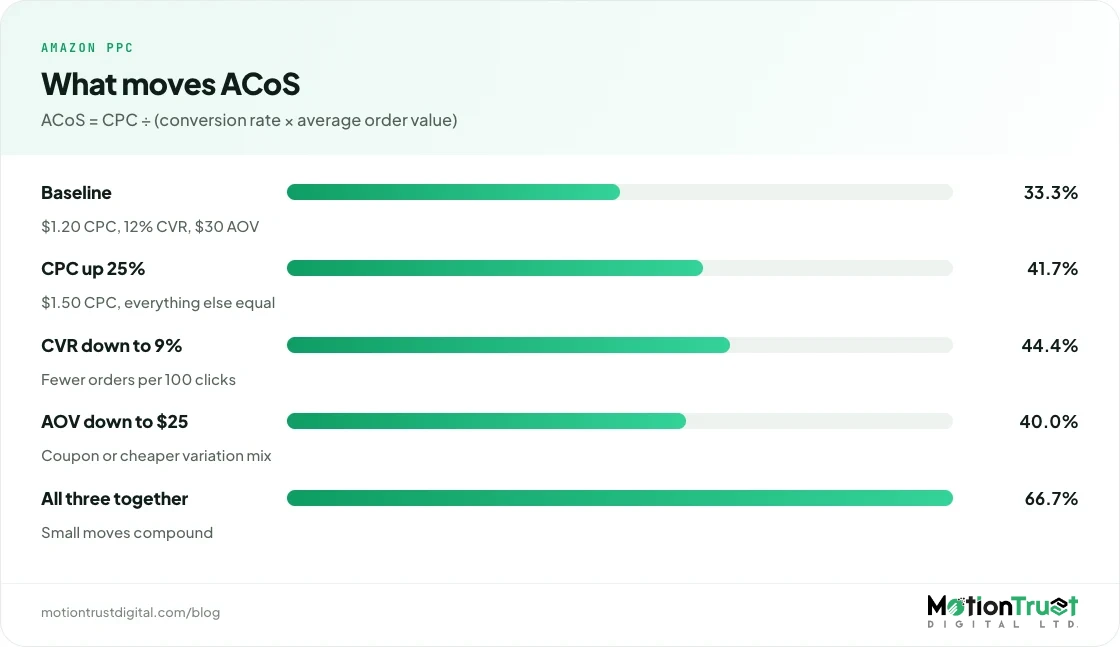
- CPC up: each click costs more, so ACoS rises in direct proportion. A 25% CPC rise means a 25% ACoS rise if nothing else changes.
- Conversion rate down: fewer orders per 100 clicks, so each order carries more ad cost.
- Average order value down: the same number of orders brings in fewer dollars, through a price cut, a coupon, or shoppers buying a cheaper variation.
Then there is a fourth, which is not a real change at all: attribution lag. Sales from recent clicks have not been credited yet, so the last few days look worse than they will once the data settles. We cover that in detail below, because it causes more panicked bid cuts than anything else.
Where does click-through rate fit?
Notice that click-through rate (CTR) is not in the formula. A falling CTR does not raise ACoS on its own; it lowers impressions-to-clicks, which mainly cuts volume. It matters indirectly.
A low CTR often means your ad is showing on searches where shoppers do not want your product, and those same clicks tend to convert badly. It can also mean a competitor's offer looks better next to yours, which drags conversion down too. Treat a CTR drop as an early warning that conversion is about to fall, not as the cause itself.
What causes ACoS to go up suddenly?
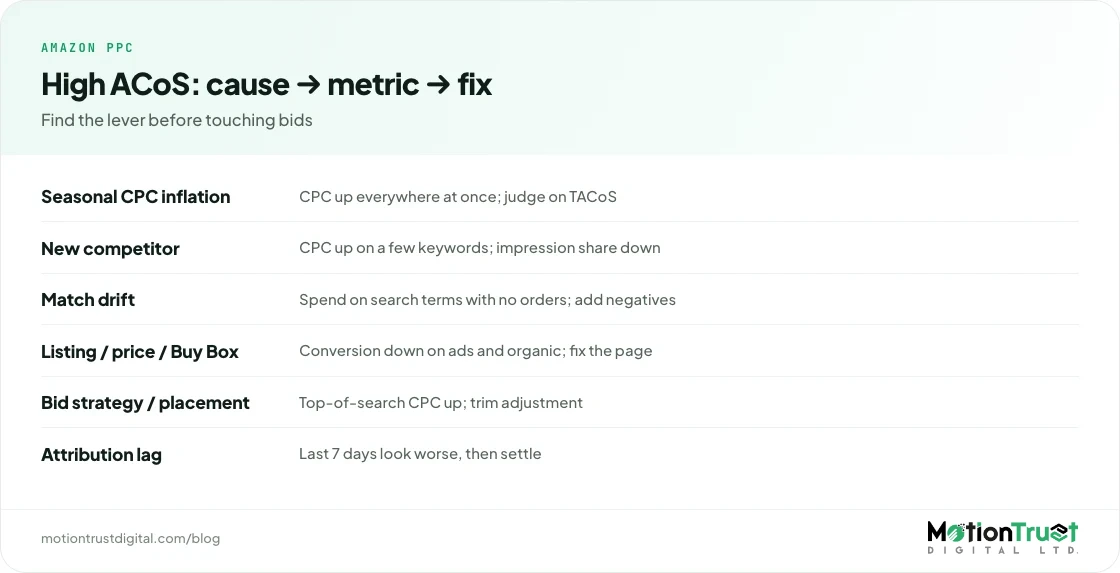
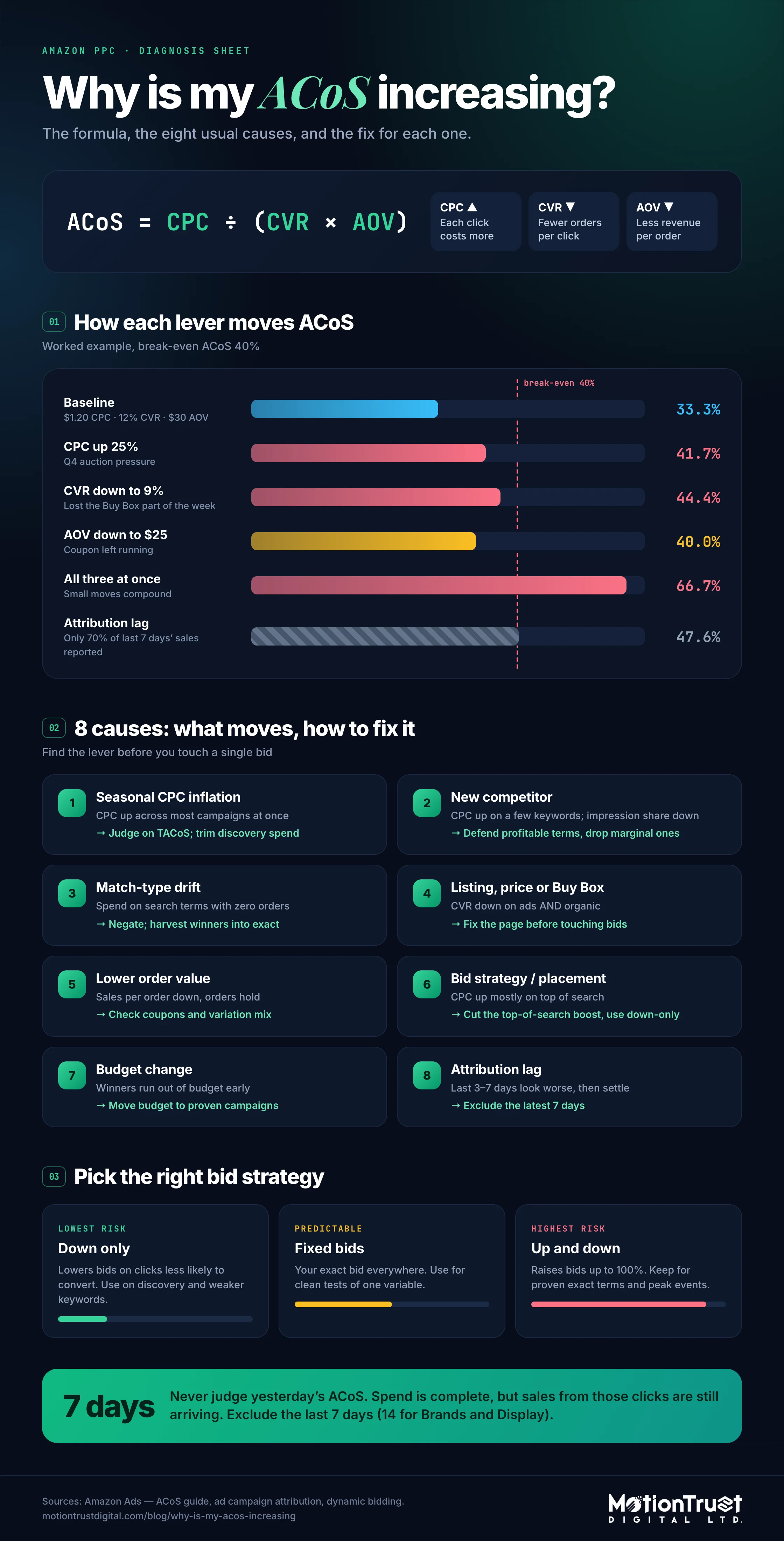
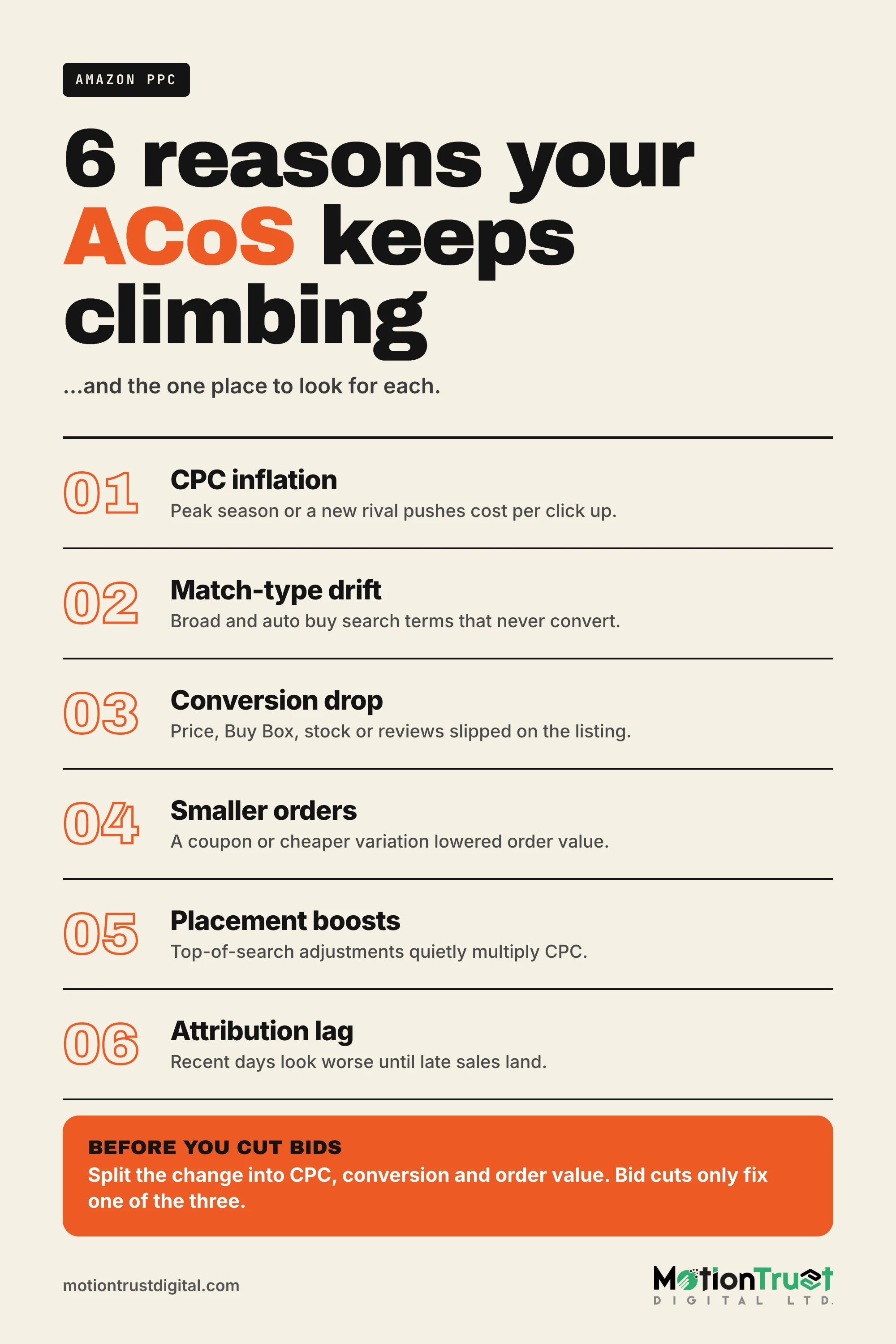
When sellers ask “why is my ACoS increasing so suddenly?”, the answer is usually one of eight causes: seasonal CPC inflation, a new or more aggressive competitor, broad and auto match drift, a conversion problem on the listing, a lower order value, a bid strategy or placement change, a budget change, or attribution lag making recent days look worse. The table maps each to the metric that proves it and the fix.
| Cause | Metric that moves | Where to see it | Fix |
|---|---|---|---|
| Seasonal CPC inflation (Prime Day, Prime Big Deal Days, Black Friday, Q4) | CPC up across most campaigns at once; CVR flat or up | Campaign Manager, CPC column, compare same weeks last year | Accept a higher ACoS on proven exact terms; trim discovery spend; judge on TACoS |
| New or more aggressive competitor | CPC up on specific keywords; top-of-search impression share down; CVR down if their offer is better | Targeting report by keyword; Search Query Performance in Brand Analytics | Defend profitable terms, drop marginal ones, review your price and offer against theirs |
| Broad, phrase or auto match drift | More search terms, more spend on terms with zero orders | Search term report, sorted by spend | Negative exact and phrase; harvest winners into exact campaigns |
| Listing, price or review problem | CVR down across ads and organic together | Business Reports, Unit Session Percentage by ASIN; Buy Box percentage | Fix the listing, price, stock or Buy Box before changing bids |
| Lower average order value | Sales per order down while orders hold | Advertised product report; Business Reports, sales per order | Check coupons, deals and variation mix; protect the higher-value child ASINs |
| Bid strategy or placement change | CPC up, mostly on top of search | Placement report; campaign settings history | Reduce top-of-search adjustment or move to down-only on weaker campaigns |
| Budget change | Spend shifts to new, untested campaigns; or winners run out of budget early | Campaign Manager, budget and "out of budget" status | Move budget to proven campaigns rather than raising everything |
| Attribution lag | Last 3–7 days show high ACoS that falls as days pass | Same date range checked again a week later | Exclude the most recent 7 days from decisions on Sponsored Products |
Amazon PPC audit tool
Want the cause found for you in minutes?
Upload your reports and our free PPC audit tool flags wasted search terms, CPC jumps and campaigns running above your break-even ACoS, so you know where to look first.
Run the free PPC auditIs my ACoS really higher, or is it attribution lag?
Check attribution before anything else. Sponsored Products sales for sellers are credited for up to 7 days after a click, so the most recent week of data is incomplete and will usually improve as late sales are added.
Amazon's ad campaign attribution page sets out the windows. Sponsored Products for sellers uses a 7-day lookback, clicks only, last click. Vendors get 14 days, which Amazon also states in its vendor advertising guide. Sponsored Brands and Sponsored Display use 14 days. Amazon also says conversions may take up to 12 hours to appear, are reported on the date of the ad click rather than the purchase date, and that attribution for a given date "remains incomplete until the lookback window has ended".
In practice, this means:
- If you look at yesterday's ACoS on a Sponsored Products campaign, you are seeing spend that is complete and sales that are not.
- Products with a long consideration period (furniture, high-ticket electronics, gifts bought ahead of a date) feel this most, because more of their sales arrive several days after the click.
- Comparing "last 7 days" with "previous 7 days" will nearly always make the recent week look worse. Compare complete periods instead, ending at least 7 days ago for Sponsored Products and 14 days ago for Sponsored Brands and Display.
The 2026 change to view attribution
There is one more 2026 wrinkle. From 1 January 2026, Amazon changed view attribution for Sponsored Brands and Sponsored Display campaigns billed on viewable impressions (vCPM), applying additional shopping signals and a shorter window to decide which views get credit. Click-based attribution did not change. If you run vCPM Sponsored Brands or Display, a year-on-year ACoS comparison across that date may show a rise that is partly measurement, not performance. The 14-day "all views" metrics are still available if you need a like-for-like view.
Why are my Amazon CPCs going up?
CPCs rise when more advertisers bid for the same shoppers, when your own bid strategy or placement settings push bids higher, or when seasonal events pull in extra demand from brands that rarely advertise. Each shows a different pattern in the reports.
Seasonal CPC inflation: Prime Day and Q4
Peak events are the most predictable cause of a CPC jump. Amazon's own holiday optimisation guide tells advertisers to switch high-priority Sponsored Products campaigns to "dynamic bids – up and down", to set an aggressive top-of-search multiplier "(e.g., +200% or higher)" on a dedicated exact-match campaign, and to raise Sponsored Brands target CPC by at least 30% on high-performing campaigns. When thousands of advertisers follow that advice in the same week, the auction gets more expensive for everyone.
Sellers describe the same thing in their own words. In an r/FulfillmentByAmazon thread before Prime Day 2026, one seller said CPCs "tend to get pretty crazy" and that they cut non-converting keywords a week before the event to concentrate on terms with a track record.
The test is simple. If CPC rose across nearly every campaign in the same week, and conversion rate held or improved, it is the market, not your account. Higher conversion during deal events can partly offset higher CPC, so judge the event on total sales and TACoS, not ACoS alone. Then watch for the week after: CPCs often stay high for a few days after the event while conversion drops back, which is when ACoS spikes hardest.
New competitors and auction pressure
When CPC rises on a handful of keywords rather than everywhere, look for a competitor. A new brand launching into your niche, or an existing one that raised its budget, bids up the specific terms it cares about. You will see higher CPC and lower top-of-search impression share on those targets in the targeting report, and sometimes lower conversion if their price, reviews or images beat yours on the results page.
A long-time seller in another r/FulfillmentByAmazon thread reported ACoS holding around 20% for years before climbing to about 50% in 2025, and commenters pointed to rising competition and placement bid adjustments pushing CPCs up.
Not every competitor fight is worth winning. If a term only converts at a cost per order you cannot afford, the right answer may be to let them have it and put the budget where you convert better, often on long-tail and branded terms. Our reverse ASIN research guide shows how to see which terms a rival is ranking and advertising on.
Your own bid strategy and placement settings
Sometimes the CPC rise is self-inflicted. Amazon's dynamic bidding guide says "dynamic bids – up and down" can increase or decrease your bid by up to 100% based on performance, so a $1.00 bid can become a $2.00 click. Placement bid adjustments for top of search, rest of search and product pages can go up to 900%, and they apply on top of your base bid.
| Bid strategy | What Amazon does | Effect on ACoS | Best for |
|---|---|---|---|
| Dynamic bids – down only | Lowers your bid on clicks it thinks are less likely to convert | Usually lowers or steadies ACoS; can reduce volume | Discovery campaigns, weaker keywords, tight margins |
| Dynamic bids – up and down | Raises bids up to 100% on likely-to-convert clicks, lowers on others | Can raise CPC and ACoS, especially with a large top-of-search adjustment | Proven exact terms, deal ASINs, peak events |
| Fixed bids | Uses your exact bid everywhere | Predictable CPC; may buy more low-value clicks | Tests where you want clean data |
Check whether anyone changed these settings in the period your ACoS rose. Up and down combined with a large top-of-search adjustment is a common reason for a sudden CPC jump. If the placement report shows top-of-search converting well enough to justify it, keep it. If not, cut the adjustment first, then consider moving to down only.
One more self-inflicted pattern: lowering bids can raise ACoS. If a lower bid knocks you off top of search, where conversion is usually highest, onto product pages or lower rest-of-search slots, your conversion rate can fall faster than your CPC. The placement report shows whether that happened.
Why is my conversion rate dropping on Amazon ads?
When conversion falls on ads, check whether it fell on organic traffic too. If both dropped, the cause is on the product page or the offer (price, Buy Box, stock, reviews, images), and no bid change will fix it. If only ad conversion dropped, the cause is targeting.
Listing, price and review changes
Open Business Reports in Seller Central and look at Unit Session Percentage and Featured Offer (Buy Box) percentage by child ASIN. Then work through what changed in the period:
- Price: you raised it, a competitor cut theirs, or a coupon ended. Shoppers compare on the results page before they click and again on the detail page.
- Buy Box: if another seller holds the featured offer, or the Buy Box is suppressed, your Sponsored Products ads can stop serving, or the click lands on someone else's offer.
- Stock: low inventory, long delivery promises or a stock-out on a popular variation all hurt conversion before they stop the ads.
- Reviews: a new run of one-star reviews, or a drop in star rating across a threshold such as 4.0, shows up on the ad itself.
- Listing edits: a new main image, title or bullets. Remember that since 27 July 2026 most categories cap product titles at 75 characters, with a separate 125-character Item Highlights field. Brands that rewrote titles in a hurry sometimes lost the phrases shoppers responded to.
If the page is the problem, the fix is on the page. Our guide to optimising an Amazon listing covers the elements that move conversion most. If reviews are the trigger, read how to respond to negative Amazon reviews before you do anything in the ad console.
Targeting drift: broad, phrase and auto match
If organic conversion held but ad conversion fell, your ads are probably reaching the wrong shoppers. Broad and phrase match, and the loose-match and complements groups in auto campaigns, keep finding new search terms. Most are useful. Some are not, and they accumulate quietly until they are a large share of spend.
Pull the search term report for the last 30 complete days and sort by spend. Look for terms with ten or more clicks and no orders, or a cost per order well above your target. Add them as negative exact (or negative phrase if a word makes the whole family irrelevant), and move converting terms into exact-match campaigns where you control the bid. Our negative keywords guide covers match types and how to avoid blocking terms you need.
Free Amazon audit
Is the listing, not the ads, pushing ACoS up?
We review your listing, pricing, reviews and ad account together and tell you which one is costing you conversions. You get a written summary, free.
Request a free Amazon auditCan lower order value increase ACoS?
Yes. ACoS is measured against sales dollars, not orders, so if each order is worth less, ACoS rises even when you get the same number of orders from the same clicks. A 10% drop in average order value raises ACoS by roughly 11% with everything else unchanged.
Common triggers are a new coupon or Lightning Deal, a price cut to win back the Buy Box, shoppers moving to a cheaper size or pack in the same variation family, or bundles dropping out of stock so buyers take the single unit instead. The advertised product report shows which ASIN the ad was for and which ASIN was bought. If sales are shifting to a lower-priced child, think about which variation the ad should lead with.
Worked example: how each lever moves ACoS
Here is a single Sponsored Products campaign with round numbers, so you can see each lever on its own and then together. All figures below are illustrative.
Baseline: 1,000 clicks a week at a $1.20 CPC is $1,200 spend. A 12% conversion rate gives 120 orders, and at a $30 average order value that is $3,600 in ad sales. ACoS is $1,200 ÷ $3,600 = 33.3%. With a $30 product that leaves $12 profit before advertising, break-even ACoS is 40%, so the campaign is profitable.
| Scenario | CPC | CVR | AOV | ACoS | vs break-even (40%) |
|---|---|---|---|---|---|
| Baseline | $1.20 | 12% | $30 | 33.3% | Profitable |
| CPC up 25% (Q4 auction) | $1.50 | 12% | $30 | 41.7% | Slight loss |
| CVR down to 9% (lost Buy Box part of the week) | $1.20 | 9% | $30 | 44.4% | Loss |
| AOV down to $25 (coupon left running) | $1.20 | 12% | $25 | 40.0% | Break-even |
| All three at once | $1.50 | 9% | $25 | 66.7% | Heavy loss |
| Attribution lag (only 70% of last 7 days' sales reported yet) | $1.20 | 12% | $30 | 47.6% shown | Looks like a loss; is not |
Three lessons sit in that table:
- Small moves compound. Three modest changes, none of them dramatic on their own, double the ACoS from 33% to 67%. That is why "my ACoS doubled overnight" is rarely one big cause.
- Bid cuts only fix one row. If the cause is the 9% conversion rate, cutting CPC from $1.20 to $1.00 only brings ACoS to 37%, still well above baseline, and you may lose placement. Restoring conversion to 12% gets you all the way back.
- Lag can fake a crisis. The last row has nothing wrong with it. Wait a week and the ACoS settles back to 33%.
Where TACoS changes the answer
Now extend the example. The same product sells $5,400 a week organically, so total sales are $9,000 and TACoS (ad spend ÷ total sales) is $1,200 ÷ $9,000 = 13.3%.
Next month you raise budgets. Spend goes to $1,800, ad sales rise to $4,500 (ACoS 40%), but organic sales fall to $4,500. Total sales are still $9,000, and TACoS has jumped to 20%. You spent $600 more a week to buy sales you were already getting for free. That is cannibalisation: ads, usually on branded terms or keywords where you already rank first organically, taking credit for orders that would have happened anyway.
The reverse also happens. ACoS can rise while TACoS falls, when ads drive new-to-brand sales and lift organic ranking. In that case a higher ACoS is a good trade. Our guide to ACoS and TACoS benchmarks explains how to set targets for each, and Amazon SEO vs PPC covers how ad sales and organic rank feed each other.
How do I fix a high ACoS on Amazon?
Once you have answered “why is my ACoS increasing?” for your own account, fix the cause the diagnosis found, in this order: confirm the data is complete, fix conversion problems on the listing, remove wasted search terms, then adjust bids, placements and budgets. Changing bids first is the most common mistake, because it treats every cause as a CPC problem.
A step-by-step diagnostic flow
- Set a clean comparison. Compare two complete periods of equal length, ending at least 7 days ago (14 for Sponsored Brands and Display). Compare with the same weeks last year if a peak event is involved.
- Split the change. Did spend rise, did sales fall, or both? Then split again: CPC, CVR, AOV.
- Check organic conversion. If Unit Session Percentage fell in Business Reports too, go to the listing, price, Buy Box, stock and reviews first.
- Segment by campaign type. Branded, non-branded exact, broad/phrase, auto, product targeting, Sponsored Brands, Sponsored Display. A blended rise usually comes from one or two segments.
- Read the search term report. Sort by spend; negate non-converters; harvest winners.
- Read the placement report. Compare CPC and CVR on top of search, rest of search and product pages; adjust placement percentages to match.
- Review settings history. Bid strategy, placement adjustments, budgets and new campaigns launched in the period.
- Change one thing per segment and wait. Give each change at least one full attribution window before judging it.
Bids: change them in steps, by target
When CPC is genuinely the cause, lower bids on the specific targets whose cost per order is above target, not across the whole account. A simple rule many practitioners use: target bid = average order value × conversion rate × target ACoS. At $30 AOV, 12% conversion and a 30% target ACoS, that is $30 × 0.12 × 0.30 = $1.08. Move towards it in steps of 10–20% rather than all at once, so you can see how placement and volume respond.
Budgets: move money, do not just add it
Amazon's Sponsored Products best practices say that if campaigns frequently run out of budget, you should add to the budget to keep ads showing through the day. That is sound for campaigns hitting target, not a reason to raise every budget. When a budget increase lands on broad and auto campaigns, it buys exploratory clicks at a higher ACoS. Fund proven exact-match campaigns first, and cap discovery budgets.
Campaign structure
Many ACoS problems are really structure problems. When one campaign mixes branded, competitor and generic keywords, a cheap branded ACoS hides an expensive generic one, and when the brand terms dip the whole campaign looks broken. Separate branded, generic and competitor targeting, and keep discovery (auto and broad) away from your proven exact terms so each can have its own bid, budget and target. Our comparison of Amazon ad types explains where Sponsored Brands and Display fit around that core.
Amazon PPC management
Rather have someone run this triage every week?
We manage Sponsored Products, Brands and Display against your break-even ACoS and TACoS, with weekly search-term and placement reviews. PPC-only plans start at $799 a month for up to $5,000 in ad spend.
See our PPC management serviceWhen is a rising ACoS fine?
A rising ACoS is fine when it is planned and TACoS or total profit is moving the right way: during a launch, a peak event, a push for a high-value keyword, or when you are winning new-to-brand customers who buy again. It is a problem when it rises with no plan and total sales are flat.
Amazon itself notes in its ACoS guide that new campaigns often show a high ACoS simply because they are new. A launch campaign buying sales velocity and organic rank is expected to run above break-even for a while; our product launch playbook covers how long and how far.
The test we use in the accounts we audit is simple: if ACoS rose, did total sales (ad plus organic) rise by more than the extra ad spend? If yes, the higher ACoS paid for itself. If total sales were flat, you are paying for cannibalised orders or wasted clicks, and the triage below will find which.
Weekly ACoS triage checklist
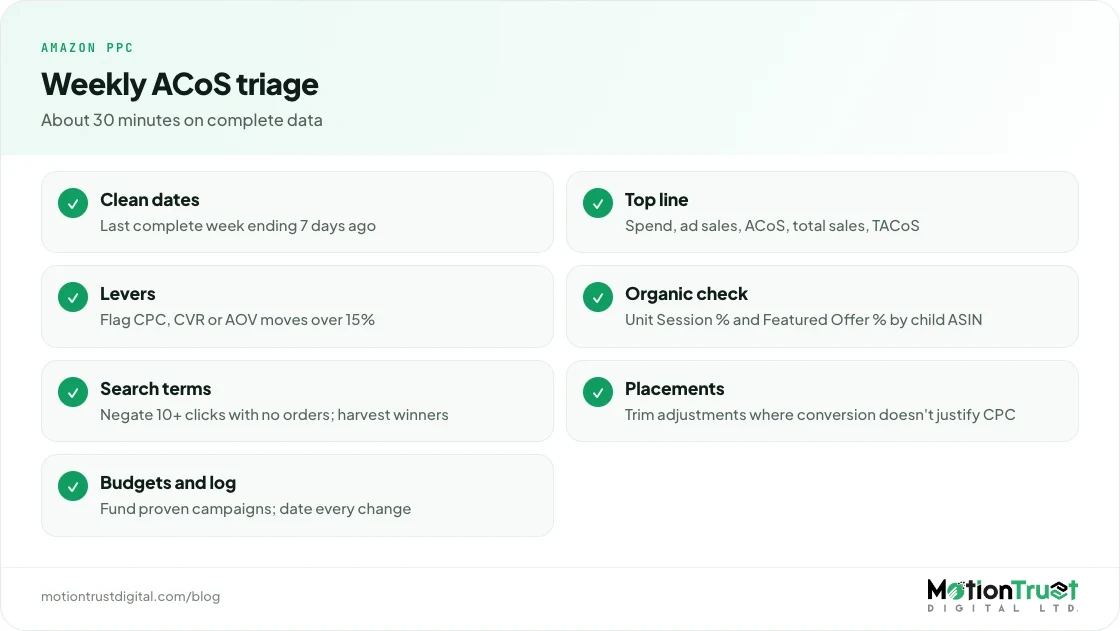
Run this once a week on complete data, so “why is my ACoS increasing?” never turns into a month-end surprise. In the accounts we manage, it takes about 30 minutes for a catalogue of up to ten parent ASINs, and catches most problems before they cost a full month of margin.
- Date range: pick the last complete 7 days ending 7 days ago (Sponsored Products) and compare with the week before and the same week last year.
- Top-line split: note spend, ad sales, ACoS, total sales and TACoS. If TACoS is flat or down, relax.
- Levers: record CPC, CVR and AOV for each campaign segment. Flag any that moved more than 15%.
- Organic check: Business Reports, Unit Session Percentage and Featured Offer percentage by child ASIN.
- Search terms: sort the search term report by spend; negate terms with 10+ clicks and no orders; harvest terms converting below target into exact.
- Placements: compare top of search, rest of search and product pages; trim adjustments where CVR does not justify CPC.
- Budgets: which campaigns ran out of budget, and were they your best or your worst?
- Change log: write down every change you make with the date, so next week's comparison is clean.
- Calendar: note upcoming deals, coupons, price changes and peak events so you do not misread their effect.
Frequently asked questions
Why is my ACoS so high all of a sudden?
A sudden jump usually comes from attribution lag, a peak-event CPC spike, or a conversion drop. First check that you are not comparing incomplete recent days, because Sponsored Products sales for sellers are credited for up to 7 days after the click. Then compare CPC, conversion rate and order value against a complete earlier period. Whichever moved most is your cause.
Why does my ACoS go up when I lower my bids?
Lower bids can push your ad off top of search, where conversion is usually highest, onto product pages or lower rest-of-search slots. If conversion falls faster than CPC, ACoS rises. Check the placement report before and after the bid change. If that happened, restore bids on your best converting exact terms and cut spend on weak targets instead.
What is a good ACoS on Amazon?
A good ACoS is one below your break-even ACoS, which is your profit per unit before advertising divided by your selling price. A $30 product with $12 profit before ads breaks even at 40%. Amazon itself says there is no single benchmark, because it depends on category, margin and goals. Launch campaigns can run above break-even for a planned period.
Is high ACoS good or bad?
It depends on what it buys. A high ACoS on a launch, a peak event or new-to-brand customers can be a good investment if total sales and organic rank rise. A high ACoS with flat total sales is bad, because it usually means wasted clicks or ads cannibalising organic orders. Judge it alongside TACoS and profit, not on its own.
How do I lower my ACoS without losing sales?
Cut waste rather than reach. Add negative keywords for search terms with clicks and no orders, move converting terms into exact-match campaigns, trim placement adjustments where conversion does not justify the CPC, and fix listing problems that hurt conversion. Lower bids only on targets above your target cost per order, in steps of 10–20%, and keep proven terms funded.
Does ACoS go up during Prime Day and Q4?
Often, because more advertisers bid harder and CPCs rise. Amazon's own holiday guide recommends up-and-down bidding and large top-of-search multipliers for priority campaigns, which lifts auction prices. Conversion also tends to rise during deals, which offsets part of it. The bigger risk is the week after, when CPCs stay high but conversion falls back.
What is the difference between ACoS and TACoS?
ACoS is ad spend divided by ad-attributed sales. TACoS is ad spend divided by total sales, ads plus organic. ACoS tells you how efficient the ads are; TACoS tells you how dependent the business is on advertising. If ACoS rises but TACoS falls, ads are probably growing organic sales. If both rise with flat total sales, look for waste or cannibalisation.
Sources
- Amazon Ads — What is advertising cost of sales (ACOS)? Calculation and tips
- Amazon Ads Support Center — Ad campaign attribution
- Amazon Ads — View attribution updates for Amazon Store ads
- Amazon Ads — Guide to dynamic bidding – up and down with Sponsored Products
- Amazon Ads — Best practices for your Sponsored Products ads
- Amazon Ads — Tips to optimize holiday advertising campaigns
- Amazon Ads — Advertising solutions for Amazon vendors
Monjur Hossain
Founder & Amazon Strategy Lead, MotionTrust Digital
Monjur incorporated MotionTrust Digital in September 2022 and leads Amazon strategy across the client base. Eight years in e-commerce and marketplace marketing, now on Amazon only — keyword strategy, listing architecture and advertising structure for growing brands.
MonjurAgencyTry the free tools
Seven Amazon tools that run in your browser — profit and ACoS calculator, PPC auditor, listing checker and more. No account, nothing uploaded.
Try the free toolsLast reviewed . We update articles in place rather than republishing at a new URL, so the link you have keeps working.
Keep your ACoS target working for you
Break-even ACoS is the starting point. One email a week with our newest PPC articles on targets, bids and wasted spend, plus listings and SEO if you want them. Email us to join.