
Amazon ranking dropped? How to recover your organic rank, cause by cause
 By Monjur HossainFounder & Amazon Strategy Lead
·
Published
·
Last reviewed
·20 min read

If your Amazon ranking dropped, recovery starts with naming the cause, because each one needs a different fix. Confirm it in Business Reports, Search Query Performance and an ASIN-plus-keyword search, repair the cause (stock, indexing, suppression, reviews, price or ads), then rebuild conversions on your core terms. Most drops we see recover in 2 to 8 weeks.
If your Amazon ranking dropped, recovery starts with naming the cause, because each one needs a different fix. Confirm it in Business Reports, Search Query Performance and an ASIN-plus-keyword search, repair the cause (stock, indexing, suppression, reviews, price or ads), then rebuild conversions on your core terms. Most drops we see recover in 2 to 8 weeks.
This guide is the practical companion to our explainer on how Amazon's ranking algorithm works. That one explains why products rank; this one is for the morning your best keyword falls from page one to page three. You get a playbook for each of the six causes we see most, a rank recovery timeline and a worked example. Amazon rules link to Amazon's own pages; timelines are our experience, because Amazon publishes none.
Why has my Amazon ranking dropped?
Almost every organic rank drop comes from one of six events: a stock-out, a listing edit that removed keywords, suppression or a category change, a rating drop, a competitor or price move, or paused advertising. Algorithm updates are rarely why one ASIN falls overnight.
Amazon ranks on relevance (can you appear for a search at all?) and performance (clicks, conversion and recent sales on that search). Amazon's own Amazon SEO guide says that "listing quality and your account health can contribute to search rankings", and that competitive pricing can improve both conversion and Best Sellers Rank. Each of the six causes breaks one of those links.
Keyword rank and Best Sellers Rank are not the same thing
Keyword rank is where you appear for one search term. Best Sellers Rank (BSR) is, in Amazon's words, a metric of how well a product is selling within featured categories. If BSR fell, you sold fewer units from any source. If one keyword fell while BSR held, you lost that search but other traffic made up for it. If both fell together, start with the eligibility causes: stock, suppression, the Featured Offer.
Is it a cliff or a slide?
- A cliff (rank gone within one to three days) points to an event: stock-out, suppression, a listing edit, a lost Featured Offer or ads switched off.
- A slide (rank easing down over two to six weeks) points to a performance problem: a weaker rating, a cheaper competitor, a better main image beside yours, or conversion slowly eroding.
How do you confirm what caused the drop?
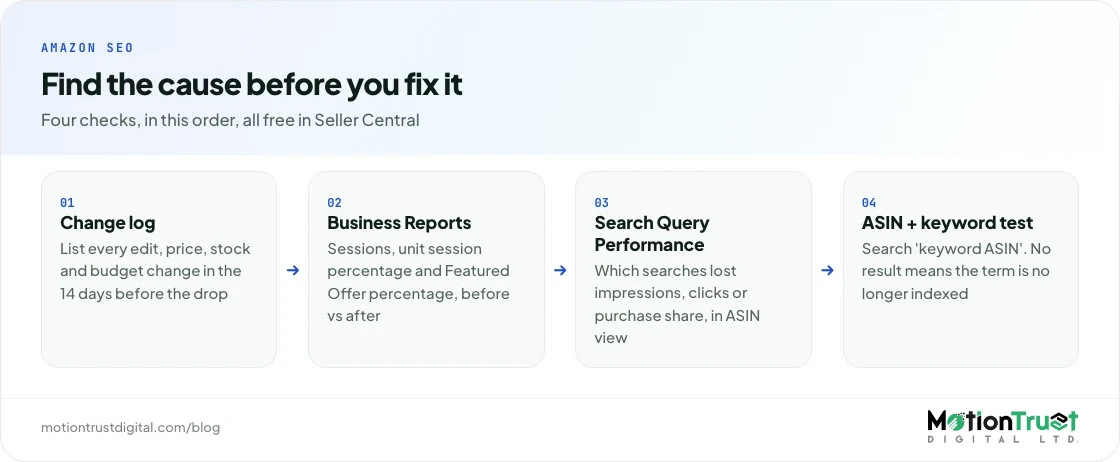
When your Amazon ranking dropped, match the date of the drop against your own change log, then check three free sources in Seller Central: Business Reports, the Search Query Performance dashboard and a manual ASIN-plus-keyword search. Together they tell you whether the listing lost eligibility, relevance or performance.
If total sales fell as well as rank, our guide to why Amazon sales drop shows how to split a traffic problem from a conversion problem in Business Reports.
Start with a change log
Write down the date your rank fell, then list everything that changed in the 14 days before: listing edits, prices, coupons ending, stock, campaign budgets, new reviews, Amazon notifications. Without this, you will confuse your own edit with a market move, and they need opposite responses.
Business Reports: sessions, conversion and the Featured Offer
In Seller Central, go to Reports > Business Reports and open the Detail Page Sales and Traffic report by child item. Amazon's guide to business reports explains where these sit and that the report tracks Featured Offer percentage alongside traffic and conversion. Compare the four weeks before the drop with the weeks after it on three columns:
- Sessions: fewer visits means you lost visibility.
- Unit session percentage: lower conversion on steady sessions means shoppers saw you but chose someone else.
- Featured Offer percentage: if this fell first, you lost the Buy Box, and the ranking drop followed.
Search Query Performance: which searches you lost
If you are a Brand Representative in Brand Registry, Brand Analytics gives you the Search Query Performance dashboard. Amazon's Brand Analytics page says it lists the keywords customers use to find your brand and tracks query volume, impressions, clicks, cart adds and purchases, at brand and ASIN level.
Switch to the ASIN view and compare impression share week by week for your top ten terms. A fall in impressions on every term at once suggests an eligibility event. A fall on two or three terms suggests lost relevance on those words. Steady impressions with falling purchase share suggests a conversion problem, usually price, reviews or images.
The ASIN-plus-keyword index test
Search Amazon for your keyword followed by your ASIN, for example silicone baking mat B0XXXXXXXX. If your product appears, you are indexed and the problem is position. If nothing appears, you have lost indexing, and no bid will buy organic rank until you fix relevance. Run it in a private window for each priority term, and cross-check with your search term report to see whether ads still trigger on the term.
Diagnostic table: symptom to likely cause
| What you see | Likely cause | Confirm with |
|---|---|---|
| All keywords and BSR fell the same day; stock was zero | Stock-out | Inventory history, Business Reports sessions |
| Two or three terms vanished after an edit; ASIN-plus-keyword search returns nothing | De-indexing from a listing or title change | Change log, index test, edit history |
| Listing shows as "Search suppressed" or the category/BSR line disappeared | Suppression or browse node change | Manage All Inventory, Account Health, Seller Support case |
| Sessions steady, unit session percentage falling for weeks | Review/rating drop or weaker images | Star rating history, Voice of the Customer, SQP purchase share |
| Featured Offer percentage fell, or a rival cut price | Competitor or price war | Business Reports, Pricing Health, competitor price history |
| Rank slid one to three weeks after campaigns were cut | PPC paused or budgets capped | Campaign history, SQP impressions on paid terms |
How do you recover Amazon ranking after a stock-out?
If your Amazon ranking dropped after a stock-out, restock fast, keep the listing active, then rebuild sales on your core keywords with tight Sponsored Products and a short promotion until conversion returns to its old level. Ranking lost to a stock-out comes back through sales, not through waiting.
Why a stock-out hits rank so hard
Two of Amazon's own rules explain most of the damage. First, Amazon's Featured Offer guide states plainly: "Your offer can't become featured if your item is out of stock." Second, Amazon Ads says Sponsored Products need the advertised product to qualify for the Featured Offer and only appear when the item is in stock. So a stock-out switches off organic sales and ads at once, while competitors collect your clicks.
How to confirm it
This is the easiest cause to prove. Line up the date stock reached zero with the date sessions fell in Business Reports. Watch for a slower delivery promise in the days before, too, as stock thins out.
Recovery steps
- Keep the listing active. Do not close or delete it; the ASIN keeps its reviews and history.
- Get sellable stock live fast. An air-freighted first batch often matters more than the full container.
- Restart Sponsored Products on day one with exact match on the five to eight terms that drove most purchases before (SQP shows these). Raise bids gradually.
- Run a short promotion, such as a coupon for one to two weeks, to lift conversion. Amazon lists coupons as a way to encourage sales in its listing tactics guide.
- Watch impression share weekly on those terms in SQP. When purchase share is back near its old level, step ad spend down in stages.
- Fix the cause. Amazon's FBA Restock tool recommends quantities from sales history, forecast and seasonality. Set a reorder point covering lead time, shipping and a buffer.
How long it takes
In the accounts we audit, a stock-out of under a week usually recovers within one to three weeks once sales restart. Two to six weeks out typically takes four to eight weeks of steady sales. Beyond two months it behaves like a relaunch. Third-party evidence disagrees (one small five-ASIN study found most recovered within four weeks; sellers on r/FulfillmentByAmazon describe long-stockout listings stuck on page five), which matches our view: duration and competition decide the outcome.
What not to do
Do not relist as a new ASIN to "escape" the history, and do not buy orders or use "search-find-buy" services to fake velocity on restock (more on that below).
How do you recover after a listing edit, title rewrite or de-indexing?
If your Amazon ranking dropped right after an edit, find the exact edit, restore the lost keywords to the title, Item Highlights or backend search terms, and change one thing at a time. Indexing usually returns within 48 hours to two weeks of a correct fix; position takes longer to follow.
The 75-character title rule changed a lot of listings
Amazon's Seller Forums announcement set the rule: from 27 July 2026, titles in all categories except media are limited to 75 characters, spaces included. Titles still over the limit are gradually replaced with AI-recommended versions, and brand owners get 14 days to review, change and approve those suggestions. Amazon also added Item Highlights, 125 characters that are "searchable and visible with titles in search results and on product detail pages".
That is the most common cause of de-indexing we have seen this year: a title shrinks to 75 characters, a size or material disappears, and long-tail searches stop finding the listing, sometimes after an unreviewed AI rewrite. Amazon's older SEO guide still mentions a 200-character limit; the July 2026 announcement supersedes it.
How to confirm it
- Compare the current title, bullets and backend terms against your last saved version (keep a copy of every version you publish).
- Run the ASIN-plus-keyword test on every term that fell. If the listing does not appear, the term is no longer indexed.
- In SQP, impressions dropping to near zero (not easing down) means lost eligibility.
Recovery steps
- Restore the words, not necessarily the old title. Rebuild the 75-character title around the main term and the strongest differentiator, then put the displaced attributes (size, material, count, use) into Item Highlights.
- Use backend search terms for the rest: synonyms and alternative spellings. Our guide to Amazon backend keywords covers the 250-byte limit and what not to repeat.
- Make one change, then wait, or you will not know what helped.
- Re-run the index test after 48 hours, then weekly. If a term still has not indexed after two weeks, check the upload status for errors.
- Support recovered terms with exact-match ads for two to four weeks so the listing earns clicks and purchases on them again.
How long it takes
In our experience, re-indexing after a clean fix happens within 48 hours to two weeks, and position on the restored terms usually returns within two to six weeks, faster if the terms are low-competition long-tail. This is consistent with the timescales in our ranking algorithm guide.
What not to do
Do not respond by stuffing every lost keyword back into the title. You only have 75 characters, a cramped title converts worse, and conversion is a ranking input. Do not repeat the same word across title, Item Highlights and backend: Amazon indexes a term once, so repetition wastes space. If you are rewriting several titles at once, our guide on how to optimise an Amazon listing sets out the order to work in.
Amazon listing optimisation
Lost keywords after the 75-character title change?
We rebuild titles, Item Highlights and backend terms around the searches that actually sold, then check every priority term is indexed again before we call it done.
See listing optimisationHow do you recover after suppression or a category change?
Clear the suppression reason shown in Manage All Inventory, correct the attribute or category, and confirm the listing is searchable again before you spend on ads. A suppressed listing can still exist on Amazon while being removed from search results entirely.
How to confirm it
Search suppression shows in Inventory > Manage All Inventory as "Search suppressed" with a reason: a missing image or attribute, a non-compliant title, or a policy flag. Our full guide to an Amazon listing suppressed status walks through each reason.
A category or browse node change is quieter: the BSR line disappears, the product shows under an unrelated category, or it appears only when you search the exact ASIN. Sellers on Amazon's forums report this after flat-file uploads.
Recovery steps
- Fix the stated reason first (image, attribute, title length, compliance document), then wait for the status to clear rather than resubmitting repeatedly.
- For a wrong browse node or product type, open a Seller Support case with the ASIN, the correct node, and screenshots of the before and after. Ask for a catalogue correction, not a general "ranking" investigation, which support cannot act on.
- For policy flags (restricted claims, missing safety documents), fix the content and submit what Account Health asks for, before anything else.
- Once searchable, run the index test on your top terms and restart ads on exact match.
How long it takes
In our experience the listing usually returns to search within a few days of the fix clearing, and position comes back over two to six weeks, because the days spent suppressed count like a short stock-out. Browse node corrections through support can take one to three weeks on their own.
What not to do
Do not create a second listing to get around a suppression, and do not strip required information just to clear a flag.
How do you recover ranking after a review or rating drop?
Find what changed in the product or the expectation, fix it, update the listing so expectations match reality, and earn new reviews only through Amazon's own tools. Rank follows conversion, and conversion follows the star rating shoppers see.
How to confirm it
This is usually a slide. Sessions hold, unit session percentage drifts lower, and in SQP click share holds while purchase share falls. Check whether the star rating crossed a visible threshold (say 4.3 to 4.1), whether a critical review now leads the page, and whether return reasons changed. A new factory batch is often the hidden cause.
Recovery steps
- Read the last 30 negative reviews and return comments and group them by cause: defect, sizing, missing part, misleading image.
- Fix the product or the packaging first. A listing fix cannot outrun a defect.
- Fix the expectation. If buyers say "smaller than expected", add a scale image and real dimensions to the bullets and Item Highlights.
- Earn new reviews compliantly with Request a Review and, for newer products, Vine, which Amazon describes as a way to "build up authentic reviews". Our guide to getting Amazon reviews compliantly covers what is allowed.
- Report reviews that genuinely break the rules; honest negative feedback stays. Our guide on how to handle negative Amazon reviews explains the options left now that public review comments have been retired.
How long it takes
This is the slowest recovery. In our experience it takes 6 to 12 weeks or more, because the rating only moves as new, better reviews arrive after the fix. Expect conversion to recover before rank does.
What not to do
Never pay or reward anyone for positive reviews, or ask staff to review. In the US, the FTC's rule on fake reviews, announced in August 2024, bans buying fake reviews and offering incentives conditioned on a particular sentiment. Amazon says it proactively blocked hundreds of millions of suspected fake reviews in 2025. A manipulated review profile is far harder to recover from than a low rating.
How do you win rank back after a competitor or price war?
Decide whether you can compete on value, not just price. Match the offer where margins allow, close the gap in images, reviews and delivery speed, and defend your best-converting terms with exact-match ads while you rebuild.
How to confirm it
Search your top five terms and note the price, rating count, main image and delivery promise of whoever now sits above you. In Business Reports, check whether Featured Offer percentage fell (another seller on your ASIN) or held while conversion fell (a competing product). Amazon's Featured Offer guide notes that featured prices are "commonly at or below the lowest priced alternatives", and that the Pricing Health page lists offers that are not currently eligible.
Recovery steps
- If you lost the Featured Offer on your own listing, fix the offer first: competitive price, stock and account health.
- If a rival product is outselling you, compare the full page. A better main image or first bullet often closes more of the gap than a discount.
- Price for conversion, within margin. Our ACoS and TACoS benchmarks help set the ceiling.
- Defend the terms that make money. Keep exact-match campaigns on your top converting keywords and add product targeting on the competitor's ASIN where your offer is stronger.
- Move to terms you can win. If the head term is a price war, build on long-tail terms. Reverse ASIN research on the new leader shows where their sales come from.
How long it takes
In our experience four to eight weeks if you can match the value on offer, and sometimes never on the head term if a better-funded competitor will lose money to hold it. Then rebuild around terms where you convert better.
What not to do
Do not file false infringement reports or join a price war you cannot afford; it trades a ranking problem for a cash problem.
Does pausing PPC hurt organic ranking?
Yes, indirectly. Ad spend is not a ranking factor, but ad-driven sales are sales, and they count towards the conversion and velocity that organic rank rewards. Switch off ads that were supplying a third of your units and organic position often slides within one to three weeks.
How to confirm it
Find the date budgets were cut or paused in campaign history, then compare total units in Business Reports before and after. If organic impressions in SQP fell two to three weeks later on the terms you used to advertise, the pause is the likely cause. Budgets running out by mid-morning work like a partial pause every afternoon.
Recovery steps
- Restart selectively: exact-match campaigns on terms that drove paid and organic sales.
- Fix the reason you paused. If ads were paused because ACoS was too high, cut wasted spend with negative keywords and better targeting rather than stopping everything.
- Set budgets that last all day. Amazon notes daily budgets are not spread evenly, so small ones run out early.
- Taper, do not cliff. Once position is back, cut spend 15 to 20 per cent a week while organic sales hold.
How long it takes
In the accounts we manage, position usually returns two to six weeks after ads restart, if the listing itself has not changed. For the wider question of how the two channels support each other, see Amazon SEO vs PPC.
What not to do
Do not try to replace paused ads with off-Amazon "ranking" schemes. Amazon's policy clarification on rebates, coupons and marketing incentives says the Seller Code of Conduct prohibits manipulating sales rank, and names two-step URLs, super URLs, funnels, treasure hunts and search-find-buy as manipulation of search rank.
Amazon PPC management
Need ads that rebuild rank without burning margin?
We restart campaigns around the terms that sell organically, set bids from your break-even ACoS and taper spend as position returns.
See PPC managementHow long does it take to recover Amazon ranking?
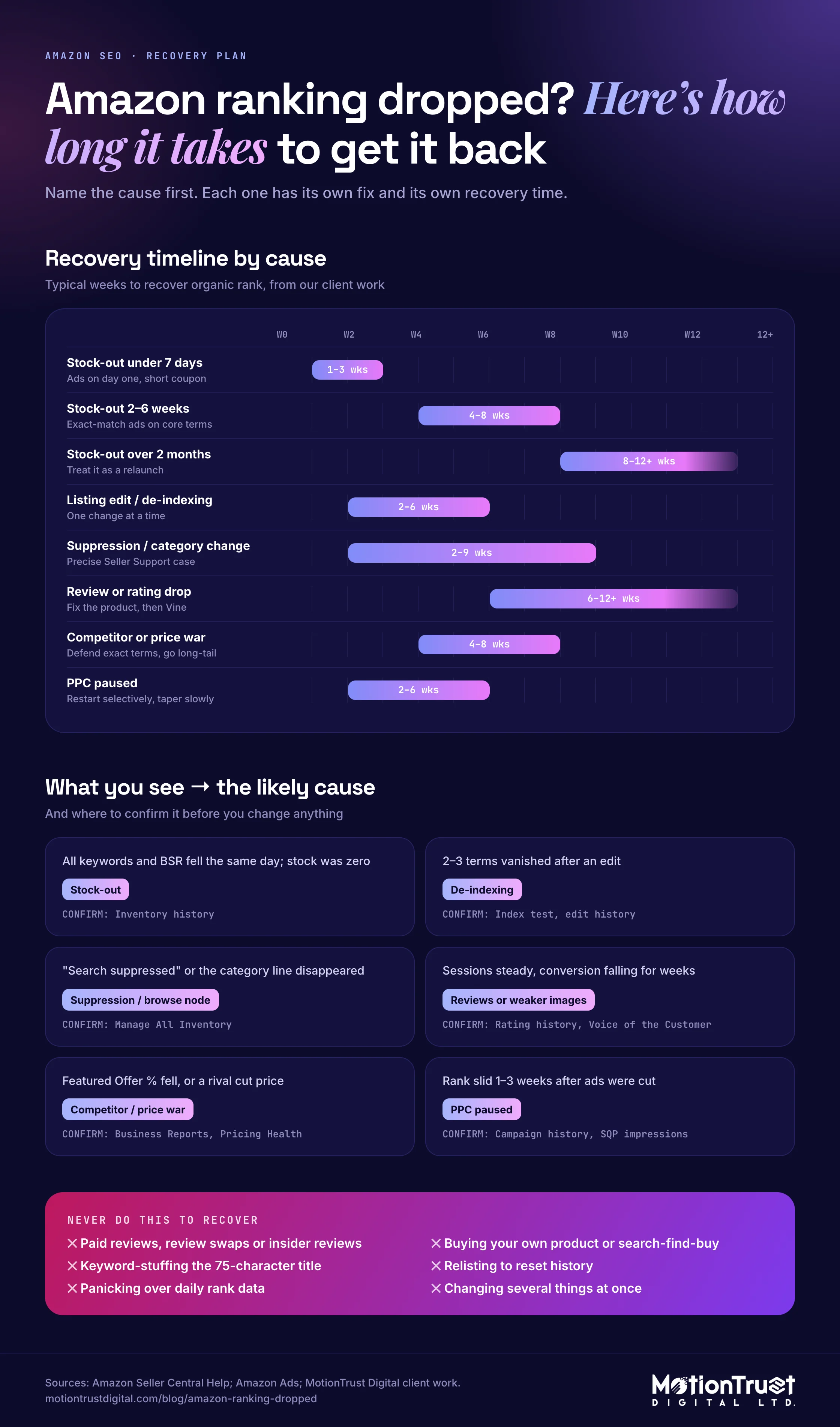
If your Amazon ranking dropped, expect usually 2 to 8 weeks once the cause is fixed, longer for review problems and long stock-outs. Amazon publishes no recovery timelines; these are our experience.
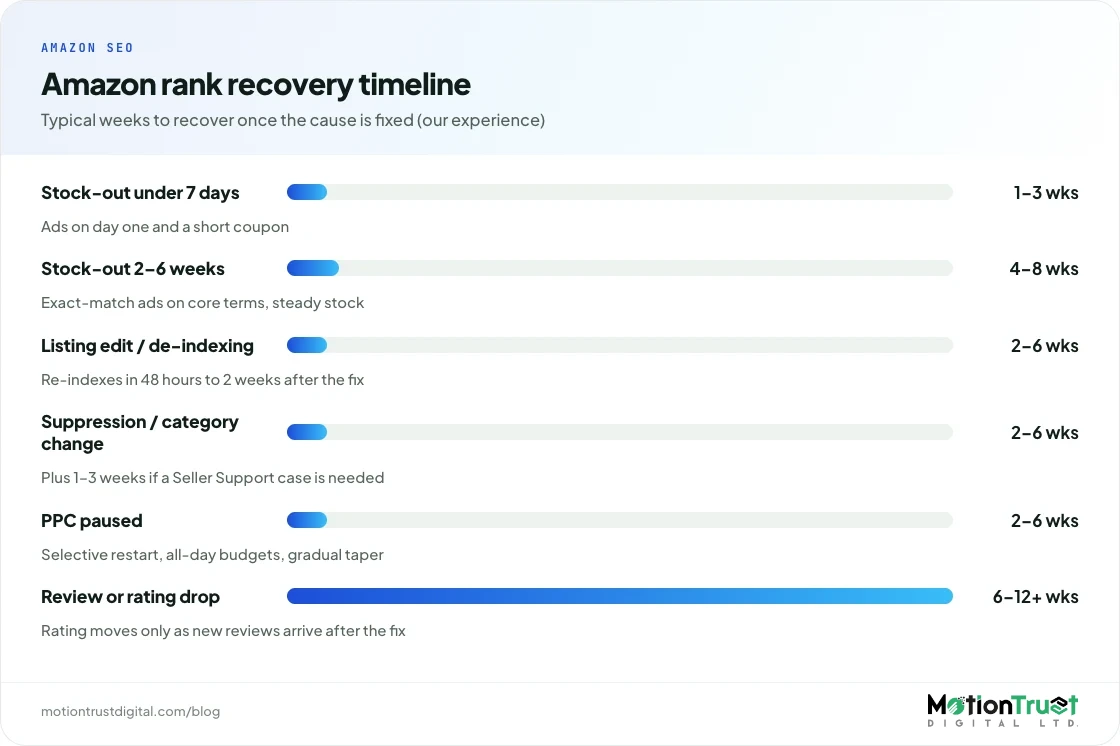
| Cause | Back in search | Typical rank recovery (our experience) | What speeds it up |
|---|---|---|---|
| Stock-out under 7 days | On restock | 1 to 3 weeks | Ads on day one, short coupon |
| Stock-out 2 to 6 weeks | On restock | 4 to 8 weeks | Exact-match ads on core terms, steady stock |
| Stock-out over 2 months | On restock | 8 to 12+ weeks, may not fully return | Treat as a relaunch; refresh images and copy |
| Listing edit or de-indexing | 48 hours to 2 weeks after fix | 2 to 6 weeks | One change at a time, Item Highlights, backend terms |
| Suppression or category change | Days after the fix clears | 2 to 6 weeks (plus 1 to 3 weeks for support cases) | Precise support case, ads once searchable |
| Review or rating drop | Never left | 6 to 12+ weeks | Fix product, set expectations, Vine and Request a Review |
| Competitor or price war | Never left | 4 to 8 weeks, or reposition | Better page, defend exact terms, long-tail focus |
| PPC paused | Never left | 2 to 6 weeks after restart | Selective restart, all-day budgets, gradual taper |
Two clocks run at once. Indexing is fast; position is slow, because it is earned through purchases on each term. Our ranking algorithm guide describes the same pattern for new listings: indexing within 48 hours to two weeks, meaningful movement in four to eight weeks, and a settled picture after 60 to 90 days.
Worked example: recovering from an 18-day stock-out
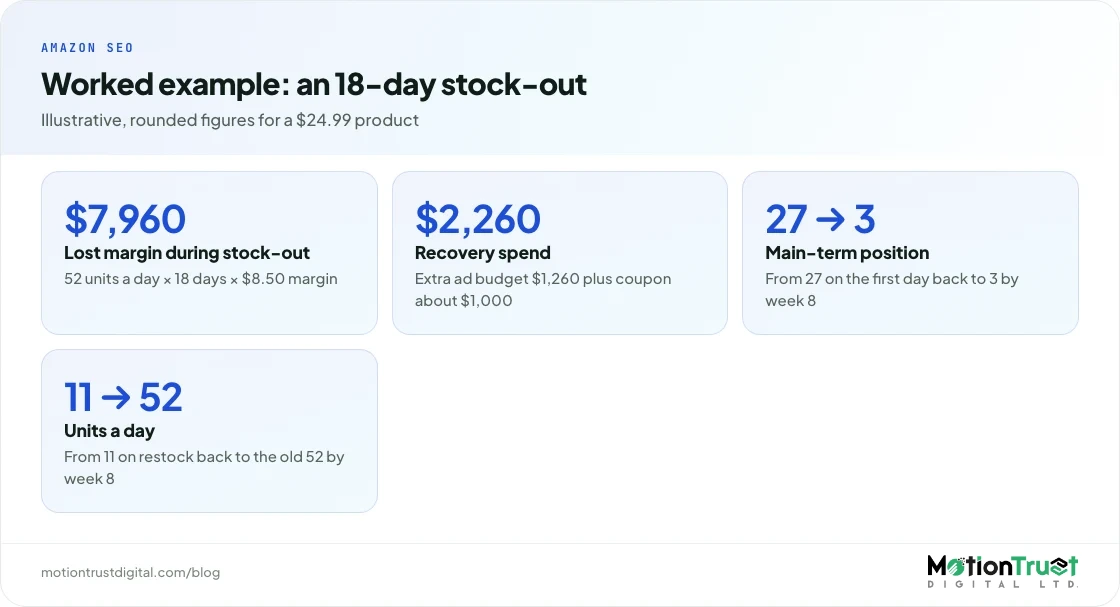
This is an illustrative example built from the pattern we see in accounts we audit, with rounded figures, not one client's data.
The starting point
- Product: a silicone baking mat set on amazon.com at $24.99, with $8.50 margin per unit before advertising.
- Before the stock-out: 52 units a day (38 organic, 14 from ads), position 3 organic for the main term, unit session percentage of 14%, ad budget $60 a day.
- Stock-out: 18 days, after a late reorder. First day back: position 27, 11 units a day.
The cost of the stock-out itself was about $7,960 in lost margin (52 units × 18 days × $8.50), before counting the slower weeks afterwards.
The recovery plan
- Weeks 1 to 2: 10% coupon ($2.50 a unit) and the ad budget raised from $60 to $120 a day, all on exact match for the six terms that drove most purchases before the stock-out.
- Weeks 3 to 4: coupon removed, budget reduced to $90 a day.
- Week 5 onwards: budget back to $60 a day, with the change log and SQP checked weekly.
| Week after restock | Main-term position | Units a day | Ad budget a day |
|---|---|---|---|
| Day 1 | 27 | 11 | $120 |
| Week 1 | 18 | 24 | $120 |
| Week 2 | 11 | 33 | $120 |
| Week 4 | 6 | 44 | $90 |
| Week 6 | 4 | 49 | $60 |
| Week 8 | 3 | 52 | $60 |
What the recovery cost
- Extra ad spend: $60 a day for 14 days ($840) plus $30 a day for 14 days ($420), so $1,260.
- Coupon: roughly 400 units in the first two weeks at $2.50, so about $1,000 if every buyer redeemed it.
- Total recovery spend: about $2,260, or around 28% of the margin lost during the stock-out.
The real lesson: a reorder placed two weeks earlier would have avoided both the $7,960 and the $2,260.
What should you never do to recover Amazon ranking?
However your Amazon ranking dropped, never manipulate reviews, sales or search. Faked velocity risks the account and hides the real cause, so the drop comes back.
- No review manipulation: paid reviews, review swaps or insider reviews.
- No fake sales: buying your own product, outside-Amazon refunds or "search-find-buy" services.
- No keyword stuffing: a crammed 75-character title lowers conversion.
- No relisting to reset history: you lose your reviews and risk a duplicate listing.
- No panic on daily data. Rank trackers sample one moment; use weekly averages.
Not sure which cause you face? Our free Amazon audit runs this diagnostic on your account.
Amazon SEO
Want a recovery plan for your ASIN, not a generic one?
We confirm the cause from your own reports, fix indexing and listing gaps, and track position weekly on the keywords that pay.
See our Amazon SEO service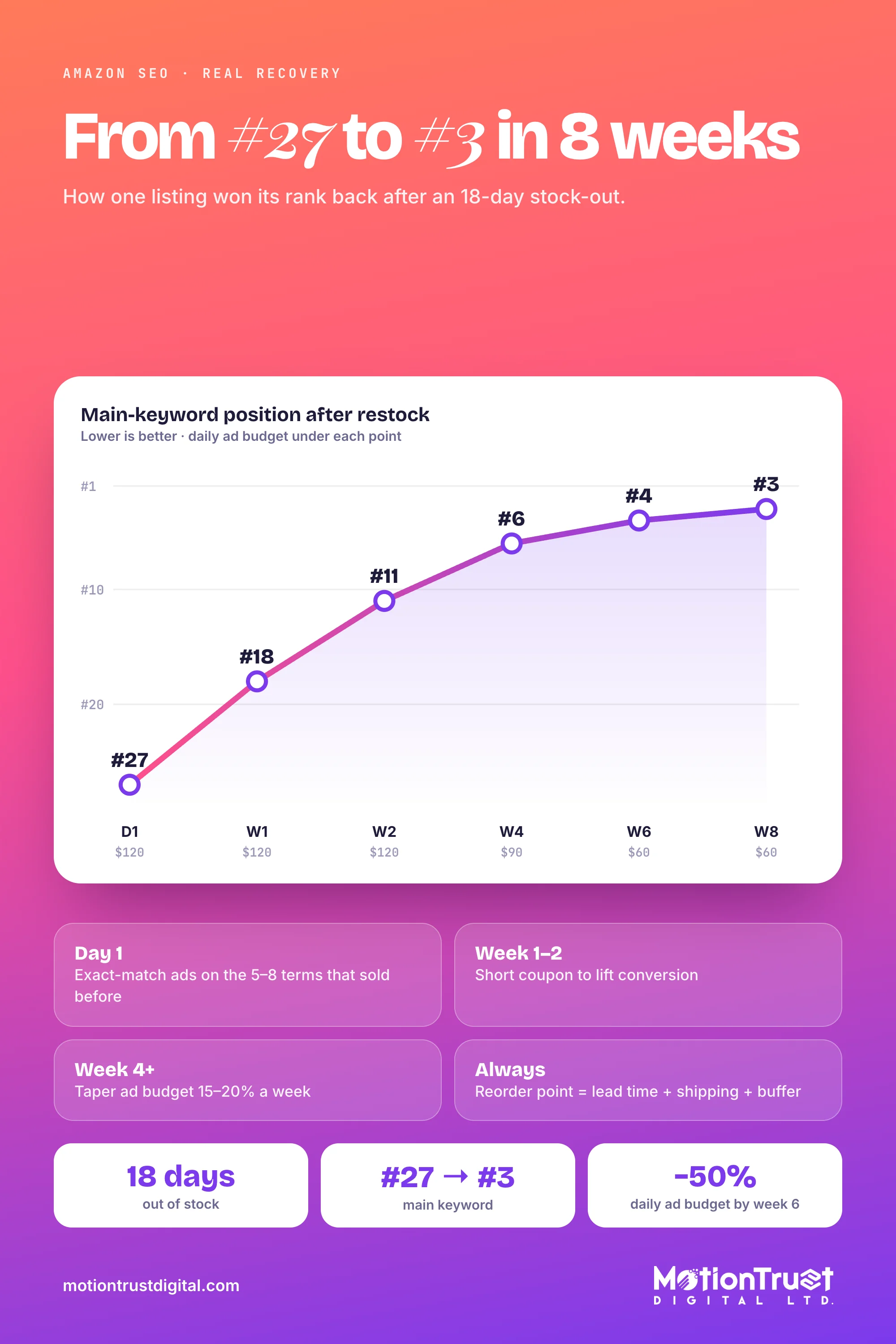
Frequently asked questions
Why did my Amazon ranking drop suddenly?
A sudden drop is usually an event rather than a slow trend: a stock-out, a listing edit that removed keywords, search suppression, a lost Featured Offer, or ads switched off. Check your change log against the drop date, then Business Reports for sessions and Featured Offer percentage, and run the ASIN-plus-keyword search on your main terms to see whether you are still indexed.
How long does it take to regain ranking after being out of stock?
In our experience, a stock-out of under a week usually recovers in one to three weeks once sales restart. Two to six weeks out typically takes four to eight weeks. After two months or more, treat it like a relaunch. Amazon publishes no official timeline. Restock fast, keep the listing active and restart exact-match ads on your best terms immediately.
Does changing my Amazon title affect my ranking?
It can. If the new title drops words that brought in searches, the listing can lose indexing for those terms. Since 27 July 2026, titles outside media are capped at 75 characters, so move displaced details into the 125-character Item Highlights field, which Amazon says is searchable, and into backend search terms. Change one element at a time and re-test indexing.
Does pausing Amazon PPC hurt organic rank?
Often, yes, though indirectly. Ad spend itself is not a ranking factor, but sales from ads add to the conversions and velocity that organic rank rewards. If ads supplied a large share of units, organic position commonly slides within one to three weeks of a pause. Restart selectively on proven terms and taper spend gradually instead.
Why did my BSR drop but my keyword rank stayed the same?
Best Sellers Rank reflects sales within a category, while keyword rank is your position for one search. If BSR fell but your main keyword held, you probably lost sales from other sources: ads, long-tail terms, external traffic or a seasonal dip. Compare sessions and units in Business Reports and check Search Query Performance to see which searches declined.
Can a dead Amazon listing be revived, or should I relaunch?
Usually revive it. An existing ASIN keeps its reviews and history, which a new listing must earn from scratch, and a second page for the same product risks being treated as a duplicate listing. Refresh the images and copy, secure steady stock, then rebuild sales on exact-match terms with ads and a short promotion. Relaunch only if the product itself changed materially.
Sources
- Amazon (Sell on Amazon blog) — Amazon SEO: 7 ways to improve your product's search rankings
- Amazon (Sell on Amazon) — Amazon Brand Analytics
- Amazon Seller Forums (News_Amazon) — Search Query Performance and Search Catalog Performance dashboards
- Amazon (Sell on Amazon blog) — Get actionable B2B insights with Amazon business reports
- Amazon Seller Forums (News_Amazon) — Updates to improve your product titles begin on July 27
- Amazon (Sell on Amazon blog) — Maximize your sales potential with the Amazon Featured Offer (formerly Buy Box)
- Amazon Ads — Sponsored Products
- Amazon (Sell on Amazon blog) — How to boost Amazon listings to drive more sales: 10 tactics
- Amazon Seller Forums — Clarification of Amazon's policy on rebates, coupons, and other marketing incentives
- US Federal Trade Commission — FTC announces final rule banning fake reviews and testimonials
- Amazon (Trustworthy Shopping) — How Amazon ensures trustworthy reviews
Monjur Hossain
Founder & Amazon Strategy Lead, MotionTrust Digital
Monjur incorporated MotionTrust Digital in September 2022 and leads Amazon strategy across the client base. Eight years in e-commerce and marketplace marketing, now on Amazon only — keyword strategy, listing architecture and advertising structure for growing brands.
MonjurAgencyTry the free tools
Seven Amazon tools that run in your browser — profit and ACoS calculator, PPC auditor, listing checker and more. No account, nothing uploaded.
Try the free toolsLast reviewed . We update articles in place rather than republishing at a new URL, so the link you have keeps working.
Keep your ACoS target working for you
Break-even ACoS is the starting point. One email a week with our newest PPC articles on targets, bids and wasted spend, plus listings and SEO if you want them. Email us to join.